
TheLadyRaven
Participant
April 18, 2020
Answered

Error 125 while installing Illustrator from Creative Cloud Desktop app on Windows 7

  • April 18, 2020
  • 14 replies
  • 17419 views

Hi everyone,  How are you all doing during this pandemic?


Not sure if anyone else is having this problem right now, but I can't seem to get Illustrator CC to update.


I first was not able to update Illustrator CC on my desktop, and after a few tries (even leaving it for a day or two, than retrying) it still came up with an error.  With an attempt to uninstall the file, I proceeded to reinstall Illustrator, and it still failed fatality with the Error Code: 125


As a test, my husband download it onto his system, and he had no problems.  I did my best in reading through all available solutions (none of which seems relatable to what I can see).  All other apps are successfully updating and downloading - Just Illustrator is having this issue.


Is there perhaps someone I can talk with to help me troubleshoot this problem?


Thank you.


{Renamed by MOD}
This topic has been closed for replies.
Correct answer Srishti Bali

Hi,


Sorry about the inconvenience caused. Error 125 has been fixed by our Product team. If you are still getting that error, please restart your system and try again and let us know how it goes.


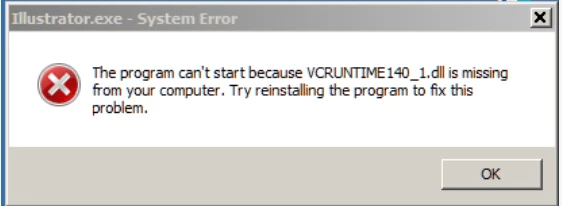
We have also observed that few users are getting VCruntime140_1.dll error while launching the application.


This is a windows error which generally occurred due to the missing or corrupt  Visual C++ redistributable files. If you get this error while launching Illustrator, please try the steps shared in this help article (https://helpx.adobe.com/illustrator/kb/vcruntime-error-on-launch.html) and let us know how it goes.


Regards,

Srishti

14 replies

Participant
May 13, 2020

I'm not sure this will be helpful, but every time I update Illustrator in Creative Cloud, I get an error and then cannot open the existing version. My fix was, and currently is, this:

Right after updating (and getting the error), I would restart the computer then go back to Creative Cloud app and update again, and it would work. That's it. I don't know why, but I have been doing this for every update for the last year or longer.

Maybe the issues others are having is different, but I just wanted to put this out there in case it works for others.
I'm running Windows 10 (but had the same issue for Windows 7).

Srishti Bali
Community Manager
Srishti BaliCommunity ManagerCorrect answer
Community Manager
May 5, 2020

Hi,


Sorry about the inconvenience caused. Error 125 has been fixed by our Product team. If you are still getting that error, please restart your system and try again and let us know how it goes.


We have also observed that few users are getting VCruntime140_1.dll error while launching the application.


This is a windows error which generally occurred due to the missing or corrupt  Visual C++ redistributable files. If you get this error while launching Illustrator, please try the steps shared in this help article (https://helpx.adobe.com/illustrator/kb/vcruntime-error-on-launch.html) and let us know how it goes.


Regards,

Srishti

Srishti Bali
Community Manager
Community Manager
May 1, 2020

For VMruntime error: please try these steps shared on this help article (https://helpx.adobe.com/illustrator/kb/vcruntime-error-on-launch.html) and let us know how it goes.


Regards!

Srishti Bali
Community Manager
Community Manager
April 30, 2020

Ben is right. This issue has been resolved by our Product team. I would request if you could restart your system and try again and let us know how it goes.


Regards!

nicguy59
Participating Frequently
April 30, 2020

This is worse...

At least before I started beta-testing your fix, I had a working program

nicguy59
Participating Frequently
April 30, 2020

How do I roll this update back, so I don't have to reset all my personal settings and swatches like the last time I had an issue like this?

BenHutchison
Participant
April 30, 2020

Adobe has fixed the Creative Cloud API bug that was preventing the Windows 7 version of the CC app from installing the Illustrator 24.1.2 update. They also deleted my post about the cause of this issue, even though it wasn't spam. Now the Illustrator update can be successfully installed on Windows 7, not just on Windows 10.

Srishti Bali
Community Manager
Community Manager
April 28, 2020

Hi All,


If you are working on Windows 7, could you please share the exact version and build of the operating system?

  • Press Windows Key + R , type winver, and press Enter.
  • Share this screenshot of "About Windows".


Regards!


nicguy59
Participating Frequently
April 28, 2020

Participant
April 29, 2020

TheLadyRaven
Participant
April 26, 2020

Hey, thanks...I do still have Windows 7.  So yeah, version 24.1.2 is not compadible, but I can still upload version 23.1


Again, thank you all for your comments, and so now the problem is now solved.

nicguy59
Participating Frequently
April 27, 2020

So.  Not a Connectivity error, but a Windows 7 version error?

Is there a Linux Adobe Illustrator version I should consider?

Srishti Bali
Community Manager
Community Manager
April 24, 2020

Hi there,


So sorry to hear that you are having trouble. This error is generally caused due to network and connectivity restrictions. I would request that if you could check a few things and share your observations:


Regards,

Srishti

Participant
April 26, 2020

Funny because I managed to install Photoshop correctly and some other apps are installing fine. Only Illustrator throws an error. Internet connection is working, the test link on Adobe site too, as well as /pong endpoint...

Jacob Bugge
Community Expert
Community Expert
April 24, 2020

Chris,


"I did use Acronis system cleaner not long before the problem,"


That is completely different and unrelated to the Cleaner Tool.


But since you have things working, I would suggest your simply waiting to see whther an easy (and non destructive) solution turns up here.


Participating Frequently
April 24, 2020

Sorry to mislead. I used Acronis system cleaner function for general windows system cleanup, not to solve this issue, and before the issue occurred. I posted in case others had also done similarly, as a possible root cause of the download error for a small number of users. I'm wondering if the cleaner deleted some file required by the core sync app. My 'hosts' file has no adobe sites listed (as put forward as a pointer to a possible fix) yet other cc apps update ok. Will wait to see if next update works instead. 

Participating Frequently
April 24, 2020

cant download keep getting update failed and then following through get the below


Exit Code: 125
-------------------------------------- Summary --------------------------------------
- 2 fatal error(s), 0 error(s), 0 warnings(s)

FATAL: Fatal Error '125' occurred while download
FATAL: Error occurred in install product workflow with error code 125 error message {https://cdn-ffc.oobesaas.adobe.com/core/v2/applications?name=ILST&version=24.1.2&platform=win64&build=24.1.2.408,P:-4,PS:404,G:-4}
-------------------------------------------------------------------------------------


{Renamed by MOD}

Ashutosh_Mishra
Inspiring
April 24, 2020

Hi there,


Sorry to hear about your experience. Error 125 occurs when there is a problem with internet connectivity or firewall settings as per help article https://helpx.adobe.com/creative-cloud/kb/troubleshoot-download-install-logs.html

Please try steps provided on help article https://helpx.adobe.com/in/x-productkb/policy-pricing/activation-network-issues.html and let us know how it goes.


Regards,

Ashutosh

Participating Frequently
April 26, 2020

Hi, thanks... sorry thats not the issue as I installed latest version Photoshop at the same time. any other ideas?