Exit
  • Global community
    • Language:
      • Deutsch
      • English
      • Español
      • Français
      • Português
  • 日本語コミュニティ
  • 한국 커뮤니티
1

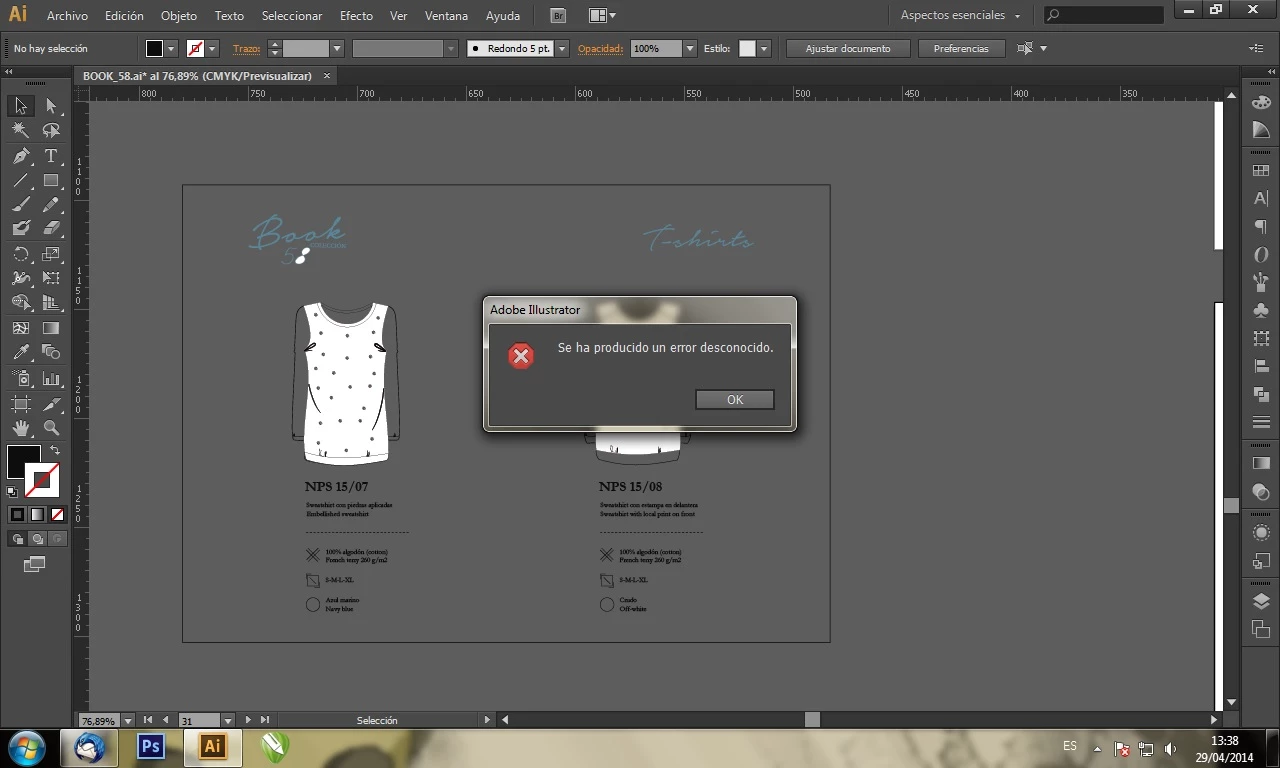
Error desconocido al guardar en illustrator

Community Beginner ,
Apr 30, 2014 Apr 30, 2014

Hola,

tengo un problema con Ai 6, cuando voy a guardar un archivo en .Ai me da error desconocido, ya lo reinstale pero sigue el problema...error.jpg
253.6K
Translate
Report
Community guidelines
Be kind and respectful, give credit to the original source of content, and search for duplicates before posting. Learn more
community guidelines

correct answers 1 Correct answer

New Here , Sep 08, 2022 Sep 08, 2022

Prueben convirtiendo todo el texto en contorno. Me funcionó. En el caso de no haber texto pruebn expandiendo los objetos. Suerte!

Translate
Adobe
New Here ,
Nov 23, 2020 Nov 23, 2020

https://www.youtube.com/watch?v=ib0IrkEVyMo ahí está la solución!!! por lo menos a mi me funcionó, espero que a ustedes también<33

Translate
Report
Community guidelines
Be kind and respectful, give credit to the original source of content, and search for duplicates before posting. Learn more
community guidelines
New Here ,
Nov 23, 2020 Nov 23, 2020

https://www.youtube.com/watch?v=ib0IrkEVyMo ahí está la respuesta!! por lo menos a mi me funcionó, espero que a ustedes también<33

Translate
Report
Community guidelines
Be kind and respectful, give credit to the original source of content, and search for duplicates before posting. Learn more
community guidelines
New Here ,
Feb 05, 2021 Feb 05, 2021

Hola no se si les sirva a quienes vuelvan a presentar este problema a mi no me dejaba guardar en ningun formato me aparecía la misma ventana con el mensaje de se ha producido un error desconocido, lo que a mi me funciono fue restablecer las preferencias de illustrator y reiniciar el programa y ya me dejo guardar archivos.


Saludos 

Translate
Report
Community guidelines
Be kind and respectful, give credit to the original source of content, and search for duplicates before posting. Learn more
community guidelines
New Here ,
Apr 11, 2025 Apr 11, 2025

Si hago eso, se borrarán los archivos?


Translate
Report
Community guidelines
Be kind and respectful, give credit to the original source of content, and search for duplicates before posting. Learn more
community guidelines
New Here ,
Feb 11, 2021 Feb 11, 2021

a mi me paso lo mismo, prueba guardarlo en formato eps, o encapsulado, a mi me funciono

Translate
Report
Community guidelines
Be kind and respectful, give credit to the original source of content, and search for duplicates before posting. Learn more
community guidelines
New Here ,
Apr 13, 2021 Apr 13, 2021

zya

Translate
Report
Community guidelines
Be kind and respectful, give credit to the original source of content, and search for duplicates before posting. Learn more
community guidelines
Guest
May 07, 2021 May 07, 2021

Hola, me pasaba lo mismo lo mismo y la solucion fue convertir todos los textos en curvas, recien ahi pude guardar el archivo 


Translate
Report
Community guidelines
Be kind and respectful, give credit to the original source of content, and search for duplicates before posting. Learn more
community guidelines
New Here ,
Dec 09, 2021 Dec 09, 2021

Uf viendo todas las respuestas a mi me sirvió la solución de convertir todos los textos a contornos

el proceso sería (seleccionar - objetos - objetos de texto) luego seleccionar cualquier texto con click derecho y darle a crear contornos, eso si asegurate de que todos los textos se conviertan por que aveces algunos textos no se seleccionan. 


Translate
Report
Community guidelines
Be kind and respectful, give credit to the original source of content, and search for duplicates before posting. Learn more
community guidelines
New Here ,
Sep 08, 2022 Sep 08, 2022

Prueben convirtiendo todo el texto en contorno. Me funcionó. En el caso de no haber texto pruebn expandiendo los objetos. Suerte!

Translate
Report
Community guidelines
Be kind and respectful, give credit to the original source of content, and search for duplicates before posting. Learn more
community guidelines
New Here ,
Oct 17, 2023 Oct 17, 2023

Ya sé que la publicación es antigua, pero alguien la servirá mi respuesta. El problema es que tienes elementos fuera de la mesa de trabajo. Crea una mesa de trabajo que ocupe los elementos que tienes creados. 

Translate
Report
Community guidelines
Be kind and respectful, give credit to the original source of content, and search for duplicates before posting. Learn more
community guidelines
New Here ,
May 07, 2025 May 07, 2025

me pasa el mismo problema, tengo dias trabajando en un diseño y no se quiere guardar 😞

Translate
Report
Community guidelines
Be kind and respectful, give credit to the original source of content, and search for duplicates before posting. Learn more
community guidelines
Adobe Employee ,
May 07, 2025 May 07, 2025
LATEST

Hello @Gabriela_Ventura3948,

Could you share more details, like the version of the OS/Illustrator installed, and if Illustrator behaves this way when working with a particular file or saving to a particular folder location (Internal/External/Network drive or a cloud-synced folder like Google Drive/Dropbox/etc.), so I can better assist you?

Also, try saving your file as a PDF with Illustrator editing capabilities enabled or as a Cloud Document and share your observations.

Looking forward to hearing from you.


Anubhav

Translate
Report
Community guidelines
Be kind and respectful, give credit to the original source of content, and search for duplicates before posting. Learn more
community guidelines
