


Participant
July 7, 2025
질문

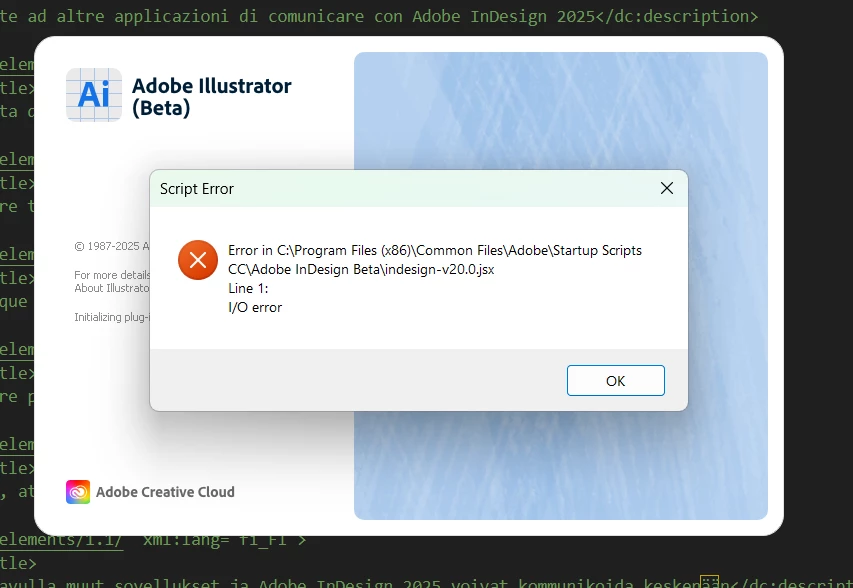
error in C:\Program Files (x86)\Common Scripts CC\ Adobe InDesign Beta\indesign-v20.O.jsx

  • July 7, 2025
  • 1 답변
  • 345 조회

Hola, alguien sabe cómo solucionar este error? ya instale y desinstale adobe illustrator y Indesign, tanto la versión normal como la beta y me sigue saliendo. El error solo sale al abrir illustrator, no sale cuando abro indesign. 
Ingresé al script pero según el visualizador de codigo no hay ningun error y no falta ningun "}"
 

1 답변

Anubhav M
Community Manager
Community Manager
July 7, 2025

Hello @Juls HL,

I'm sorry to hear about your experience. Could you try moving the Startup Scripts CC folder to the desktop from the following location to see if it helps:

C:\Program Files (x86)\Common Files\Adobe
C:\Program Files\Common Files\Adobe


Looking forward to hearing from you.

Anubhav

Juls HL작성자
Participant
July 10, 2025

Hi @Anubhav M,

Thank you so much for your help but it doesn't work for me :c

Anubhav M
Community Manager
Community Manager
July 10, 2025

Hello @Juls HL,

I'm sorry to hear the suggestions did not help. Could you try deleting the Startup Scripts folder from the aforementioned locations and then relaunching Illustrator to see if it helps? If not, try the following steps and check if they help:


Looking forward to hearing from you.

Anubhav