


- Home
- Illustrator
- Discussions
- Find and Replace Script for multiple files
- Find and Replace Script for multiple files

Copy link to clipboard
Copied
I am trying to find a script that will either open a selection of .ai files or run through all the open files in illustrator and complete a Find and Replace. Right now I have a script that runs the Find and Replace but I have to run it on each document instead of all my open files.
var openDocument = app.documents.item(0);

var search_string = /001D/gi; // g for global search, remove i to make a case sensitive search
var replace_string = '001E';

var text_frames = active_doc.textFrames;

if (text_frames.length > 0)
{
    for (var i = 0 ; i < text_frames.length; i++)
      {
          var this_text_frame = text_frames;
           var new_string = this_text_frame.contents.replace(search_string, replace_string);

           if (new_string != this_text_frame.contents)
               {
                    this_text_frame.contents = new_string;
               }
      }
}
Thanks for any help.


 1 Correct answer

Oh, my bad, I gave bad advice, pasting pixxxel's code into my code results in a re-definition of the "i" counter.
Vinicius is corrent.
Here is my updated one:
...function FindAndReplaceScript_AllOpenDocuments(){
for(var i=app.documents.length -1; i > -1; i--){
app.documents.activate();
var aDoc = app.documents;
var searchString = /001D/gi;
var replaceString = '001E';
var theTF = aDoc.textFrames;
if (the


Explore related tutorials & articles
 36
Replies
36
36
Replies
36



Copy link to clipboard
Copied
[Moved to the Illustrator Scripting forum]
Copy link to clipboard
Copied
If you care to use Actions, you may stick this script into an action and then batch-process a folder of files with that action.
But, I'm not sure your script will work since your active document is called "openDocument" in one line and "active_doc" in another line.

Copy link to clipboard
Copied
Hi jasonm64137335,
you can do something like this:
var aDoc = app.activeDocument;
aDoc.textFrames[0].contents = "abcdABCD"; // this is only for one seachable text
var searchString = /\u0041/gi; // search for "a" or "A"
var replaceString = "\u0058"; // replace with "X"
var theTF = aDoc.textFrames;
if (theTF.length > 0) {
for ( i = 0 ; i <=theTF.length-1; i++) {
var aTF = theTF;
var newString = aTF.contents.replace(searchString, replaceString);
if (newString != aTF.contents) {
theTF.contents = newString;
}
}
}
Have fun

Copy link to clipboard
Copied
This works but still only replaces it in one open Document, I would like it to run through all open documents if possible.
Copy link to clipboard
Copied
Then you must wrap pixxxel's code in this code:
function FindAndReplaceScript_AllOpenDocuments(){
for(var i=0; i<app.documents.length; i++){
app.documents.activate();
// paste pixxxel's code starting here on this line
};
};
FindAndReplaceScript_AllOpenDocuments();
Copy link to clipboard
Copied
So this is what I have now:
function FindAndReplaceScript_AllOpenDocuments(){
for(var i=0; i<app.documents.length; i++){
app.documents.activate();
var aDoc = app.activeDocument;
aDoc.textFrames[0].contents = "abcdABCD"; // this is only for one seachable text
var searchString = /001D/gi;
var replaceString = '001E';
var theTF = aDoc.textFrames;
if (theTF.length > 0) {
for ( i = 0 ; i <=theTF.length-1; i++) {
var aTF = theTF;
var newString = aTF.contents.replace(searchString, replaceString);
if (newString != aTF.contents) {
theTF.contents = newString;
}
}
}
};
};
FindAndReplaceScript_AllOpenDocuments();
But it is still only changing one document of 21 that are open... I am over my head. Appreciate any help.
Copy link to clipboard
Copied
Oh, my bad, I gave bad advice, pasting pixxxel's code into my code results in a re-definition of the "i" counter.
Vinicius is corrent.
Here is my updated one:
function FindAndReplaceScript_AllOpenDocuments(){
    for(var i=app.documents.length -1; i > -1;  i--){
        app.documents.activate();
        var aDoc = app.documents;

        var searchString = /001D/gi;
        var replaceString = '001E';

        var theTF = aDoc.textFrames;
if (theTF.length > 0) {
for (var j = 0 ; j <theTF.length; j++) {
var aTF = theTF
; var newString = aTF.contents.replace(searchString, replaceString);
if (newString != aTF.contents) {
theTF
.contents = newString; }
}
}
}
};
FindAndReplaceScript_AllOpenDocuments();
Copy link to clipboard
Copied
Awesome, worked beautifully!

Copy link to clipboard
Copied
How do I make this script replace with a string that includes returns? Works fine unless my "replacement" text has more than one line.
Copy link to clipboard
Copied
How do you write a string that has more than one line in your code?
Copy link to clipboard
Copied
There is a Line Feed (\n) between each line.
Copy link to clipboard
Copied
I just tested this snippet and it appeared to work correctly:
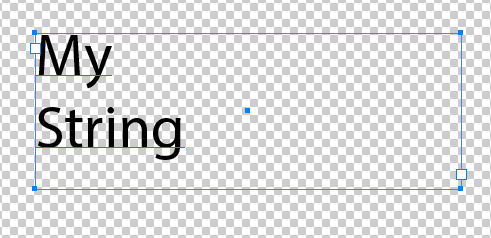
#target illustrator
function test(){
var doc = app.activeDocument;
var t = doc.textFrames[0];
t.contents = "My\nString";
};
test();
Copy link to clipboard
Copied
Silly-V, you're amazing! I'll see what I can learn from this. Thanks so much!
Copy link to clipboard
Copied
This works great! I had used "\n" regex to add a return in my string when I simply needed to add it to the text itself.
Another question: How would I loop 3 or more "Search and Replace" requests in a single script? I have duplicated the script 3 times, leaving out the "var active_doc…" line and it works, but I'm sure there's a more efficient way. The script is being run through Keyboard Maestro where the variables are accessed.
var active_doc = app.activeDocument;
var search_string = /Name/gi; // g for global search, remove i to make a case sensitive search
var replace_string = "%Variable%Name%";
var text_frames = active_doc.textFrames;
if (text_frames.length > 0)
{
for (var i = 0 ; i < text_frames.length; i++)
{
var this_text_frame = text_frames;
var new_string = this_text_frame.contents.replace(search_string, replace_string);
if (new_string != this_text_frame.contents)
{
this_text_frame.contents = new_string;
}
}
}
var search_string = /Date/gi; // g for global search, remove i to make a case sensitive search
var replace_string = "%Variable%Date%";
var text_frames = active_doc.textFrames;
if (text_frames.length > 0)
{
for (var i = 0 ; i < text_frames.length; i++)
{
var this_text_frame = text_frames;
var new_string = this_text_frame.contents.replace(search_string, replace_string);
if (new_string != this_text_frame.contents)
{
this_text_frame.contents = new_string;
}
}
}
var search_string = /Sentiment/gi; // g for global search, remove i to make a case sensitive search
var replace_string = "%Variable%Sentiment%";
var text_frames = active_doc.textFrames;
if (text_frames.length > 0)
{
for (var i = 0 ; i < text_frames.length; i++)
{
var this_text_frame = text_frames;
var new_string = this_text_frame.contents.replace(search_string, replace_string);
if (new_string != this_text_frame.contents)
{
this_text_frame.contents = new_string;
}
}
}
Copy link to clipboard
Copied
You can use a nested loop and a set of two arrays (or one array containing objects) like this:
var allSearchReplaceStrings = [
{ search : "MySearch1", replace : "MyReplace1" },
{ search : "MySearch2", replace : "MyReplace2" },
{ search : "MySearch3", replace : "MyReplace3" }
];
var this_text_frame, thisSearchReplacePair;
for (var i = 0 ; i < text_frames.length; i++) {
this_text_frame = text_frames;
for(var j = 0; j < allSearchReplaceStrings.length; j++){
thisSearchReplacePair = allSearchReplaceStrings
if(this_text_frame.contents == thisSearchReplacePair.search){
this_text_frame.contents = thisSearchReplacePair.replace;
}
}
}
Copy link to clipboard
Copied
thanks for sharing your knowledge. I’ll implement this tomorrow.

Copy link to clipboard
Copied
Are you tried use app.documents[]? like this:
for (x=0; x < app.documents.length; x++){
app.documents
.activate(); var aDoc = app.activeDocument;
aDoc.textFrames[0].contents = "abcdABCD"; // this is only for one seachable text
var searchString = /\u0041/gi; // search for "a" or "A"
var replaceString = "\u0058"; // replace with "X"
var theTF = aDoc.textFrames;
if (theTF.length > 0) {
for ( i = 0 ; i <=theTF.length-1; i++) {
var aTF = theTF;
var newString = aTF.contents.replace(searchString, replaceString);
if (newString != aTF.contents) {
theTF.contents = newString;
}
}
}
};
I think it work
Greetings
-Vinícius

Copy link to clipboard
Copied
Hi guys, I was looking for a script like this, because I have lots of cruise maps whose locations are to be translated from IT to EN. I tried to run the script marked as correct answer, it returns no errors but it does…nothing. I mean, the window jitters a bit but anything else, might it be related to the 2015.5 update? Or am I missing some code, some steps?
Thanks a lot!
Copy link to clipboard
Copied
Hello! Paste your code, let's see also a sample graphic of what you're trying to do.
Copy link to clipboard
Copied
Hi! I tried to run your code, marked as correct answer, and I simply need to find/replace city names on like 40 files, so that once i replace, e.g. "Venezia" with "Venice", it'll be replaced everywhere.
Copy link to clipboard
Copied
So you tried to run the code without making any edits to it?
Copy link to clipboard
Copied
Yep, exactly.

Copy link to clipboard
Copied
Same as ascotto here. I run the script and nothing happens. Is a dialog box supposed to appear?
(also, I'm on CS6, should it work or not?)
Thanks for your help.
Copy link to clipboard
Copied
You have to edit the script to put in your words.
These lines need to be edited to make it work. Change the 001D to your word you need to replace and the 001E to the one you want to change to.
- var searchString = /001D/gi;
- var replaceString = '001E';

-
- 1
- 2

Get ready! An upgraded Adobe Community experience is coming in January.
Learn more
 AdChoices