
Participant
September 25, 2020
Answered

Fonts not appearing as they should

  • September 25, 2020
  • 1 reply
  • 550 views

Hello all,

I am having an issue with Google fonts not showing up how they appear in other (windows) programs and was hoping someone has some suggestions on how to fix it. The fonts are installed on my system (windows 10) and show up in illustrator and Indesign no problem but do not appear as they do in word or on the Google fonts download page. Attached below are reference photos of the differences: 
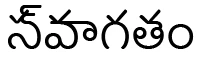
 

Indesign - Baloo Tammundu font
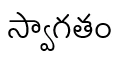


Word - Baloo Tammundu font


Any suggestions would be greatly appreciated!


Cheers,


Krysten

This topic has been closed for replies.
Correct answer Krysten5ED1

Hello Ashutosh, 


Thank you for your reply. I looked into the discussion you mentioned; however, the solution was not successful for me. Researching on that thread did lead me to a solution, however.


For anyone else having the same problem I had to enable Indic Options in the Paragraph by going to Edit - Preferences - Type... - check "Show Indic Options". Then in Paragraph, you can select the option for Middle Eastern & South Asian Single Line Composer. This corrected most problems automatically, but some still had to be re-copied/ rewritten in order to have the correct characters.  


1 reply

Ashutosh_Mishra
Inspiring
September 25, 2020

Hi there,


Thanks for reaching out. I have found a similar discussion on Adobe Illustrator community. Please check if the steps given here help you out.

Let us know how it goes.


Regards,

Ashutosh

Krysten5ED1AuthorCorrect answer
Participant
September 28, 2020

Hello Ashutosh, 


Thank you for your reply. I looked into the discussion you mentioned; however, the solution was not successful for me. Researching on that thread did lead me to a solution, however.


For anyone else having the same problem I had to enable Indic Options in the Paragraph by going to Edit - Preferences - Type... - check "Show Indic Options". Then in Paragraph, you can select the option for Middle Eastern & South Asian Single Line Composer. This corrected most problems automatically, but some still had to be re-copied/ rewritten in order to have the correct characters.