
Inspiring
September 28, 2014
Answered

Free Plain Rectangle Tool

  • September 28, 2014
  • 12 replies
  • 18381 views

Adobe®, in its AI CC2014 version, has introduced a new tool called the Live Rectangle. This is a really great feature but has its huuuuge limitation: it doesn’t snap to grids, points and objects correctly on resize!

Since we don’t know whether adobe is going to fix this and since there is no option to replace the Live Rectangle with the classic one (plain) by default, I’ve decided to write my own plugin (available for free for personal and commercial use) which imitates behavior of the ‘old’ Rectangle Tool. It doesn’t replace the Live Rectangle – it works completely independent!

My Plain Rectangle Tool correctly snaps to grids/objects/points and correctly aligns to grid/points on resize. Of course it supports the SHIFT and ALT/OPTION keys, Snap to Grid and Smart Guides options. In other words it works almost 100% the same as the Rectangle Tool we know from CC (17.1), CS6 and earlier.

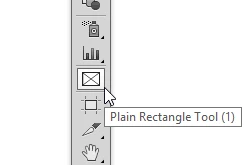
The installation package (zxp) adds ‘Plain Rectangle Tool’ icon into the Ai panel (of curse you can assign your custom keyboard shortcut to it as well)
Note: The Plain Rectangle can be easily converted into the Live one using Object > Shape > Convert to Rectangle

Grab your copy at http://63mutants.com/subc/products/PlainRectangleTool_m01/PlainRectangleTool_m01.php and share it with your friends.

It’s completely free.


Regards,

Pawel Kuc

This topic has been closed for replies.
Correct answer Dhirendra Mohan

Hello Everyone,

With the latest update 18.1 of Adobe Illustrator CC 2014, we have fixed the snapping issues with Live Shapes. Please upgrade to the new version of AI and let us know your findings.

Thanks,

Dhirendra

12 replies

Kris Hunt
Legend
February 23, 2016

PXC‌, any chance you could develop a Plain Ellipse tool and Plain Line tool, now that Adobe has crippled those tools too?

PXCAuthor
Inspiring
February 23, 2016

KrisHunt‌,

been sooo busy with a freelance project, that I haven't had time to release the newest version of the Plain Rectangle yet (space bar drag + some new snap options)… but yes – I have those two (ellipse and line) and a Plain Triangle on my list as well. The priority is to release the newest Plain Rectangle along with the standalone installer (two or three weeks) and then prepare: ellipse, triangle and line. Cannot tell you any time-frame since I'm working on this in my spare time but quite possible I will have it ready within 2 or 3 months.

PXCAuthor
Inspiring
June 22, 2015

Update - my Plain Rectangle Tool has been updated to work with the latest #CC2015 release. And again - It’s completely free.

Thanks,

Pawel Kuc

Inspiring
August 6, 2015

thank pxc, i'm gonna try it. i absolutely hate the live rectangle. i have to expand every time i want a simple square which is 99.99 percent of the time i draw a square. i don't understand why we had to loose the simple rectangle tool

Participant
February 19, 2015

I have 18.1.1 but unfortunately this issue is still not fixed. Any news on a an update?

Participant
November 28, 2014

Hi.

I've tried to install this free tool (I'm using the updated Illustrator CC2014 on a 10.8.5 osx machine) but it's opened by the "extention manager CS6" that doesn't recognize it as a valid installation. I've got CS6, CC and CC2014 programs installed, and I don't find an extention manager for CC2014. How can I install the plain rectangle tool? Thanks a lot.

Monika Gause
Community Expert
Community Expert
November 28, 2014

You need the extension manager for CC.

Download it from the Adobe website or use the Creative Cloud app.

Participant
November 28, 2014

Thanks a lot Monika.

I didn't think to watch in the not installed apps... ^_^"

martauniquename
Participant
October 15, 2014

I'm on CC 2014, I have installed the version 18 of Illustrator and PS 2014.2.0 and still have this bug. 

Participating Frequently
October 8, 2014

Deleting preferences won't solve the problem (well at least it didn't solved for me) and besides you should be careful and backup your preferences or else you will loss your customized workspaces, shortcuts, etc.

Kris Hunt
Legend
October 15, 2014

> you should be careful and backup your preferences or else you will loss your customized workspaces, shortcuts, etc.

You won't lose them; they just won't be selected by default. Workspaces and shortcuts reside in separate files.

Participating Frequently
October 15, 2014

Well, in my experience I lost them, luckily I always keep a backup

I really not sure what or when I did it, since each new version of Adobe product saves preferences in a different location (at least in spanish ES version) so can't really tell what version number was back then.

Dhirendra Mohan
Adobe Employee
Dhirendra MohanCorrect answer
Adobe Employee
October 7, 2014

Hello Everyone,

With the latest update 18.1 of Adobe Illustrator CC 2014, we have fixed the snapping issues with Live Shapes. Please upgrade to the new version of AI and let us know your findings.

Thanks,

Dhirendra

Participating Frequently
October 7, 2014

Sorry I don't agree with you. I'v just updated (both from my personal account at home and my corporate account) and the bug is still there. NO SNAP TO GRID YET

Larry G. Schneider
Community Expert
Community Expert
October 7, 2014

Did you replace your preferences files and force AI to write new ones?

Participating Frequently
October 6, 2014

Thanks! works great so far. I'll be putting it to test on next big project starting next week. If only Adobe was so fast in solving their bugs rather than having to rely on their (awesome) comunity…

Thanks again!

Participant
October 3, 2014

to install I get this:

Kris Hunt
Legend
September 30, 2014

Unfortunately, this is causing Illustrator to crash. Thanks anyway!

PXCAuthor
Inspiring
September 30, 2014

KrisHunt

what is your OS? AI crushes on startup? Could you please provide more details, please?

Thnaks,

Pawel Kuc

Kris Hunt
Legend
September 30, 2014

Mac OS X Mavericks with Illustrator CC 2014.

I can't reproduce the crash reliably, but it's happened three times now while trying to use the tool. I'm accustomed to creating a specific size rectangle by clicking on the artboard with the tool, which this tool does not allow; it may happen then, but of course not every time.