Exit
  • Global community
    • Language:
      • Deutsch
      • English
      • Español
      • Français
      • Português
  • 日本語コミュニティ
  • 한국 커뮤니티
0

Gradient Annotator - Adjusting Position

Community Beginner ,
Sep 22, 2020 Sep 22, 2020

Hi all,

I was wondering if somebody could explain me how to adjust the position of an already existing Gradient Annotator - hence not by creating a new one. Angle remains the same, I'm only interested in adjusting its position, not its rotation. According to what I've read, one should be able to move an existing annotator by dragging its starting point. 

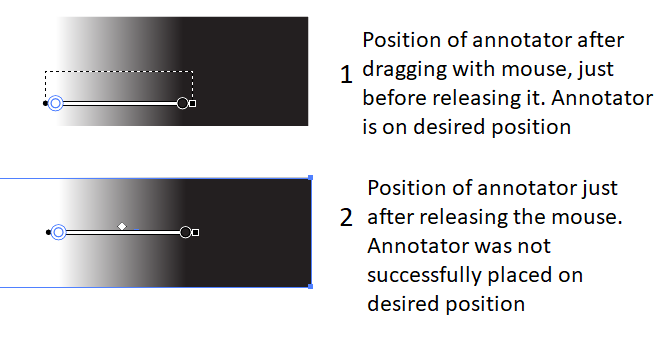
When I drag the starting point to somewhere on my screen, I see a dashed line. However when I release the mouse, the 'new' position is not where the annotator was just before releasing the mouse, see image.

Does somebody know how to reposition the gradient annotator? Thanks in advance!


Gradient Annotator 1.png

TOPICS
Draw and design , Tools
901
Translate
Report
Community guidelines
Be kind and respectful, give credit to the original source of content, and search for duplicates before posting. Learn more
community guidelines

correct answers 1 Correct answer

Community Expert , Sep 22, 2020 Sep 22, 2020

tromboniator_0-1600822423552.png

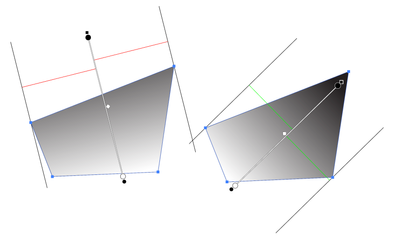
For linear gradients the annotator always positions itself in the middle of the extreme widths of the path parallel to the annotator, if that makes sense. You can move the ends anywhere you like along that center line, but annotator itself is always centered in the gradient perpendicularly to its direction. A radial gradient annotator may be positioned anywhere.


Peter


Translate
Adobe
Community Expert ,
Sep 22, 2020 Sep 22, 2020

It's not dragging the starting point anymore. You can drag the gradient by clicking somewhere on the gradient ramp

Translate
Report
Community guidelines
Be kind and respectful, give credit to the original source of content, and search for duplicates before posting. Learn more
community guidelines
Community Beginner ,
Sep 22, 2020 Sep 22, 2020

Hi,

Thanks for the quick reply. I also tried that, it gives the same effect as dragging the starting point. After releasing the mouse the annotator is not positioned where I would like it to be.


Translate
Report
Community guidelines
Be kind and respectful, give credit to the original source of content, and search for duplicates before posting. Learn more
community guidelines
Community Expert ,
Sep 22, 2020 Sep 22, 2020

tromboniator_0-1600822423552.png

For linear gradients the annotator always positions itself in the middle of the extreme widths of the path parallel to the annotator, if that makes sense. You can move the ends anywhere you like along that center line, but annotator itself is always centered in the gradient perpendicularly to its direction. A radial gradient annotator may be positioned anywhere.


Peter


Translate
Report
Community guidelines
Be kind and respectful, give credit to the original source of content, and search for duplicates before posting. Learn more
community guidelines
Community Beginner ,
Oct 20, 2020 Oct 20, 2020

Hi,

Apologies for the late reply, thanks! That explains why the annotator is jumping back to another position.

Alice

Translate
Report
Community guidelines
Be kind and respectful, give credit to the original source of content, and search for duplicates before posting. Learn more
community guidelines
Community Expert ,
Oct 20, 2020 Oct 20, 2020
LATEST

Hi, Alice,

I find it a bit unnerving, too, when the annotator jumps, even though I should be used to it by now.

And:

You're welcome!


Peter

Translate
Report
Community guidelines
Be kind and respectful, give credit to the original source of content, and search for duplicates before posting. Learn more
community guidelines