Exit
  • Global community
    • Language:
      • Deutsch
      • English
      • Español
      • Français
      • Português
  • 日本語コミュニティ
  • 한국 커뮤니티
0

Help with text not being editable after applying effects

Explorer ,
Nov 05, 2021 Nov 05, 2021

Hi, I’m relatively new to Illustrator and I’m following this tutorial here which shows how to do a text effect: https://www.youtube.com/watch?v=aBNFKsZvl9M


It involves transforming text using the envelope distort, shear, extrude and bevel then expand appearance commands. In the video it looks like, after doing these steps, the object is still a text object, allowing him to edit parts of it individually. But as soon as I do the envelope distort step my text seems to turn into an image and I can’t select individual parts of it anymore. So I'm unable to do anything he does after 3:10 because I can't select individual parts of the text. As you can see below as well, Illustrator seems to recognise it as one image after I do these steps:
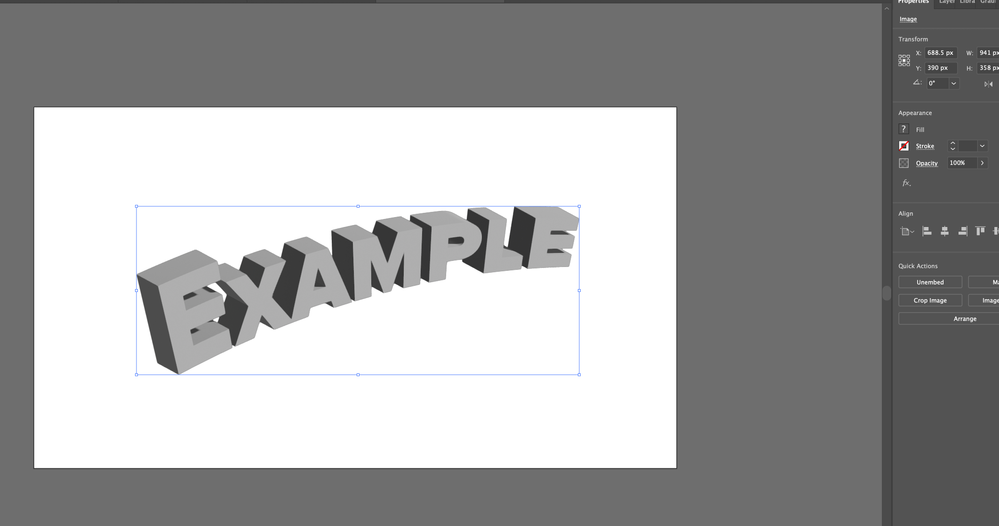
 

Screen Shot 2021-11-06 at 5.10.10 pm.png


Does anyone know what I'm doing wrong here?


Thanks!

TOPICS
Draw and design , Tools
621
Translate
Report
Community guidelines
Be kind and respectful, give credit to the original source of content, and search for duplicates before posting. Learn more
community guidelines

correct answers 1 Correct answer

Community Expert , Nov 06, 2021 Nov 06, 2021

If you want to edit the paths, you hjave to expand appearance first.

In order to get the paths as expected, you the 3D effects from the "Classic" submenu

Translate
Adobe
Community Expert ,
Nov 06, 2021 Nov 06, 2021

Object > Envelope Distort > Edit Contents

Translate
Report
Community guidelines
Be kind and respectful, give credit to the original source of content, and search for duplicates before posting. Learn more
community guidelines
Explorer ,
Nov 06, 2021 Nov 06, 2021

That doesn't seem to work unfortunately. It's less that I want to edit the text, more that I want to be able to click on elements in the finished 3D text, like the tops and bottoms of the letters, like he does in the video. But this doesn't seem to work for me since it just becomes an image file. Wondering if this is something to do with the fact that I'm using the 2022 version of Illustrator and not the 2021 one the video creator is using.

Translate
Report
Community guidelines
Be kind and respectful, give credit to the original source of content, and search for duplicates before posting. Learn more
community guidelines
Community Expert ,
Nov 06, 2021 Nov 06, 2021

If you want to edit the paths, you hjave to expand appearance first.

In order to get the paths as expected, you the 3D effects from the "Classic" submenu

Translate
Report
Community guidelines
Be kind and respectful, give credit to the original source of content, and search for duplicates before posting. Learn more
community guidelines
Explorer ,
Nov 06, 2021 Nov 06, 2021
LATEST

Thank you! This worked for me

Translate
Report
Community guidelines
Be kind and respectful, give credit to the original source of content, and search for duplicates before posting. Learn more
community guidelines