Exit
  • Global community
    • Language:
      • Deutsch
      • English
      • Español
      • Français
      • Português
  • 日本語コミュニティ
  • 한국 커뮤니티
4

how do I edit in Photoshop from Illustrator

Explorer ,
Sep 04, 2009 Sep 04, 2009

I am running CS4 Master Suite on Mac 10.5.8 and in other CS versions of Illustrator, I could select the image I just placed and click "Edit Original" and the image would then open in Photoshop. Now the "Edit Original" is grayed out. I am sure it's a simple setting I am overlooking and I tried to search the forum, but get an admin error when trying to search the forum no matter what info I add in the search field. It seems the forum is all Adobe what's to give us as far as tech support....and now it is giving errors!

Mark

166.1K
Translate
Report
Community guidelines
Be kind and respectful, give credit to the original source of content, and search for duplicates before posting. Learn more
community guidelines

correct answers 1 Correct answer

Advisor , Sep 04, 2009 Sep 04, 2009

The file has to be placed as a Link, not embedded. If you go to the links panel and see a little graphic icon next to the link then you image is embedded. Select the link in the Links Panel and click the Go to Link icon at the bottom of the panel, this will center you up on the image so you can confirm it is the image you want to relink to. Now click the Relink Icon at the bottom of the Links panel. Navigate to the image which was placed. This will relink or update the link. Once this is done yo

...
Translate
Adobe
Community Beginner ,
Aug 22, 2014 Aug 22, 2014

I had a similar problem with an embedded image I got from a client — the image was not on my machine and hence unavailable for re-linking.

To my (happy) surprise Illustrator CC has a feature to UNEMBED the image (don't know if this is also there in previous versions).

Double click on the image and in the horizontal bar you will see the UNEMBED image button (screen shot attached).
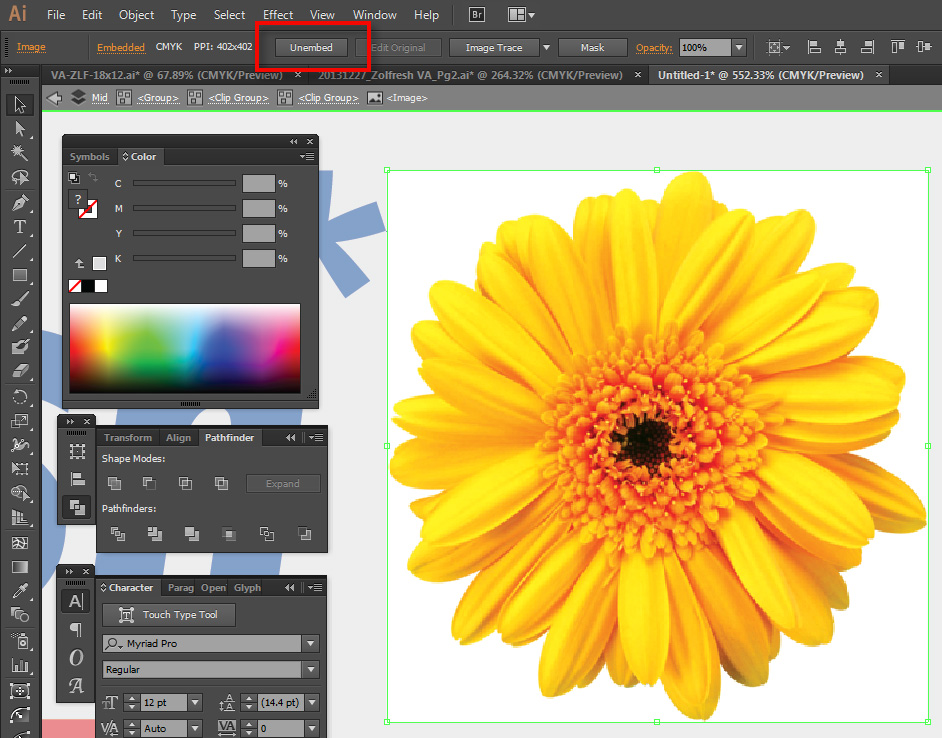
Unembed.jpgClicking on the button gives you the option of saving the image to disk as a PSD/other file.

Translate
Report
Community guidelines
Be kind and respectful, give credit to the original source of content, and search for duplicates before posting. Learn more
community guidelines
New Here ,
Apr 10, 2015 Apr 10, 2015
Translate
Report
Community guidelines
Be kind and respectful, give credit to the original source of content, and search for duplicates before posting. Learn more
community guidelines
New Here ,
Apr 13, 2015 Apr 13, 2015

Thanx so much!

Translate
Report
Community guidelines
Be kind and respectful, give credit to the original source of content, and search for duplicates before posting. Learn more
community guidelines
Advocate ,
Oct 05, 2023 Oct 05, 2023

Do you know of a MacOS equivalent of this?

Translate
Report
Community guidelines
Be kind and respectful, give credit to the original source of content, and search for duplicates before posting. Learn more
community guidelines
Adobe Employee ,
May 27, 2022 May 27, 2022

Hi all,


Take a look at the following article to move designs between Photoshop and Illustrator for a different workflow that suits your design objectives: https://helpx.adobe.com/photoshop/using/move-designs-between-photoshop-illustrator.html


Also, if you are looking to work with Illustrator design in Photoshop? See this: https://helpx.adobe.com/illustrator/using/use-illustrator-artwork-in-photoshop.html


Hope it helps.

Thanks,

Mohit

Translate
Report
Community guidelines
Be kind and respectful, give credit to the original source of content, and search for duplicates before posting. Learn more
community guidelines


