


Participant
February 8, 2022
해결됨

How: make segments of the same path overlap each other
  • February 8, 2022
  • 3 답변들
  • 1223 조회

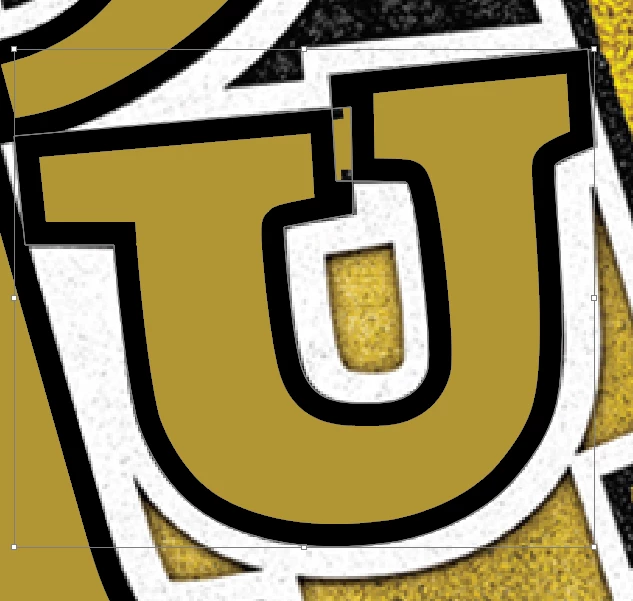
The U pictured is a single path with a gold fill color and a black 5pt. inside stroke.  I would like the left top-right section to overlap the right top-left section but, instead, the overlapping segments are affecting each other and pushing the stroke out instead of overlapping.

이 주제는 답변이 닫혔습니다.
최고의 답변: Laura Coyle.

You probably need to make a copy of this letter and expand it, Object > Expand Appearance first, so that you can make edits once the paths have no stroke. I attached a 1 min video, small 4MB - hopefully this will upload and be of help.

3 답변

Ton Frederiks
Community Expert
Community Expert
February 8, 2022

If it is a vector and a compound path, you may try to change the winding rule in the Attributes panel.

Participant
February 8, 2022

This is close but it gets rid of the inside fill and I want it to complete the inside fill like in the attached image.  I ended up just duplicating the path and expanding appearance so the black and gold are seperate and controlable.  A little time consuming but it works.  Thanks for your help tho.

Laura Coyle.
Community Expert
Community Expert
February 8, 2022

You probably need to make a copy of this letter and expand it, Object > Expand Appearance first, so that you can make edits once the paths have no stroke. I attached a 1 min video, small 4MB - hopefully this will upload and be of help.

Participant
February 8, 2022

This is what I ended up doing and it works, just a little more time consuming than I was hoping for but you can't argue with success.  Thanks for your help!

michelew83603738
Community Expert
Community Expert
February 8, 2022

From this selection, it doesn't seem to be a vector image. Can you post your layers panel expanded with the object selected so we can see what is going on. Is this a vector image?

Participant
February 8, 2022

It is a Vector Image I made tracing a raster image.  The "textured" areas you're seeing are the original image underneath and then I'm making a vector path on top of it.  Sorry, I should have turned off the raster before I screen shot.  I ended up just expanding appearances and making the black and gold seperate paths with no stroke.  Thanks for your help though!