
big_smile_00
Inspiring
June 17, 2019
Answered

How to change the transformation point in symbols?

  • June 17, 2019
  • 2 replies
  • 5060 views

In Illustrator, the transformation tool handily allows you to select the transformation origin:
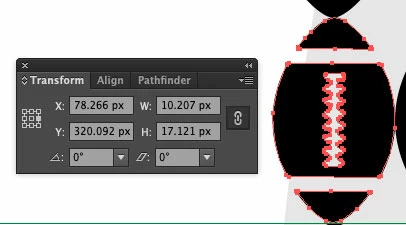
In the above example, when you resize the image, it will resize from the center-right side (as the transformation origin has been set to the center-right).

However, when working with symbols this option disappears:
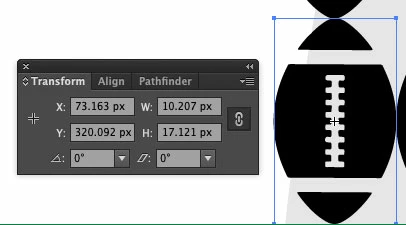
If I re-size this image, it will resize from the center-center. How can I control the transformation origin with symbols? I know I can break the symbol apart (so it is no longer a symbol), but I don't want to do this, just in case I need to update the design of the symbol.

I am using Illustrator CS6, but symbols have been around for a long time, so there must be a solution to control the transformation origin, as I can't imagine people struggled without being able to for the many years that symbols have existed.

    This topic has been closed for replies.
    Correct answer big_smile_00

    I have figured this out.

    Go to the transformation panel.

    Click the little arrow to display the menu.

    Click Show options

    Click "Use registration point for symbol".

    Now it will work like normal.

    2 replies

    big_smile_00
    big_smile_00AuthorCorrect answer
    Inspiring
    June 17, 2019

    I have figured this out.

    Go to the transformation panel.

    Click the little arrow to display the menu.

    Click Show options

    Click "Use registration point for symbol".

    Now it will work like normal.

    Doug A Roberts
    Community Expert
    Community Expert
    June 17, 2019

    You can set the registration point in the options window when creating the symbol. To change it after creating, double-click on the symbol in the symbols panel to enter isolation mode and move the object(s) relative to the registration point.

    big_smile_00
    Inspiring
    June 17, 2019

    Doug A Roberts

    I double clicked the symbol and set the registration point to centre-right. But when I exit Isolation mode and try to re-size, it still resizes from centre-centre

    I don't want to move the object in isolation mode because then all the other instances of the symbol will move.

    Ares Hovhannesyan
    Community Expert
    Community Expert
    June 17, 2019

    When you defining you need to set his registration point . In you case you can replace your existing symbol with existing one,

    1. Choose your existing object.

    2. Make a new copy of it

    3. Unlink it from existing symbol

    4. Choose and set a new symbol but with correct registration point (that you need)

    5. Press ALT and drag it on existing symbol

    6. Now your new symbol has been replace with new one.

    This will help to transform all existing symbols instances with new registration point