Exit
  • Global community
    • Language:
      • Deutsch
      • English
      • Español
      • Français
      • Português
  • 日本語コミュニティ
  • 한국 커뮤니티
0

How to make this brush in illustrator?

Explorer ,
Jan 18, 2022 Jan 18, 2022

I want to make a brush like this:

l83U3h7


I tried but I only got here. How can  I make start and end or the Art brush the same as the calligraphy brush?

77cskbA

TOPICS
Draw and design
578
Translate
Report
Community guidelines
Be kind and respectful, give credit to the original source of content, and search for duplicates before posting. Learn more
community guidelines
Adobe
Community Expert ,
Jan 18, 2022 Jan 18, 2022

You may modify the Art Brush definition and do some experiments with the "Stretch Between Guides" settings.


Translate
Report
Community guidelines
Be kind and respectful, give credit to the original source of content, and search for duplicates before posting. Learn more
community guidelines
Community Expert ,
Jan 18, 2022 Jan 18, 2022

Use the Width tool to create a width profile for that brush stroke

Screenshot 2022-01-18 at 22.51.49.png

Translate
Report
Community guidelines
Be kind and respectful, give credit to the original source of content, and search for duplicates before posting. Learn more
community guidelines
Explorer ,
Jan 18, 2022 Jan 18, 2022

Almost there, I think. Any ideas for this step?

H8vrtNd

Translate
Report
Community guidelines
Be kind and respectful, give credit to the original source of content, and search for duplicates before posting. Learn more
community guidelines
Community Expert ,
Jan 18, 2022 Jan 18, 2022

You may need multiple stroked paths and create a different width profile (Shift W for the Width tool)

https://helpx.adobe.com/illustrator/using/stroke-object.html

Translate
Report
Community guidelines
Be kind and respectful, give credit to the original source of content, and search for duplicates before posting. Learn more
community guidelines
Community Expert ,
Jan 18, 2022 Jan 18, 2022

I'd still recommend to take a look at the "Stretch Between Guides" settings.


But as per your last sketch, you may just have to use separate paths instead of one continuous path to get the desired look.


Translate
Report
Community guidelines
Be kind and respectful, give credit to the original source of content, and search for duplicates before posting. Learn more
community guidelines
Explorer ,
Feb 05, 2022 Feb 05, 2022

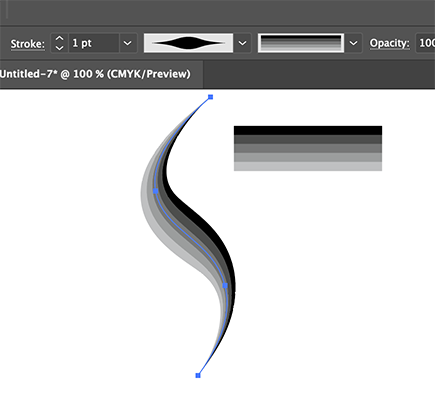
Is there a way to use width profile with "Calligraphic Brush"?


IUiAvMh

Translate
Report
Community guidelines
Be kind and respectful, give credit to the original source of content, and search for duplicates before posting. Learn more
community guidelines
Community Expert ,
Feb 05, 2022 Feb 05, 2022
LATEST

No.

Translate
Report
Community guidelines
Be kind and respectful, give credit to the original source of content, and search for duplicates before posting. Learn more
community guidelines