이 주제는 답변이 닫혔습니다.

4 답변

joaosp
joaosp작성자
Inspiring
March 11, 2019

Thanks everyone for the replies, also tromboniator​​ and @Doug A Roberts (I couldn't find your user on mention suggestions, sorry ) for the step-by-step instructions. I will practice using both ways, but I think the Peter's one is easier, at least when looking at it.

I don't know if it's just me, but I have so much difficulty to see the logic in the arts behind logos, I mean, Bojan Živković​ told me about the overlapping, and I just couldn't figure it out since it's something relatively simple. I'd like to ask if you are able to see those logics because you already made something similar or if someone taught those things to you. I'm a web designer but I really wanna be good at logo design, which is for me the first and most important step of the whole thing behind a brand.

Doug A Roberts
Community Expert
Community Expert
March 11, 2019

When I see people ask questions like this I assume they're having difficulty because they don't have any background in drawing. Is this the case here?

If you can draw, you can for the most part visualise the relations between things in space, and then work out how to make them.

joaosp
joaosp작성자
Inspiring
March 11, 2019

Absolutely RIGHT! My BA was in journalism and I migrated to graphic/web design since I liked that. The only things I drew (when child) were car speedometers, only . Some time ago, I posted a similar doubt on StackExchange's Graphic Design forum and I was only criticized with replies like "if you had tried to do on your own, you'd know how to do it". Unfortunately, some people have no education, that's something I faced in my whole life since we can't be good at something without asking things. Not all professionals like to be "asked".

rcraighead
Legend
March 11, 2019

With a bit of effort you could make custom "Art Brushes" using the "Stretch Between Guides" feature to create the look.

tromboniator
Community Expert
Community Expert
March 11, 2019

Here's one way to do it.

Peter

Bojan Živković11378569
Community Expert
Community Expert
March 11, 2019

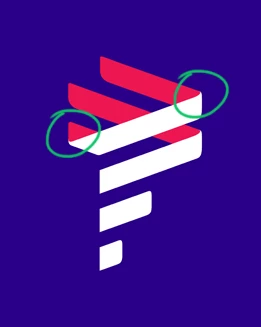
Have you tried to create multiple objects and overlap them paying attention on position of object stack? In essence white part of the logo seats on top of the red part, do you understand what I mean?

joaosp
joaosp작성자
Inspiring
March 11, 2019

Yes, I got it, I hadn't realized about the overlapping, but actually there's a curve on the edges of the white part which gives them a fold illusion. How to make those "joins" which are "connecting" white and red exactly where I put the green circles?

Bojan Živković11378569
Community Expert
Community Expert
March 11, 2019

Place image which you have uploaded here in Illustrator then trace red part then white part of the logo. You have guidelines what makes things easier.