Inspiring
July 26, 2019
해결됨

How to save jpgs of artboards in varying but specific folders?

  • July 26, 2019
  • 3 답변들
  • 1956 조회

Hello everybody, I'm on version 2019 23.0.3

Is there any way to automate the action of saving a set of JPEGs, seperated by artboards, with the same name as the AI file, up one folder in the folder structure and within a specifically named subfolder within the upper folder?

Basically, we have a file system server where every job we do has a folder name of "190726_8051 Canberra Australia" or "180819_6289_SpaceCityCruisersFall 2018" or similar. EVERY single folder has a set of these exact folder names inside it:

_comps

_media

_prod

_specs

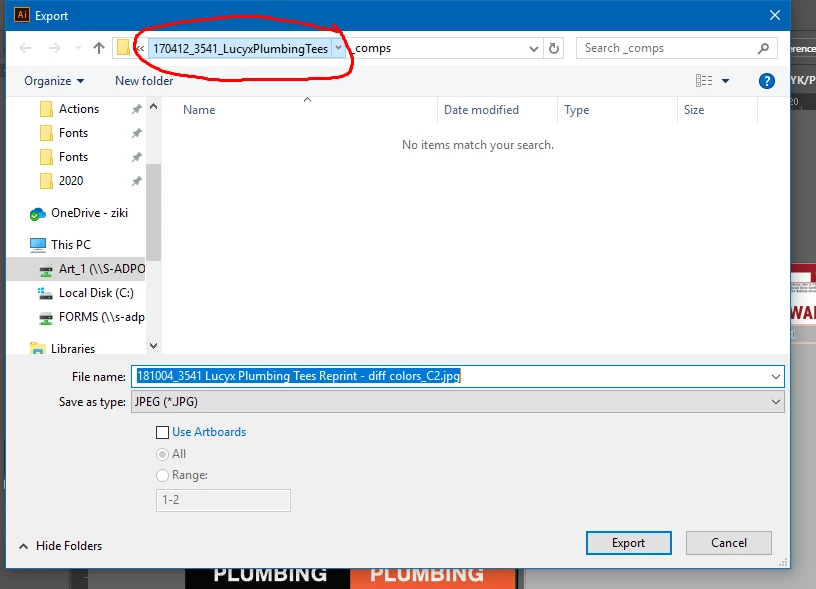
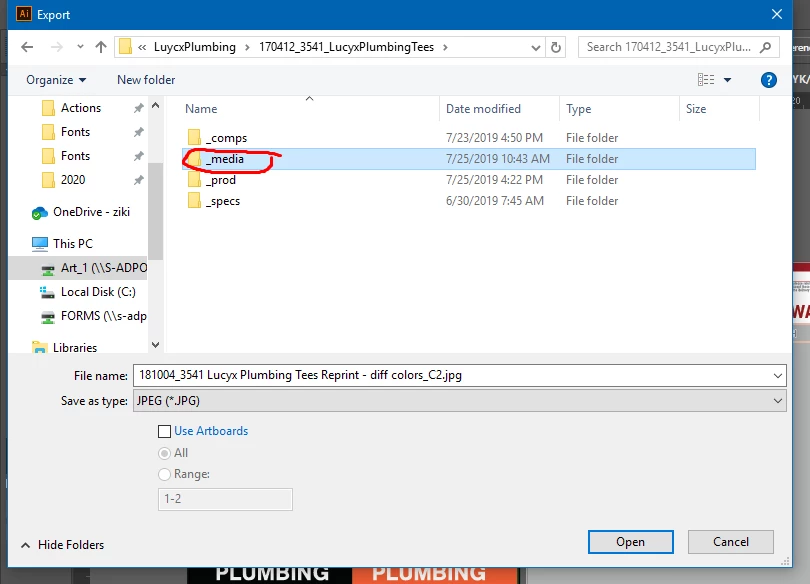
and we always save our proof AI inside _comps right before exporting our customer proof jpegs inside _media. The process of doing this happens at least 20 times every day for every designer. I just want to expedite the jpeg part though.

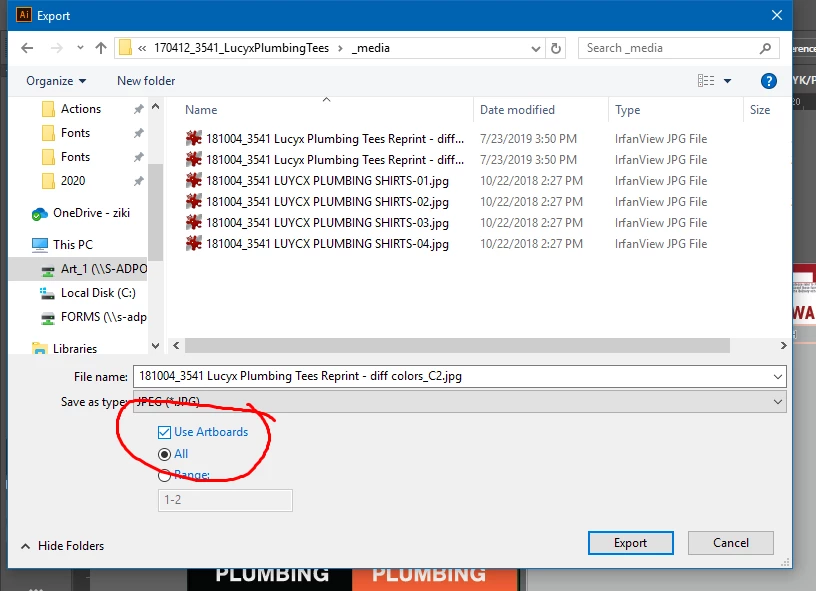
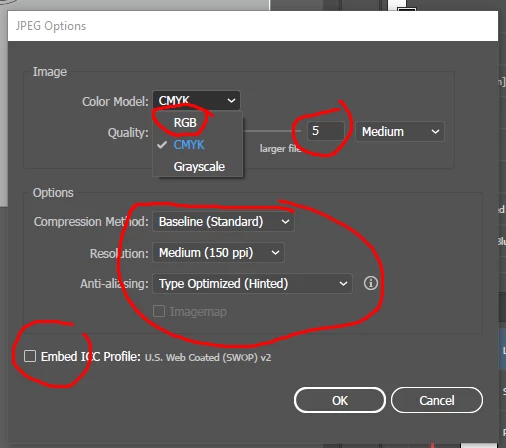
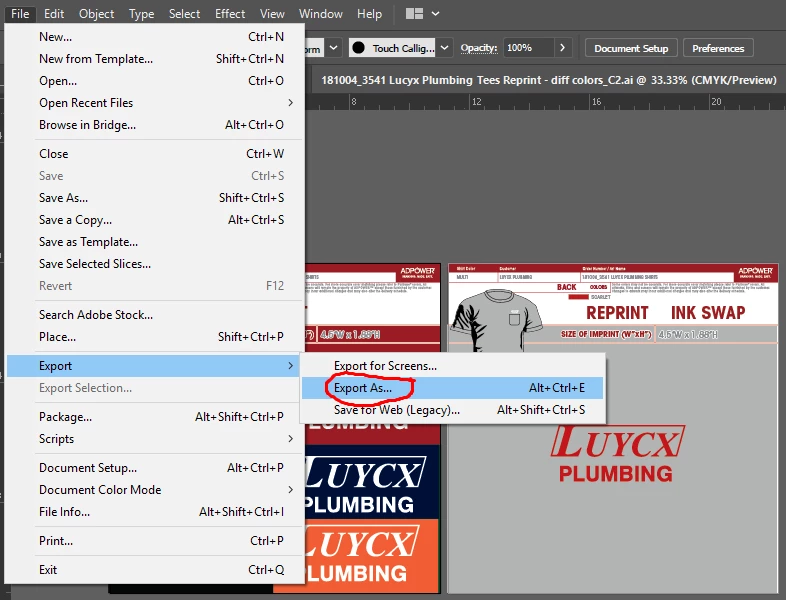
Here is the process in screenshots with extra details on the options we need to set:

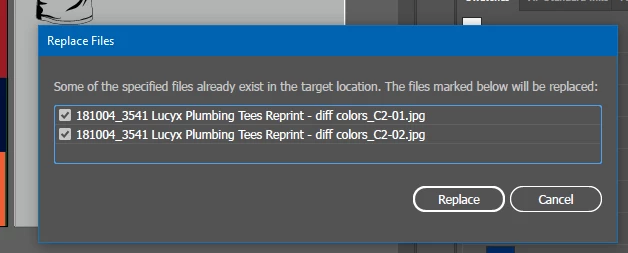
It also needs to be able to replace the old ones if there are any:

Please help me out

Thank you so much in advance!!!

이 주제는 답변이 닫혔습니다.
최고의 답변: Lumenn

Hello, below updated code, i've changed os specific paths to URI notation, hopefully this will fix the compatibility issue.

Typescript version here: adobe-forums-scripts/export_images.ts at export_images · lumenn/adobe-forums-scripts · GitHub

function displayMessage(text) {

    var messageWindow = new Window("dialog", undefined, undefined, {

        borderless: true

    });

    messageWindow.add("statictext", undefined, text);

    messageWindow.add("button", undefined, "OK");

    messageWindow.show();

}

function getActiveDocument(app) {

    if (app.activeDocument) {

        return app.activeDocument;

    }

    else {

        prompt("There are no opened documents");

    }

}

function getDestinationPath(pathToDocument) {

    var newPath;

    var name;

    name = pathToDocument.split("/").pop();

    newPath = pathToDocument.slice(0, -name.length) + "_media";

    var checkFolder = new Folder(newPath + "/");

    if (checkFolder.exists) {

        return newPath;

    }

    else {

        checkFolder.create();

        return newPath;

    }

}

function createImages(document, destPath, filename) {

    var options = new ExportForScreensOptionsJPEG;

    options.compressionMethod = JPEGCompressionMethodType.BASELINESTANDARD;

    options.embedICCProfile = false;

    options.antiAliasing = AntiAliasingMethod.TYPEOPTIMIZED;

    options.scaleType = ExportForScreensScaleType.SCALEBYRESOLUTION;

    options.scaleTypeValue = 150;

    var prefix;

    prefix = filename.split("\.").shift() + "!@#$";

    var outputFile;

    outputFile = new File(destPath + "/" + filename);

    document.exportForScreens(outputFile, ExportForScreensType.SE_JPEG100, options, undefined, prefix);

}

function moveFilesToParentFolder(rootPath) {

    var rootFolder = new Folder(rootPath);

    var filesFolder = new Folder(rootPath + "/150ppi");

    var files;

    files = filesFolder.getFiles("");

    for (var i = files.length; i > 0; i--) {

        var file = files.pop();

        if (file.exists) {

            file.copy(rootFolder + "/" + file.displayName);

            file.remove();

        }

    }

    filesFolder.remove();

}

function correctFileNames(rootPath) {

    var rootFolder = new Folder(rootPath + "/150ppi");

    var files;

    files = rootFolder.getFiles("");

    for (var i = 0; i < files.length; i++) {

        var file = files;

        if (file.exists) {

            var newName = file.displayName.split("!@#$").shift() + "-" + (i > 9 ? "" : "0") + i + ".jpg";

            file.rename(newName);

        }

    }

}

function main() {

    var activeDocument = getActiveDocument(app);

    var destPath = getDestinationPath(activeDocument.path.absoluteURI);

    createImages(activeDocument, destPath, activeDocument.fullName.displayName);

    correctFileNames(destPath);

    moveFilesToParentFolder(destPath);

    displayMessage("Files saved");

}

main();

3 답변

Lumenn
Inspiring
August 1, 2019

Hello,
unfortunatelly i don't have any MacOS to test this script on this system, i'll try to correct it, but it might take some more time,
maybe if there is anyone here with Apple setup will be able to correct it faster

Lumenn
Lumenn답변
Inspiring
August 2, 2019

Hello, below updated code, i've changed os specific paths to URI notation, hopefully this will fix the compatibility issue.

Typescript version here: adobe-forums-scripts/export_images.ts at export_images · lumenn/adobe-forums-scripts · GitHub

function displayMessage(text) {

    var messageWindow = new Window("dialog", undefined, undefined, {

        borderless: true

    });

    messageWindow.add("statictext", undefined, text);

    messageWindow.add("button", undefined, "OK");

    messageWindow.show();

}

function getActiveDocument(app) {

    if (app.activeDocument) {

        return app.activeDocument;

    }

    else {

        prompt("There are no opened documents");

    }

}

function getDestinationPath(pathToDocument) {

    var newPath;

    var name;

    name = pathToDocument.split("/").pop();

    newPath = pathToDocument.slice(0, -name.length) + "_media";

    var checkFolder = new Folder(newPath + "/");

    if (checkFolder.exists) {

        return newPath;

    }

    else {

        checkFolder.create();

        return newPath;

    }

}

function createImages(document, destPath, filename) {

    var options = new ExportForScreensOptionsJPEG;

    options.compressionMethod = JPEGCompressionMethodType.BASELINESTANDARD;

    options.embedICCProfile = false;

    options.antiAliasing = AntiAliasingMethod.TYPEOPTIMIZED;

    options.scaleType = ExportForScreensScaleType.SCALEBYRESOLUTION;

    options.scaleTypeValue = 150;

    var prefix;

    prefix = filename.split("\.").shift() + "!@#$";

    var outputFile;

    outputFile = new File(destPath + "/" + filename);

    document.exportForScreens(outputFile, ExportForScreensType.SE_JPEG100, options, undefined, prefix);

}

function moveFilesToParentFolder(rootPath) {

    var rootFolder = new Folder(rootPath);

    var filesFolder = new Folder(rootPath + "/150ppi");

    var files;

    files = filesFolder.getFiles("");

    for (var i = files.length; i > 0; i--) {

        var file = files.pop();

        if (file.exists) {

            file.copy(rootFolder + "/" + file.displayName);

            file.remove();

        }

    }

    filesFolder.remove();

}

function correctFileNames(rootPath) {

    var rootFolder = new Folder(rootPath + "/150ppi");

    var files;

    files = rootFolder.getFiles("");

    for (var i = 0; i < files.length; i++) {

        var file = files;

        if (file.exists) {

            var newName = file.displayName.split("!@#$").shift() + "-" + (i > 9 ? "" : "0") + i + ".jpg";

            file.rename(newName);

        }

    }

}

function main() {

    var activeDocument = getActiveDocument(app);

    var destPath = getDestinationPath(activeDocument.path.absoluteURI);

    createImages(activeDocument, destPath, activeDocument.fullName.displayName);

    correctFileNames(destPath);

    moveFilesToParentFolder(destPath);

    displayMessage("Files saved");

}

main();

jackary333작성자
Inspiring
August 5, 2019

Hey again! I've completed my script, mostly thanks to you!! Thank you so much!! Tested on Mac & Windows Illustrator 2019

This is my final script. What I've done to yours is as follows:

  • Include converting doc to RGB if it's in CMYK, which was one of my original requirements.
  • Add 1 to the i number because we want the names to be the EXACT way it was when they're exported by Export As... artboards command since many times, users will want to use this script to replace files made originally the manual way, and this will replace all of them, rather than adding an extra one with "-00" at the end and not replacing the final one of the group.
  • Rename artboards to simple a# format before doing anything else, since for some reason the OS sorts the names of the artboards in the wrong order when the names of the artboards are "Artboard 1", "Artboard 1 copy", "Artboard 1 copy 1" etc, effectively reordering them to a unwanted order when the seperate jpegs are renamed. This version successfully orders them as expected, as you can see by the big red numbers on the JPEG previews as well as the filenames:


  • Undoes all document changes made by the script (i.e. artboard renaming, RGB conversion)

function CMYKtoRGBjpg() {


    // Keep track of whether doc is in RGB color mode for exporting JPG

    var badColorMode = 0;

    // Check document color space

        if ( app.activeDocument.documentColorSpace == DocumentColorSpace.RGB ) {

    //all good for exporting JPG

        } else {

        badColorMode = 1;

        }

    //if doc is CMYK, convert to RGB, export JPEG

    if ( badColorMode > 0 ) {


            app.executeMenuCommand("doc-color-rgb");

            exportjpg();


    //if doc is RGB already just export JPEG

    } else {

            exportjpg();


        }

    //export JPG function

        function exportjpg() {

            //files saved popup

            function displayMessage(text) { 

                var messageWindow = new Window("dialog", undefined, undefined, { 

                    borderless: true 

                }); 

                messageWindow.add("statictext", undefined, text); 

                messageWindow.add("button", undefined, "OK"); 

                messageWindow.show(); 

            } 

            //check if anything open, if so get doc name

            function getActiveDocument(app) { 

                if (app.activeDocument) { 

                    return app.activeDocument; 

                } 

                else { 

                    prompt("There are no opened documents"); 

                } 

            } 

            //find where active doc is located and go to parent folder, create _media folder if doesnt exist

            function getDestinationPath(pathToDocument) { 

                var newPath; 

                var name; 

                name = pathToDocument.split("/").pop(); 

                newPath = pathToDocument.slice(0, -name.length) + "_media"; 

                var checkFolder = new Folder(newPath + "/"); 

                if (checkFolder.exists) { 

                    return newPath; 

                } 

                else { 

                    checkFolder.create(); 

                    return newPath; 

                } 

            } 

            //exportforscreens options

            function createImages(document, destPath, filename) { 

                var options = new ExportForScreensOptionsJPEG; 

                options.compressionMethod = JPEGCompressionMethodType.BASELINESTANDARD; 

                options.embedICCProfile = false; 

                options.antiAliasing = AntiAliasingMethod.TYPEOPTIMIZED; 

                options.scaleType = ExportForScreensScaleType.SCALEBYRESOLUTION; 

                options.scaleTypeValue = 150; 

                var prefix; 

                prefix = filename.split("\.").shift() + "!@#$"; 

                var outputFile; 

                outputFile = new File(destPath + "/" + filename); 

                document.exportForScreens(outputFile, ExportForScreensType.SE_JPEG100, options, undefined, prefix); 

            } 

            //get rid of 150ppi folder created by exportforscreens

            function moveFilesToParentFolder(rootPath) { 

                var rootFolder = new Folder(rootPath); 

                var filesFolder = new Folder(rootPath + "/150ppi"); 

                var files; 

                files = filesFolder.getFiles(""); 

                for (var i = files.length; i > 0; i--) { 

                    var file = files.pop(); 

                    if (file.exists) { 

                        file.copy(rootFolder + "/" + file.displayName); 

                        file.remove(); 

                    } 

                } 

                filesFolder.remove(); 

            } 

            //rename files like how export Artboards selection works on Export As... menu command

            function correctFileNames(rootPath) { 

                var rootFolder = new Folder(rootPath + "/150ppi"); 

                var files; 

                files = rootFolder.getFiles(""); 

                for (var i = 0; i < files.length; i++) { 

                    var file = files

                    if (file.exists) { 

                        var newName = file.displayName.split("!@#$").shift() + "-" + (i > 9 ? "" : "0") + (i+1) + ".jpg"; 

                        file.rename(newName); 

                    } 

                } 

            } 

            //run all export jpg functions

            function main() { 

                var activeDocument = getActiveDocument(app); 

                var destPath = getDestinationPath(activeDocument.path.absoluteURI); 

                createImages(activeDocument, destPath, activeDocument.fullName.displayName); 

                correctFileNames(destPath); 

                moveFilesToParentFolder(destPath); 

                displayMessage("Files saved"); 

            } 

            main(); 

        }

}

// renameArtboards to a# for correct sorting of file names

function renameArtboards() {

    var doc = app.activeDocument; 

    for (var i = 0, l = doc.artboards.length; i < l; i++) { 

        if (doc.artboards.active) {

        }

        // this is where rename happens

        doc.artboards.name = "a"+(i+1); 

    }   

}

renameArtboards();

CMYKtoRGBjpg();

//undo everything done locally to doc by script, ie rename artboards & change color space

app.executeMenuCommand("undo");

Lumenn
Inspiring
July 31, 2019

Hello,
below code updated with features you've requested

  1. Checking if _media folder exists, if no it's created.
  2. Corrected naming of the files.
  3. Now saving files as proper .jpg using exportForScreens function (it's compatible with CC2018 and up due to this)
    It also creates subfolder 150ppi, so there is added moving those files to the parent _media folder.

TypeScript version for the code here: adobe-forums-scripts/export_images.ts at export_images · lumenn/adobe-forums-scripts · GitHub

function displayMessage(text) {

    var messageWindow = new Window("dialog", undefined, undefined, {

        borderless: true

    });

    messageWindow.add("statictext", undefined, text);

    messageWindow.add("button", undefined, "OK");

    messageWindow.show();

}

function getActiveDocument(app) {

    if (app.activeDocument) {

        return app.activeDocument;

    }

    else {

        prompt("There are no opened documents");

    }

}

function getDestinationPath(pathToDocument) {

    var newPath;

    var name;

    name = pathToDocument.split("\\").pop();

    newPath = pathToDocument.slice(0, -6 - (name.length + 1)) + "_media";

    var checkFolder = new Folder(newPath + "\\");

    if (checkFolder.exists) {

        return newPath;

    }

    else {

        checkFolder.create();

        return newPath;

    }

}

function createImages(document, destPath, filename) {

    var options = new ExportForScreensOptionsJPEG;

    options.compressionMethod = JPEGCompressionMethodType.BASELINESTANDARD;

    options.embedICCProfile = false;

    options.antiAliasing = AntiAliasingMethod.TYPEOPTIMIZED;

    options.scaleType = ExportForScreensScaleType.SCALEBYRESOLUTION;

    options.scaleTypeValue = 150;

    var prefix;

    prefix = filename.split("\.").shift() + "!@#$";

    var outputFile;

    outputFile = new File(destPath + "\\" + filename);

    document.exportForScreens(outputFile, ExportForScreensType.SE_JPEG100, options, undefined, prefix);

}

function moveFilesToParentFolder(rootPath) {

    var rootFolder = new Folder(rootPath);

    var filesFolder = new Folder(rootPath + "/150ppi");

    var files;

    files = filesFolder.getFiles("");

    for (var i = files.length; i > 0; i--) {

        var file = files.pop();

        if (file.exists) {

            file.copy(rootFolder + "\\" + file.displayName);

            file.remove();

        }

    }

    filesFolder.remove();

}

function correctFileNames(rootPath) {

    var rootFolder = new Folder(rootPath + "/150ppi");

    var files;

    files = rootFolder.getFiles("");

    for (var i = 0; i < files.length; i++) {

        var file = files;

        if (file.exists) {

            var newName = file.displayName.split("!@#$").shift() + "-" + (i > 9 ? "" : "0") + i + ".jpg";

            file.rename(newName);

        }

    }

}

function main() {

    var activeDocument = getActiveDocument(app);

    var destPath = getDestinationPath(activeDocument.fullName.fsName);

    createImages(activeDocument, destPath, activeDocument.fullName.displayName.split("\\").pop());

    correctFileNames(destPath);

    moveFilesToParentFolder(destPath);

    displayMessage("Files saved");

}

main();
jackary333작성자
Inspiring
July 31, 2019

Hello! This is sooo amazing! On WIndows. However, I just checked both this script and the previous one on mac and they didn't work. Is there a way to get this script working cross-platform?

It gives this error:

Thank you so much! You're the best ever!

Lumenn
Inspiring
July 29, 2019

Please specify if the ICC profile should be embeded.

If yes, then there is no simple way to do it with a script propably.

With a script you can embed the icc profile only while saving as .ai or .psd

Maybe with some use of dynamic actions it could work for .jpg

jackary333작성자
Inspiring
July 29, 2019

Thank you for your reply! No, it should not have an embedded ICC profile. But the Color Model should be RGB, if that was confusing. Our AI files are always set as CMYK but we want to export JPEGs as RGB to avoid any compatibility issues with customer's devices.

Creating a dynamic action to use with app.doScript() method.

I looked at this, and it seems pretty useful, but it's hard to get my head wrapped around how to edit some of the code, since I'm very new to coding.

My brain is getting overloaded just looking at this part haha:

When the action is ready to be dispatched, a string replacement would look like this:

var myNewPath = Folder.myDocuments.toString() + "/Destination";

var myNewPathEncoded = hexEncode(myNewPath); // find a hex encode function via google
var thisActionString = actionString.replace("{{hex_encoded_path}}", myNewPathEncoded).replace("{{number_of_characters}}", myNewPath.length);

Now it's time to write the file.

var f = File(actionFileLocation);

f.open('w');

f.write(thisActionString);

f.close();

Lumenn
Inspiring
July 30, 2019

Test below code if it suits your needs.

Unfortunatelly with imageCapture there is no way to specify compression as far as i know, but when using ExportOptionsJPEG there is no way to specify resolution.

So this is something between what you expect, let us know if any changes are needed

Original code was written using typescript, and you can find it here:

adobe-forums-scripts/export_images.ts at export_images · lumenn/adobe-forums-scripts · GitHub

Below ready to use compiled code

function displayMessage(text) {

    var messageWindow = new Window("dialog", undefined, undefined, {

        borderless: true

    });

    messageWindow.add("statictext", undefined, text);

    messageWindow.add("button", undefined, "OK");

    messageWindow.show();

}

function getActiveDocument(app) {

    if (app.activeDocument) {

        return app.activeDocument;

    }

    else {

        prompt("There are no opened documents");

    }

}

function getDestinationPath(pathToDocument) {

    var newPath;

    var name;

    name = pathToDocument.split("\\").pop();

    newPath = pathToDocument.slice(0, -6 - (name.length + 1)) + "_media";

    return newPath;

}

function getImages(document, destPath, filename) {

    var options = new ImageCaptureOptions;

    options.resolution = 150;

    options.antiAliasing = true;

    options.matte = false;

    for (var i = 0; i < document.artboards.length; i++) {

        var outputFile = void 0;

        outputFile = new File(destPath + "\\" + filename + (i + 1) + ".jpg");

        document.imageCapture(outputFile, document.artboards.artboardRect, options);

    }

}

function main() {

    var activeDocument = getActiveDocument(app);

    var destPath = getDestinationPath(activeDocument.fullName.fsName);

    getImages(activeDocument, destPath, activeDocument.fullName.displayName.split("\.").pop());

    displayMessage("Files saved");

}

main();