


- Home
- Illustrator
- Discussions
- Re: How would I count the number of cells of a cer...
- Re: How would I count the number of cells of a cer...

Copy link to clipboard
Copied
I am playing around with some pixel art. 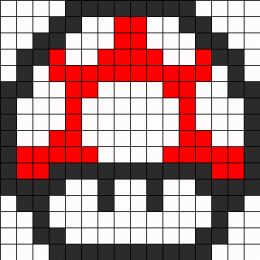
I am using the grid system to design my image, like the mushroom above. Once the image is done, or in the process of making it, I would like to have a tally at the end that says 24 white; 45 red; 18 black (or whatever the correct number is).
Any suggestions on how to do that?


 1 Correct answer

ah. at first i wasn't quite sure what was going on, but i did some testing and i got the same error you did when i ran the script on the "How you had it" layer in the file that i sent via google drive.
Please open the file from the google drive link i sent before. Then run the script and choose the "My Recommendation" button when you get the dialog and it should work.
You'll need to adjust your other files/layers to match this formatting in order for this script to work reliably. Any files that ar
...

Explore related tutorials & articles
 14
Replies
14
14
Replies
14

Copy link to clipboard
Copied
*EDIT* Changed the formatting of the resulting string and added support for no-fill items
function getCellColors()
{
var docRef = app.activeDocument;
var layers = docRef.layers;
var swatches = docRef.swatches;
var resultColors = {};
var resultString = "";
//function to get the color of a given cell
function getColorOfCell(cell)
{
var result;
var color = cell.fillColor;
if(!cell.filled)
{
result = "No Fill";
}
else if(color.spot)
{
result = color.spot.name;
}
else
{
//there are a TON of different ways to
//figure determine what color a process
//swatch represents. You can customize
//this however you want. I just chose the
//easiest way here for demonstration
//purposes.
result = "C: " + color.cyan;
result += ", M: " + color.magenta;
result += ", Y: " + color.yellow;
result += ", K: " + color.black;
}
return result;
}
//target the objects here. Without seeing your working files, i'm just guessing.
//i'm assuming that all of the "cells" are on layer 1 and that there is no other artwork
//on that layer.
var cells = layers[0].pageItems;
var curCell, curColor;
//loop the cells to determine the color of each.
for(var x=0,len=cells.length;x<len;x++)
{
curCell = cells
; curColor = getColorOfCell(curCell);
if(!resultColors[curColor])
{
resultColors[curColor] = 0;
}
resultColors[curColor]++;
}
for(var color in resultColors)
{
resultString += resultColors[color] + ": " + color + "\n";
}
alert("Results:\n" + resultString);
}
getCellColors();
Copy link to clipboard
Copied
Here is a link to the file: How To AI Files.ai - Google Drive
I am running the script and it is saying Result 3:No Fill
If I double-click on one of the cells it will do a Result 1: No Fill
Thanks for the help!
Copy link to clipboard
Copied
ah. yea i see the problem. the live paint object will need to be expanded before it can be measured.
The best route is probably to duplicate the target object (so you can expand it non-destructively) and then process the resulting groupItem.
As it stands, the script is attempting to read the fillColor property of a groupItem (can't do that).
i'd also recommend putting the grid of lines on it's own layer separate from the pixel art. That should help simplify the file as well as help prevent confusion when processing the cells in question.
Copy link to clipboard
Copied
I am struggling to make this work.
I was able to expand and separate the grid from the image.
I don't know enough about how illustrator and js connect to debug properly.
I updated the document so you can see what I did.
Copy link to clipboard
Copied
Try this file structure instead. I think you'll find it's much easier and a cleaner way to work, though i'm only guessing since i don't know your process. But at least in terms of what you're trying to do here, this should work out better for you. How To AI Files (1).ai - Google Drive
As to your question about debugging, check out Adobe's "ExtendScript ToolKit". That's the environment for debugging and testing scripts. Search the forums if you have trouble, there are tons of posts about getting it and using it.
Also to be clear, I was saying that the script should duplicate the live paint object and then expand it. That way the script can count the cells of the expanded live paint object and then delete it when it's done so you still have a fresh, unharmed live paint object that you can make adjustments to. Give this a try:
/*
Script Name: getCellColors
Author: William Dowling
Date: 4/6/18
Required:
--Illustrator CS6+ (any platform)
-An Illustrator file with one or more layers which contain
only one live paint object. Each live paint object should live
on its own layer.
-The live paint objects should be colored in using RGB, CMYK,
or Spot colors.
-The live paint objects should be constructed out of plain rectangles.
Beware:
-There is very little to no error handling, and even less testing.
Please make sure to save your work before running the script. You
are solely responsible for any artwork/time lost as a result of the
failure of this script or Illustrator crashing or whatever. Just
protect yourself, please.
*/
function getCellColors()
{
if(!app.documents.length)
{
alert("You must have a document open!");
return false;
}
var docRef = app.activeDocument;
var layers = docRef.layers;
var swatches = docRef.swatches;
var resultColors = {};
var resultString = "";
//function to get the color of a given cell
function getColorOfCell(cell)
{
var result;
var color = cell.fillColor;
if(!cell.filled)
{
result = "No Fill";
}
else if(color.spot)
{
result = color.spot.name;
}
else
{
//there are a TON of different ways to
//figure determine what color a process or RGB
//swatch represents. You can customize
//this however you want. I just chose the
//easiest way here for demonstration
//purposes.
//for RGB colors:
if(color.typename === "RGBColor")
{
result = "R: " + color.red;
result += ", G: " + color.green;
result += ", B: " + color.blue;
}
//for CMYK colors:
else if(color.typename === "CMYKColor")
{
result = "C: " + color.cyan;
result += ", M: " + color.magenta;
result += ", Y: " + color.yellow;
result += ", K: " + color.black;
}
}
return result;
}
//prompt the user for their desired parent layer
function getTargetLayer()
{
var result;
var btns = [];
var w = new Window("dialog");
var topTxt = w.add("statictext", undefined, "Select the desired parent layer.");
var btnGroup = w.add("group");
btnGroup.orientation = "column";
for(var x=0,len=layers.length;x<len;x++)
{
makeButton(x);
}
w.show();
return result;
function makeButton(index)
{
btns[index] = btnGroup.add("button", undefined, layers[index].name);
btns[index].onClick = function()
{
result = layers[index];
w.close();
}
}
}
var targetLayer = getTargetLayer();
var targetItem = targetLayer.pageItems[0];
var livePaintCopy = targetItem.duplicate();
docRef.selection = null;
livePaintCopy.selected = true;
app.executeMenuCommand("Expand Planet X");
var expandedLivePaint = docRef.selection[0];
var cells = expandedLivePaint.pageItems;
resultString += "Image contains " + cells.length + " cells.\n";
var curCell, curColor;
//loop the cells to determine the color of each.
for(var x=0,len=cells.length;x<len;x++)
{
curCell = cells
; curColor = getColorOfCell(curCell);
if(!resultColors[curColor])
{
resultColors[curColor] = 0;
}
resultColors[curColor]++;
}
for(var color in resultColors)
{
resultString += resultColors[color] + ": " + color + "\n";
}
expandedLivePaint.remove();
alert("Results:\n" + resultString);
}
getCellColors();
Copy link to clipboard
Copied
The code is making it to line 126 and breaking:
resultString += "Image contains " + cells.length + " cells.\n";
It says "undefined is not an object"
I tried alerting out the cells.length and it is not returning a number.
Copy link to clipboard
Copied
try this alert on line 126 (push everything else down a line)
alert(expandedLivePaint.pageItems.length);
Copy link to clipboard
Copied
Sorry for the delay in response.
I get the same error message: Error 21 "undefined is not an object"
Copy link to clipboard
Copied
ah. at first i wasn't quite sure what was going on, but i did some testing and i got the same error you did when i ran the script on the "How you had it" layer in the file that i sent via google drive.
Please open the file from the google drive link i sent before. Then run the script and choose the "My Recommendation" button when you get the dialog and it should work.
You'll need to adjust your other files/layers to match this formatting in order for this script to work reliably. Any files that are formatted like the one you initially sent will result in the error you're mentioning.
Copy link to clipboard
Copied
AWESOME thank you so much this is AMAZING! I figured out how to make it all work. Thank you so much for your time.
Copy link to clipboard
Copied
you got it, brother. Glad to help.
*Edit
Out of curiosity, what are you using this functionality for? I'm curious what the application for this is and why it's important to know the number of cells of each color. I've racked my brain and i can't really figure out why that'd be necessary. So perhaps i can learn something here too. 😃
Copy link to clipboard
Copied

Copy link to clipboard
Copied
So when do i get my free wall pixel art in exchange for being SUCH a huge help? 

Copy link to clipboard
Copied
I am so sorry I didn't see this message!!! 😞
We are working on a product called Wall Pixels 🙂 It should launch on Kickstarter in a couple weeks.
So we have to order the correct number and color of pixels, so we needed to count them and then print the sheets. 🙂


Get ready! An upgraded Adobe Community experience is coming in January.
Learn more
 AdChoices