


Participating Frequently
April 5, 2018
解決済み

How would I count the number of cells of a certain color using grids?

  • April 5, 2018
  • 返信数 2.
  • 2935 ビュー

I am playing around with some pixel art. 
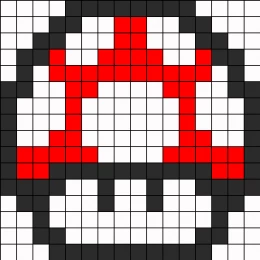
I am using the grid system to design my image, like the mushroom above. Once the image is done, or in the process of making it, I would like to have a tally at the end that says 24 white; 45 red; 18 black (or whatever the correct number is).

Any suggestions on how to do that?

このトピックへの返信は締め切られました。
解決に役立った回答 Disposition_Dev

Sorry for the delay in response. 

I get the same error message: Error 21 "undefined is not an object"


ah. at first i wasn't quite sure what was going on, but i did some testing and i got the same error you did when i ran the script on the "How you had it" layer in the file that i sent via google drive.

Please open the file from the google drive link i sent before. Then run the script and choose the "My Recommendation" button when you get the dialog and it should work.

You'll need to adjust your other files/layers to match this formatting in order for this script to work reliably. Any files that are formatted like the one you initially sent will result in the error you're mentioning.

返信数 2

TimLCooley作成者
Participating Frequently
August 14, 2018

I am so sorry I didn't see this message!!!  :-(

We are working on a product called Wall Pixels :-) It should launch on Kickstarter in a couple weeks. 

So we have to order the correct number and color of pixels, so we needed to count them and then print the sheets.  :-)

Disposition_Dev
Legend
April 5, 2018

*EDIT* Changed the formatting of the resulting string and added support for no-fill items

function getCellColors()

{

    var docRef = app.activeDocument;

    var layers = docRef.layers;

    var swatches = docRef.swatches;

    var resultColors = {};

    var resultString = "";

    //function to get the color of a given cell

    function getColorOfCell(cell)

    {

        var result;

        var color = cell.fillColor;

        if(!cell.filled)

        {

            result = "No Fill";

        }

        else if(color.spot)

        {

            result = color.spot.name;

        }

        else

        {

            //there are a TON of different ways to

            //figure determine what color a process

            //swatch represents. You can customize

            //this however you want. I just chose the

            //easiest way here for demonstration

            //purposes.

            result = "C: " + color.cyan;

            result += ", M: " + color.magenta;

            result += ", Y: " + color.yellow;

            result += ", K: " + color.black;

        }

        return result;

    }

    //target the objects here. Without seeing your working files, i'm just guessing.

    //i'm assuming that all of the "cells" are on layer 1 and that there is no other artwork

    //on that layer.

    var cells = layers[0].pageItems;

    var curCell, curColor;

    //loop the cells to determine the color of each.

    for(var x=0,len=cells.length;x<len;x++)

    {

        curCell = cells;

        curColor = getColorOfCell(curCell);

        if(!resultColors[curColor])

        {

            resultColors[curColor] = 0;

        }

        resultColors[curColor]++;

    }

    for(var color in resultColors)

    {

        resultString += resultColors[color] + ": " + color + "\n";

    }

    alert("Results:\n" + resultString);

}

getCellColors();

TimLCooley作成者
Participating Frequently
April 5, 2018

Here is a link to the file: How To AI Files.ai - Google Drive

I am running the script and it is saying Result 3:No Fill

If I double-click on one of the cells it will do a Result 1: No Fill

Thanks for the help!

Disposition_Dev
Legend
April 19, 2018

Sorry for the delay in response. 

I get the same error message: Error 21 "undefined is not an object"


ah. at first i wasn't quite sure what was going on, but i did some testing and i got the same error you did when i ran the script on the "How you had it" layer in the file that i sent via google drive.

Please open the file from the google drive link i sent before. Then run the script and choose the "My Recommendation" button when you get the dialog and it should work.

You'll need to adjust your other files/layers to match this formatting in order for this script to work reliably. Any files that are formatted like the one you initially sent will result in the error you're mentioning.