



danitosan
Inspiring
September 1, 2022
해결됨

I can't place or open PNG files in Illustrator

  • September 1, 2022
  • 2 답변들
  • 7920 조회

AI 25.4.8 on MacOS (Intel Xeon Mac Pro)


If I drag and dop a png nothing happens. No image placed, no message. Same thing if I open the image, nothing it just goes back to the blank document.

If I try to place it through the menu I get this message:
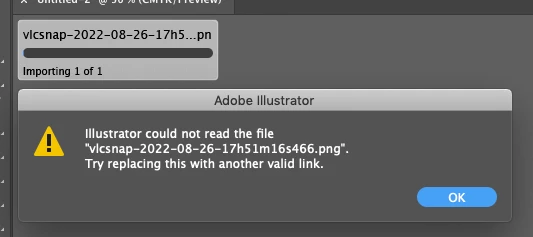
There are no locked layers, it doesn't work in a new document. 

I have deleted all the prefs, restarted AI with command+option+shift, uninstalled AI a couple of times, Adobe Cleaner Tool and then reinstalled. Nothing seems to work. JPEG or PSD files work normally, it's only happenning with PNGs and it was working correctly yesterday. 


AdobeLogs_20220901_133836_337-mac-GS.zxp

이 주제는 답변이 닫혔습니다.
최고의 답변: Ton Frederiks

hi   so you mean downgrade?    possible?    how please?


Yes, install the previous update.

In the CC app go to Apps > All Apps and click the 3 dots next to Illustrator.

Select Other Versions and install the 25.4.7 version

2 답변

Participant
September 3, 2022

hi

my god .... yesterday was working fine ... today same problem

can't place .png in illustrator .... I have 25.4.8

I have read this post ... nothing works for me

can anyone please help me?

Ton Frederiks
Community Expert
Community Expert
September 3, 2022

Did you try to install the 25.4.7 version? 

Participant
September 3, 2022

hi   so you mean downgrade?    possible?    how please?

Ton Frederiks
Community Expert
Community Expert
September 1, 2022

How are these png files created?

If you resave them in Photoshop, do they work?

danitosan
danitosan작성자
Inspiring
September 1, 2022

I've tried with many files from different origins, none of them work. I've tried opening and resaving in Photoshop too. 

Ton Frederiks
Community Expert
Community Expert
September 1, 2022

Can you share such a problem png?