Exit
  • Global community
    • Language:
      • Deutsch
      • English
      • Español
      • Français
      • Português
  • 日本語コミュニティ
  • 한국 커뮤니티
0

I need to duplicate 365 equal lines in a circle - HELP

Participant ,
Dec 08, 2016 Dec 08, 2016

Hello,

I am making a fertility wheel and need to make the days in a year go all around the outside. I am starting with a line in my circle, and was going to duplicate it a certain number for my circle size (6.2813).

I thought if I divide 6.2813 by 365 that would give me the percentage to duplicate/copy, but it's not working.

This is my current file. I need 365 lines all the way around that circle. I don't have to manually count do I?

Help please, thanks!Screen Shot 2016-12-08 at 1.11.44 PM.png

1.1K
Translate
Report
Community guidelines
Be kind and respectful, give credit to the original source of content, and search for duplicates before posting. Learn more
community guidelines

correct answers 1 Correct answer

Community Expert , Dec 08, 2016 Dec 08, 2016

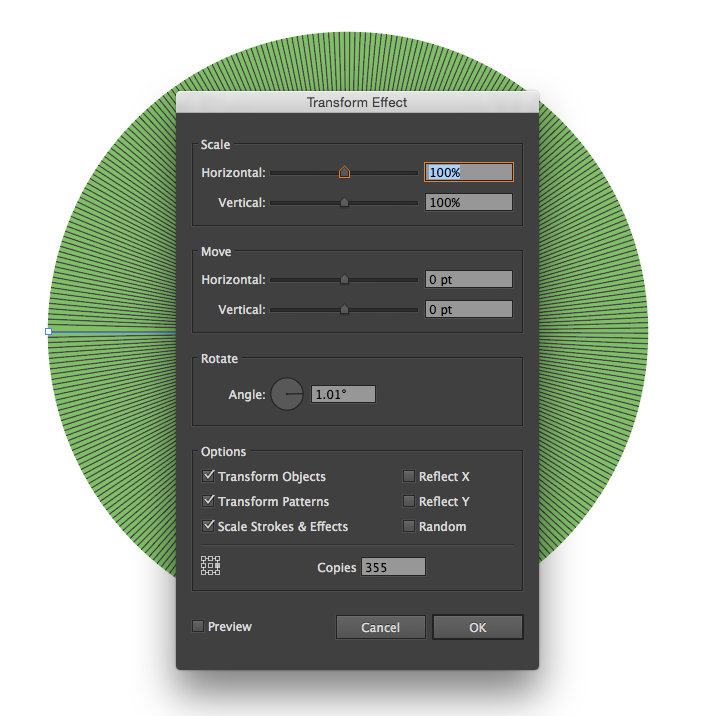
Draw 1 circle and 1 line. On the line add a transform effect with thees setting. Unfortuantley the rotate value rounds so not sure if you will have an issue there, but hope this helps.

Screen Shot 2016-12-08 at 12.55.13 PM.png

Note the position on the rubiks cube (reference point square) to center the rotation

Translate
Adobe
Community Expert ,
Dec 08, 2016 Dec 08, 2016

Draw 1 circle and 1 line. On the line add a transform effect with thees setting. Unfortuantley the rotate value rounds so not sure if you will have an issue there, but hope this helps.

Screen Shot 2016-12-08 at 12.55.13 PM.png

Note the position on the rubiks cube (reference point square) to center the rotation

Translate
Report
Community guidelines
Be kind and respectful, give credit to the original source of content, and search for duplicates before posting. Learn more
community guidelines
Participant ,
Dec 08, 2016 Dec 08, 2016

Ok, next question.

All of these lines are acting as 1 line because they are still grouped in the transform function. Some of the lines, I want to isolate and make the stroke bigger. It's not letting me isolate each single line. Is there a way to expand the effect so I have individual access?

Translate
Report
Community guidelines
Be kind and respectful, give credit to the original source of content, and search for duplicates before posting. Learn more
community guidelines
Community Expert ,
Dec 08, 2016 Dec 08, 2016

Object > Expand Appearance

Translate
Report
Community guidelines
Be kind and respectful, give credit to the original source of content, and search for duplicates before posting. Learn more
community guidelines
Community Expert ,
Dec 08, 2016 Dec 08, 2016
LATEST

umagurl,

Or you could use the Polar Grid Tool, just click the Artboard and set the W/H and 0 Concentric Dividers, and 365 Radial Dividers, then Ctrl/Cmd+Shify+G to Ungroup and delete the outer circle; you may Ungroup the lines if you wish.

Apart from that, with the Transform Effect, you can use the angle 360/365, which is 0.9863 degrees; with (about) 1.01 degrees you will only get the 355 copies, 10 less than specified in the OP.

Translate
Report
Community guidelines
Be kind and respectful, give credit to the original source of content, and search for duplicates before posting. Learn more
community guidelines