


- Home
- Illustrator
- Discussions
- Re: [Illustrator 2017] Using the brand new "Export...
- Re: [Illustrator 2017] Using the brand new "Export...

Copy link to clipboard
Copied
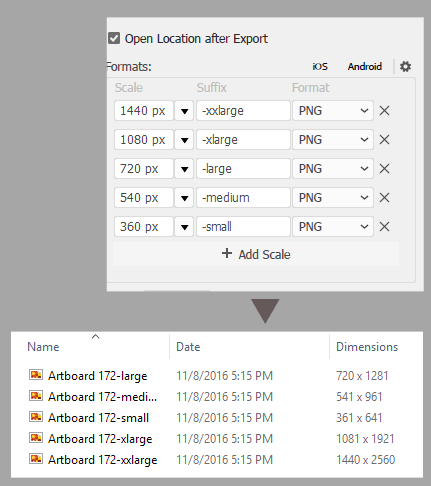
even when I specify a width size in pixels (without any decimals), the results shows always, no matter what, 1 pixel extra to each exported file. Annoying. And yes, my artboard is pixel
Why is this happening? I was really happy with this new tool but it's not working correctly.


 1 Correct answer


Hi,
We are pleased to inform you that your request is available in the latest release of Illustrator version 22.0.
Visit your Adobe Creative Cloud Application and update. If you do not see an update on the application please check for update from the flyout options on the application after clicking on three vertical dots. For step by step process please visit: https://helpx.adobe.com/in/creative-cloud/help/download-install-app.html#Checkforupdates
Warm Regards,
Ashutosh Chaturvedi | Sr. Quality Eng
...

Explore related tutorials & articles
 10
Replies
10
10
Replies
10



Copy link to clipboard
Copied
Moved out of the Forum Lounge (not for technical support) and to the Illustrator forum.

Copy link to clipboard
Copied
You might be using pixels as a measurement but are they aligned to whole numbers?
Copy link to clipboard
Copied
Yes. Every shape is pixel perfect aligned as the artboards. 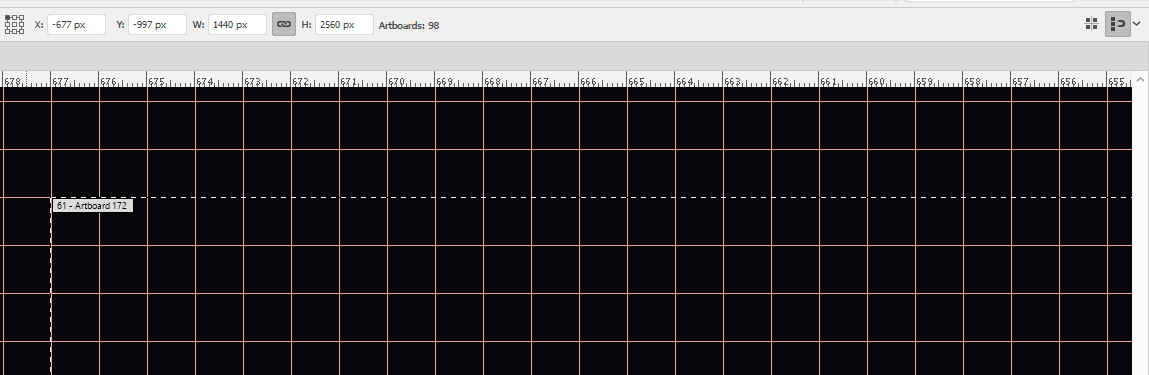

Copy link to clipboard
Copied
Hi Miguel,
This can happen when you use stroke align center and outside. Can you please try it with stroke align inside.
You can find the option to change stroke align in Stroke Panel (Window > Stroke > Align Stroke).
If you still face this issue please share the file us.
Thanks & Regards
Nitish Agarwal
Illustrator Team
Copy link to clipboard
Copied
The stroke is not the problem since I'm using the option for export an artboard, not an asset. The shape in the artboard has a notable bleeding in order to avoid possible lost pixels at the borders.
How I can send you the file?

Copy link to clipboard
Copied
I'm having the exact same problem.
It's erratic but reproducible with a simple artboard that only has a rectangle with no stroke.
Creating a new file from scratch will give me clean results, but once I duplicate the artboard the 2nd (and 3rd etc) artboards randomly get 1px added horizontally or vertically.
I've checked solutions for previous similar bugs. Ie making sure the artboard is on a whole number, making sure the artboard is aligned top-left or center etc etc. No luck.
For me it seems to only happen on artboard sizes below 48x48.
Copy link to clipboard
Copied
I've just double checked this and can easily reproduce with simple shapes !on
macOS sierra
Windows 8.1
Windows 10 anniversary update

Copy link to clipboard
Copied
Same issue here. Just updated to 2017 and the dreaded 1 px bug is back when exporting. Doesn't matter if the artboards are perfectly aligned or not. I really hope Adobe finally acknowledges this is something that needs to be fixed or made to not happen after 10 years of people posting on the problem.
Copy link to clipboard
Copied
Hi,
We are pleased to inform you that your request is available in the latest release of Illustrator version 22.0.
Visit your Adobe Creative Cloud Application and update. If you do not see an update on the application please check for update from the flyout options on the application after clicking on three vertical dots. For step by step process please visit: https://helpx.adobe.com/in/creative-cloud/help/download-install-app.html#Checkforupdates
Warm Regards,
Ashutosh Chaturvedi | Sr. Quality Engineering Manager – Illustrator
Adobe. Make It an Experience.

Copy link to clipboard
Copied
This bug still exists even in 24.1.2 in 2020. If your artboard coordinates are fractional, you will have an extra pixel border added. Very annoying bug.


Find more inspiration, events, and resources on the new Adobe Community
Explore Now
 AdChoices