Exit
  • Global community
    • Language:
      • Deutsch
      • English
      • Español
      • Français
      • Português
  • 日本語コミュニティ
  • 한국 커뮤니티
0

Illustrator (27.5) Compatible GPU not available despite dedicated GPU present

New Here ,
May 19, 2023 May 19, 2023

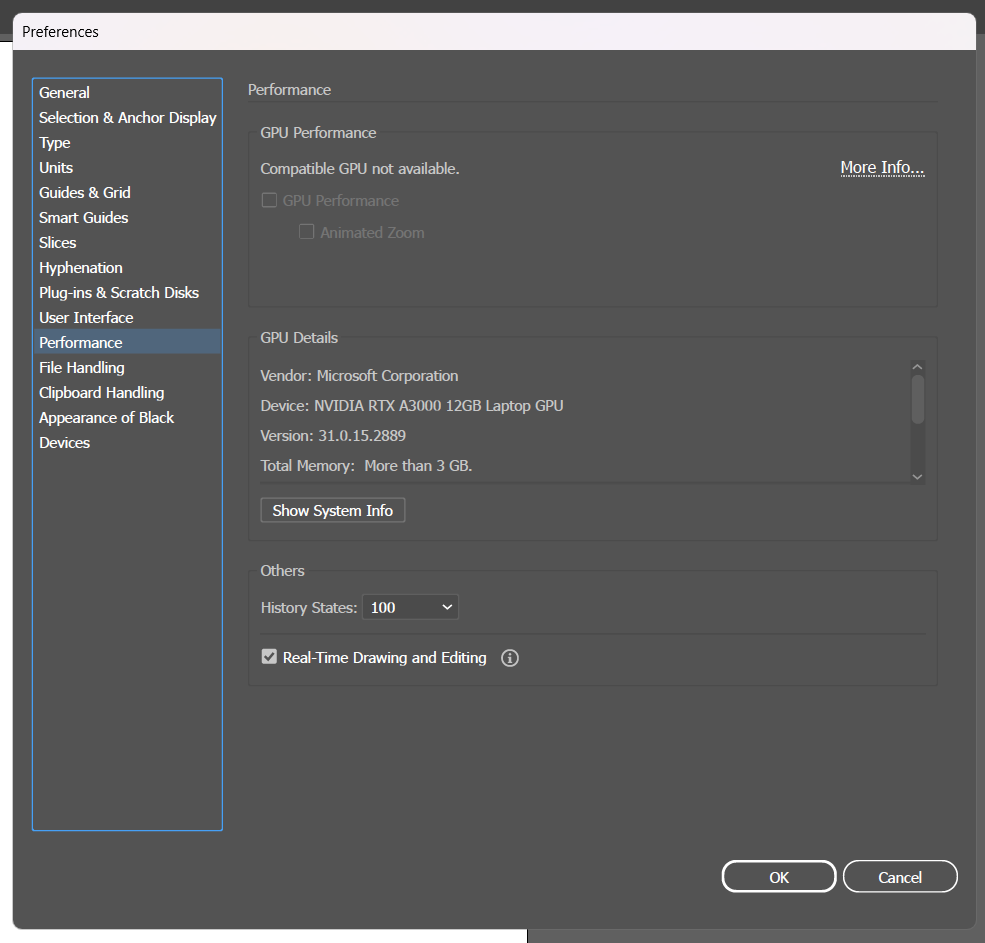
I'm having issues with my Dell Precision 5770 Workstation Laptop: despite having a dedicated graphic card as well as the processor integrated graphics, Illustrator says "Compatible GPU not available" on Performance tab in Preferences (see screencap)


may2023 prefs performance tab - compatible gpu na.png


Below my system configuration:

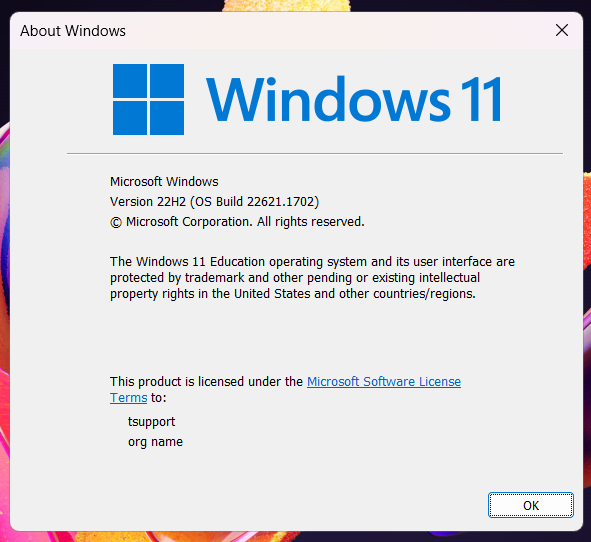
  • Windows 11 Education (OS Build 22621.1702)
  • Intel Core i7-12800 (12th Gen.) 2.4 GHz 
  • Intel Iris Xe Integrated Graphic (Version: 31.0.101.4032), 1 GB
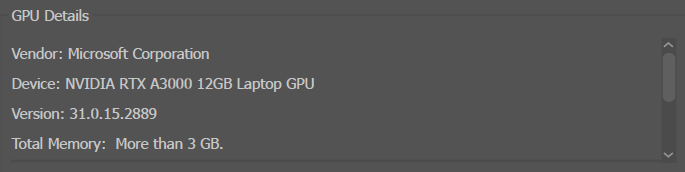
  • NVIDIA RTX A3000 (Version 31.0.15.2889), 12 GB
  • RAM: 32GB


may2023 prefs performance tab - nvidia gpu.png


may2023 prefs performance tab - intel iris xe gpu.png


By the way, I already tried updating the video driver for the dedicated and integrated graphics hardware.


may2023 system about info.png


Now Adobe is the leader on the design software market, as well as Ilustrator being the most used vector software in the world: I'm certain that the community or the development team have a fix for this issue or at least is working on it. I at least hope, since Windows 11 was released almost 2 years ago (19 months exactly).


Any help would be greatly appreciated.

TOPICS
Bug , Feature request , Performance
10.7K
Translate
Report
Community guidelines
Be kind and respectful, give credit to the original source of content, and search for duplicates before posting. Learn more
community guidelines

correct answers 1 Correct answer

New Here , May 24, 2023 May 24, 2023

Thanks Bobby and Anubhav,


It happened to be my Intel Iris Xe Graphics Driver: after updating it, all Adobe Software recognized both graphic cards, the NVIDIA RTX discrete GPU and the Intel Iris integrated video. Didn't need to update the NVIDIA driver.


Thanks for your fast reply.

Translate
Adobe
Community Expert ,
May 19, 2023 May 19, 2023

Just as a troubleshooting step, do you have the latest NVidia RTX/Quadro driver installed for your graphics accelerator? It's surprising the RTX-A3000 in your computer isn't automatically enabling GPU acceleration in Illustrator.

Translate
Report
Community guidelines
Be kind and respectful, give credit to the original source of content, and search for duplicates before posting. Learn more
community guidelines
Adobe Employee ,
May 19, 2023 May 19, 2023

Hello @Mr. Pedro A.,


We understand that encountering technical issues can be frustrating. Would you mind performing a clean reinstallation of the GPU drivers (Intel / NVIDIA / AMD) and setting the Graphics Preference to High-Performance for Illustrator (https://www.amd.com/en/support/kb/faq/gpu-110), as suggested by Bobby and checking if it helps?


Also, try manually resetting Illustrator's preferences and share your observations:

 - Close all Adobe applications.

- Go to Location C:\Users\%USERPROFILE%\AppData\Roaming\Adobe

- Rename Adobe Illustrator and Adobe Illustrator 27 Settings folders to Adobe Illustrator.old and Adobe Illustrator - 27 Settings.old

- Relaunch Illustrator from Creative Cloud


Disclaimer: Please note that renaming preferences folders will remove all the custom settings, and Illustrator will launch with default settings. You can also save a backup of the folders in case you want to. The location is mentioned above.


Looking forward to hearing from you.


Thanks,

Anubhav

Translate
Report
Community guidelines
Be kind and respectful, give credit to the original source of content, and search for duplicates before posting. Learn more
community guidelines
New Here ,
May 24, 2023 May 24, 2023

Thanks Bobby and Anubhav,


It happened to be my Intel Iris Xe Graphics Driver: after updating it, all Adobe Software recognized both graphic cards, the NVIDIA RTX discrete GPU and the Intel Iris integrated video. Didn't need to update the NVIDIA driver.


Thanks for your fast reply.

Translate
Report
Community guidelines
Be kind and respectful, give credit to the original source of content, and search for duplicates before posting. Learn more
community guidelines
New Here ,
Apr 16, 2025 Apr 16, 2025
LATEST

This worked for me. Illustrator lagged badly and after following tehse steps it all works smooth as it´s supposed to. Thanks for the help!

Translate
Report
Community guidelines
Be kind and respectful, give credit to the original source of content, and search for duplicates before posting. Learn more
community guidelines