


Illustrator 27.8 unbekannter Fehlermeldung (UKCO)

Copy link to clipboard
Copied
Hallo,
wenn ich Illustrator öffne bekomme ich folgende Fehlermeldung:
Der Vorgang konnt nicht vollständig ausgeführt werden, weil ein unbekannter Fehler aufgetreten ist. (UKCO)
Kann mir da jemand weiter helfen?
Danke!


 1 Pinned Reply


Hello everyone,
Thanks for your patience. Our team has made some improvements in the latest version of Illustrator v27.8.1, which should help alleviate the trouble you're having with Illustrator. Would you mind trying to update to the latest Illustrator version and sharing your observations?
|
|

Looking forward to hearing from you.
Thanks,
Anubhav


Explore related tutorials & articles
 15
Replies
15
15
Replies
15


Copy link to clipboard
Copied
Da hilft nur momentan leider ein Downgrade.

Copy link to clipboard
Copied
Try rebooting the computer. Check for any updates to your computer's operating system and graphics accelerator card. If those steps do not work you may have to reset Preferences in Adobe Illustrator. If resetting Preferences does not work Illustrator may have to be removed and reinstalled.
Copy link to clipboard
Copied
There are currently a couple of threads about the matter. For these people a downgrade was the only thing that helped.
Other people do not encounter that issue at all (me, for instance).
Copy link to clipboard
Copied
I haven't encountered the error on my work desktop or notebook either (knocking on wood). This problem sounds worse than the latest auto tracing issues.

Copy link to clipboard
Copied
...bekomme seit heute (07.08.2023) die gleiche Fehlermeldung, was ist bei Adobe los? Man zahlt schließlich einiges an Geld für die Nutzung und kann nicht damit arbeiten!!!
Copy link to clipboard
Copied
@Uwe5EFD schrieb:
...bekomme seit heute (07.08.2023) die gleiche Fehlermeldung, was ist bei Adobe los? Man zahlt schließlich einiges an Geld für die Nutzung und kann nicht damit arbeiten!!!
Dieses Forum ist ein Community-Forum. 95% der Leute sind keine Adobe-Mitarbeiter.
Das Problem haben derzeit viele (aber nicht alle) Anwender. Am schnellsten lässt es sich mit einem Downgrade lösen.
Ansonsten gibt es hier einen Hinweis: https://illustrator.uservoice.com/forums/601447-illustrator-desktop-bugs/suggestions/47043832-illust...
![Illustrator desktop version 27.8 Error message [UKCO] after update on 8-3-2023](https://s3.amazonaws.com/uploads.uservoice.com/logo/design_setting/299961/original/ai_appicon_noshadow_128.png?1592570108 "Illustrator desktop version 27.8 Error message [UKCO] after update on 8-3-2023")
Copy link to clipboard
Copied
Hallo Monika,
habe ein Downgrade gemacht und alles ist wieder schick! Danke für Eure Hilfe!!!
UK5EFD
Copy link to clipboard
Copied
Hallo,
wenn ich Illustrator öffne bekomme ich folgende Fehlermeldung:
Der Vorgang konnte nicht ausgeführt werden, da ein unbekannter Fehler aufgetreten ist. (UKCO)
Meine Illustrator Version ist aktuell 27.8
Kann das am letzten Ubdate liegen?
Danke schon mal.

Copy link to clipboard
Copied
Hi @Viktoria31516771hu4z @Uwe5EFD,
We understand the frustration you're facing with the "UKCO" error in Illustrator 27.8. The product team is aware of this issue and has already worked on a fix. You can expect the resolution in the next release. To stay updated and receive the fix, I recommend upvoting this UserVoice (https://illustrator.uservoice.com/forums/601447-illustrator-desktop-bugs/suggestions/47043832-illust...)
In the meantime, you can try a workaround by removing the "Vectorizing Presets" from the preferences folder. Please note that any custom presets created in the previous releases for image trace might not appear after deleting this file.
Preferences folder location:
Windows - " %AppData%\Adobe\Adobe Illustrator 27 Settings "
Copy & paste this location into the My PC address bar.
Mac - " ~/Library/Preferences/Adobe Illustrator 27 Settings "
Note: Location starting with this "~" sign indicates the User Library, which is hidden. So, you need to copy & paste the exact path in spotlight search or from Finder Menu > Go > Go to Folder > Paste the location in the dialog box like this:
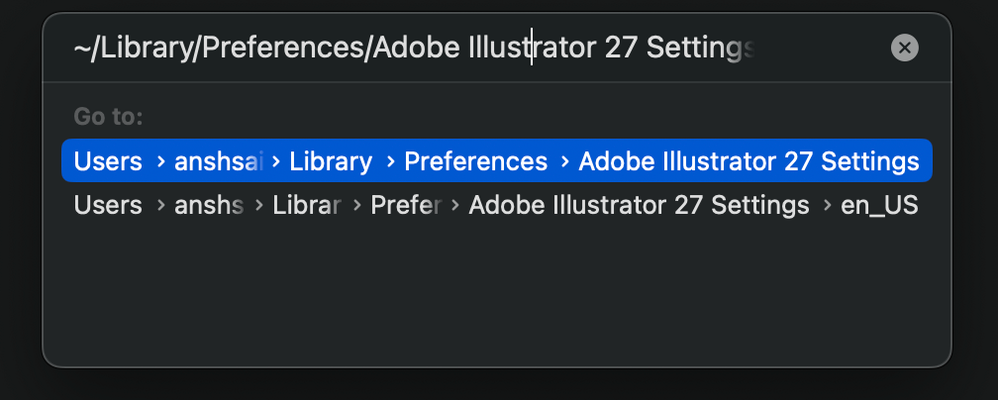
If you have any other questions or need further assistance, feel free to ask. We appreciate your patience!
Best regards,
Anshul Saini

Copy link to clipboard
Copied
Hello,
thank you for the update 27.8.1.
It worked for me too!
Thanks a lot
Copy link to clipboard
Copied
Hello everyone,
Thanks for your patience. Our team has made some improvements in the latest version of Illustrator v27.8.1, which should help alleviate the trouble you're having with Illustrator. Would you mind trying to update to the latest Illustrator version and sharing your observations?
|
|
Looking forward to hearing from you.
Thanks,
Anubhav
Copy link to clipboard
Copied
Hello, the new update worked for me, thanks!

Copy link to clipboard
Copied
unfortunately all my preferences are gone after installing our update. What can I do?
Copy link to clipboard
Copied
your update
Copy link to clipboard
Copied
You can only re-set them. Illustrator doesn't like porting the preferences.


Find more inspiration, events, and resources on the new Adobe Community
Explore Now
 AdChoices