


Inspiring
October 22, 2018
해결됨

Illustrator CC 2019 not responding
  • October 22, 2018
  • 2 답변들
  • 11949 조회

Hi!

I can't work on my Illustrator CC 2019! Almost every time I open a file, Illustrator is not responding. And I have to quit Illustrator!

It happen again and again. I can't work with it. I have quit Creative Cloud, and start up again, also quit my computer and start up again - but it doesn't help. So I have to work with Illustrator CS6.

Another problem I have is  when I want to move an object to a guide line, - the Illustrator CC 2019 will not let me place the object on the guide line as I want, but Illustrator CC 2019 place it a little bit from the guide line. And I move and move the object to the guide line , but it won't let me put the object on the guide line which I want.

But in Illustrator CS6 I can do this, - I just placed the object on the guide line as I want it to be,  - And "boom" it is on the correct line!

Why does this happen?

Could somebody help? I am very sorry that I have work in Illustrator CS6 to get my work done?

이 주제는 답변이 닫혔습니다.
최고의 답변: Monika Gause

Sorry, which 3. party plugins? I don't think I have that??

- which fonts shall I check? I have 1000 of them

- I have no printer set up to this computer.

- What is OOBE folder?

- how do I reset preferences?

- how do I uninstall Illustrator, run the Adobe Cleaner tool and reinstall

Could you please tell me? I sounds like everybody can do what you write. But I can't? Please help!!


haneadino  schrieb

Sorry, which 3. party plugins? I don't think I have that??

- which fonts shall I check? I have 1000 of them

- I have no printer set up to this computer.

- What is OOBE folder?

- how do I reset preferences?

- how do I uninstall Illustrator, run the Adobe Cleaner tool and reinstall

Could you please tell me? I sounds like everybody can do what you write. But I can't? Please help!!

- all your fonts. There are apps to do that, e.g. Fontbook

- if you don't have a printer, set up a PDF printer. It's important that Illustrator has a printer.

- OOBE folder please see in here: "Unknown Server Error" when logging in to Adobe Creative Cloud

- preferences: How to set preferences in Illustrator

- cleaner tool: Use the Creative Cloud Cleaner Tool to solve installation problems

2 답변

CnuRushi
Participant
May 20, 2019

Adobe AI, always hangs and really painful to work on this.

Monika Gause
Community Expert
Community Expert
May 20, 2019

CnuRushi  schrieb

Adobe AI, always hangs and really painful to work on this.

Please tell us your system and version.

Have you read the complete thread and tried out all the suggestions?

haneadino작성자
Inspiring
October 23, 2018

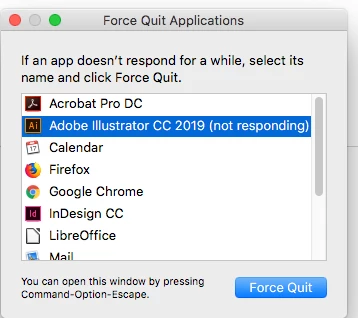
And this issue you see with this photo is every day!

Please help!

haneadino작성자
Inspiring
October 23, 2018

Adobe could you please help??

Monika Gause
Community Expert
Community Expert
October 23, 2018

So Illustrator only hangs when you open a document? Not when launching?

Do you have a printer installed, set up as default printer and turned on?

As for the alignment: Can you turn off all snap options in the View menu?