


Known Participant
August 12, 2020
해결됨

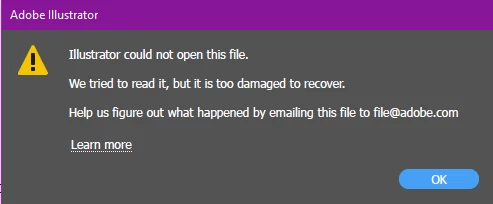
Illustrator could not open this file. We tried to read it but it's too damaged to recover

  • August 12, 2020
  • 1 답변
  • 11761 조회

I was working on a file today, and mid trying to save it, my laptop died. (so annoying)

When I got my laptop back up and running a few minutes later, I tried to open the document (didn't care if my most recent changes were gone) and I got this error.


I emailed that address like it said to but was wondering if anyone had a quicker fix.


NOTE: I do not have this in PDF form so there's no PDF to try to recover the info either.

I've been working on this file for the last 3 days without any problems. I also checked my recovery file and it's empty.


이 주제는 답변이 닫혔습니다.
최고의 답변: Jacob Bugge

Brittney,


I have tried to alert an Adobe staff friend about this.


No backup?


It is always recommended to create backups with different names regularly, and to store backups in more than one place/way.

And also to save often.

You may use Autosaviour,
https://astutegraphics.com/plugins/autosaviour


If you have a CC subscription, saving files in your Creative Cloud Files folder will automatically create and keep versions up to 10 days,
https://helpx.adobe.com/illustrator/using/crash-file-data-recovery.html
https://helpx.adobe.com/creative-cloud/help/sync-files.html
https://helpx.adobe.com/creative-cloud/help/versioning-faq.html


And there is also the new concept of Cloud documents,
https://helpx.adobe.com/in/illustrator/using/cloud-documents.html


1 답변

Jacob Bugge
Community Expert
Community Expert
August 12, 2020

Brittney,


I have tried to alert an Adobe staff friend about this.


No backup?


It is always recommended to create backups with different names regularly, and to store backups in more than one place/way.

And also to save often.

You may use Autosaviour,
https://astutegraphics.com/plugins/autosaviour


If you have a CC subscription, saving files in your Creative Cloud Files folder will automatically create and keep versions up to 10 days,
https://helpx.adobe.com/illustrator/using/crash-file-data-recovery.html
https://helpx.adobe.com/creative-cloud/help/sync-files.html
https://helpx.adobe.com/creative-cloud/help/versioning-faq.html


And there is also the new concept of Cloud documents,
https://helpx.adobe.com/in/illustrator/using/cloud-documents.html


Known Participant
August 13, 2020

Ah yes. Thank you. For some reason, my recovery saving was inactive. Not sure why but I changed that.


I also don't seem to have the checkbox option to save to the cloud. Oh well!


I want to get my file recovered. I'll keep waiting for my response from Adobe. Thank you though. 

patriciam3146867
Participant
December 29, 2021
Hi, I have the same problem.
Has your file been recovered? I just sent the file to adobe email.
I am trying to recover the file on websites and programs, but they are paid.
If Adobe doesn't answer me I will have to pay to try to resolve it.
 
I read the comment above, but the program doesn't save complex files. So in my case it had autosave active, but it didn't because it was a 1Gb file.
 
If you managed to recover the file, can you help me please? Thanks!