


Copy link to clipboard
Copied
Hi there! I just contacted customer support and got redirected to this forum. I own the Production Premium CS6 suite and am now having major issues with my illustrator crashing as soon as I am about to save my work. Yesterday I reinstalled the whole suite but the problem remains.
Is anyone aware of a solution to this? Can I clean out my Illustrator in any way to resolve the issue?
Sincerely,
Jessica Kristensen


 1 Correct answer


Jessica,
Jessica,
Is there a printer correctly installed, connected, and turned on if it is physical printer (you may use Adobe PDF/Acrobat Distiller as the default printer with no need to have a printer turned on, obviously you will need to specify when you actually need to print on paper)?
Failing everything else, you may try a full reinstallation:
A) Uninstall (ticking the box to delete the preferences),
B) Run the Cleaner Tool, and
C) Reinstall.
To uninstall:
https://www.adobe.com/cfusion/search/index.cfm?loc=en_us&term=uninstall&cat=support&produc
...

Explore related tutorials & articles
 11
Replies
11
11
Replies
11

Copy link to clipboard
Copied
Jessica,
Jessica,
Is there a printer correctly installed, connected, and turned on if it is physical printer (you may use Adobe PDF/Acrobat Distiller as the default printer with no need to have a printer turned on, obviously you will need to specify when you actually need to print on paper)?
Failing everything else, you may try a full reinstallation:
A) Uninstall (ticking the box to delete the preferences),
B) Run the Cleaner Tool, and
C) Reinstall.
To uninstall:
https://www.adobe.com/cfusion/search/index.cfm?loc=en_us&term=uninstall&cat=support&produc t=illustrator&self=1
Cleaner Tool:
Copy link to clipboard
Copied
Hi Jacob! Sorry in advance, but I am rather low tech when it comes to computer things. Should I troubleshoot all my printers? Check what it automatically wants to print as? Hope I make sense!

Copy link to clipboard
Copied
Hi Jessica,
Just check your default printer and make sure you have an active one. If you already have one selected, change it something else. You can also make Adobe PDF as your default printer and then check Illustrator. Check this link for setting up your printer: Printer setup Windows 10
Regards,
Om
Copy link to clipboard
Copied
I picked one as default however as soon as I want Windows to "Use your last used printer by default to On" my default pick is gone.
Also, when you mention making Adobe PDF as default printer, do you mean as a print setting? I don't have a printer for Adobe PDF, only "Microsoft print to PDF". Sorry if I'm being a hassle.
Sincerely,
Jessica
Copy link to clipboard
Copied
Jessica,
What Ohm said.
Copy link to clipboard
Copied
Hi Jessica,
I am sorry to hear that you are facing issues with your Illustrator CS6 crash. Does it crash with every document or specific file? Does the app crashes only while saving a document or any other workflow? Please share your system details, OS version and any crash report if you get so that we can try to assist you further.
Regards,
Om
Copy link to clipboard
Copied
I just downloaded my Illustrator CC 2017 and the same thing happends there. It's with any file as soon as I save.
It stops responding and closes. I have a PC with Windows 10.
and I haven't received any crash reports from Illustrator CS6, however, now when I open Illustrator CC 2017 I get: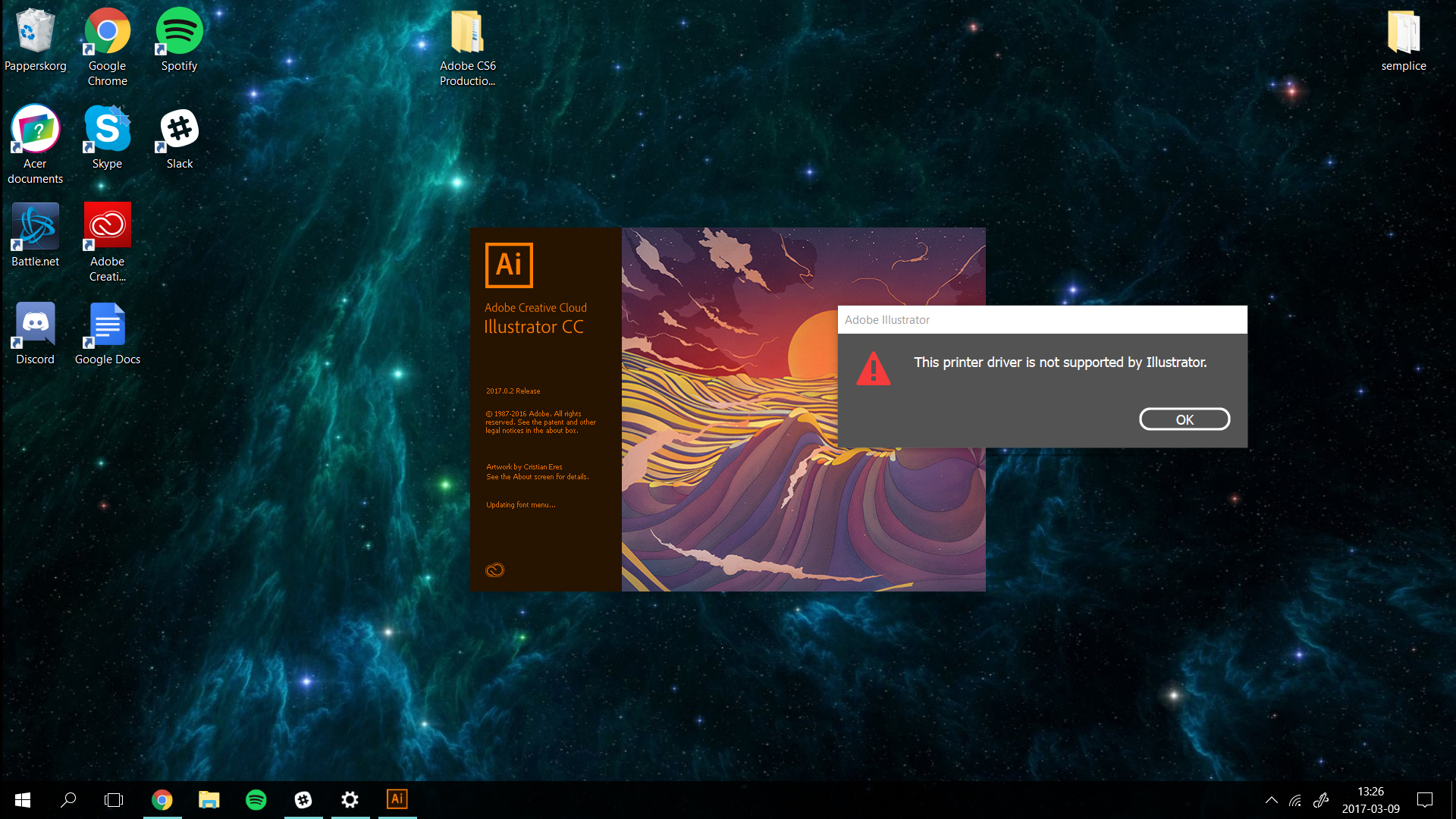
Copy link to clipboard
Copied
Jessica,
You may try to look at the suggestion in the first post.
Or you may try to update the printer driver, or ask the printer supplier.
Copy link to clipboard
Copied
Thanks to both of you! My problem is solved because of the printer-issue you adressed, lots of love 
Copy link to clipboard
Copied
For my part you are welcome, Jessica.
Copy link to clipboard
Copied
Hi Jessica,
You are welcome! I am glad that your issue is resolved.
Regards,
Om


Get ready! An upgraded Adobe Community experience is coming in January.
Learn more
 AdChoices