Exit
  • Global community
    • Language:
      • Deutsch
      • English
      • Español
      • Français
      • Português
  • 日本語コミュニティ
  • 한국 커뮤니티
1

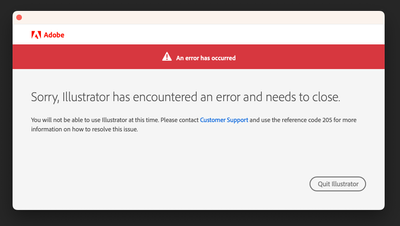
Illustrator has encountered an error and need to close. Reference code 205...

New Here ,
Jun 13, 2023 Jun 13, 2023

Screenshot 2023-06-14 at 10.22.15 AM.png

TOPICS
Bug , How-to , Tools
669
Translate
Report
Community guidelines
Be kind and respectful, give credit to the original source of content, and search for duplicates before posting. Learn more
community guidelines

correct answers 2 Correct answers

Adobe Employee , Jun 30, 2023 Jun 30, 2023

Hi @varsha29325816bk3k,


We are sorry for the trouble and delayed response.

Would you mind trying the steps suggested in this helpx article (https://helpx.adobe.com/download-install/kb/fix-licensing-error-205.html) and see if that helps?


Kindly update the discussion if you still need assistance with it. We'd be happy to help.


Thanks,

Anshul Saini

Translate
New Here , Apr 21, 2024 Apr 21, 2024

I've tried all of the steps here.

I've tried this: https://helpx.adobe.com/download-install/kb/fix-licensing-error-205.html

I've tried every step on this page:https://helpx.adobe.com/download-install/kb/adobe-license-issues-keychain-credential-mgr.html

I've uninstalled, reinstalled, logged out & logged back in again (1000 times). I've tried launching Photoshop & Illustrator, both from the command line, windows start menu & from the Creative Cloud launcher, but this error persists!

I'm used to gettin

...
Translate
Adobe
Community Expert ,
Jun 13, 2023 Jun 13, 2023

varsha,


Follow the link in the error message: contact Customer Support and use the error reference code 205, just as it says.


Translate
Report
Community guidelines
Be kind and respectful, give credit to the original source of content, and search for duplicates before posting. Learn more
community guidelines
Adobe Employee ,
Jun 30, 2023 Jun 30, 2023

Hi @varsha29325816bk3k,


We are sorry for the trouble and delayed response.

Would you mind trying the steps suggested in this helpx article (https://helpx.adobe.com/download-install/kb/fix-licensing-error-205.html) and see if that helps?


Kindly update the discussion if you still need assistance with it. We'd be happy to help.


Thanks,

Anshul Saini

Translate
Report
Community guidelines
Be kind and respectful, give credit to the original source of content, and search for duplicates before posting. Learn more
community guidelines
New Here ,
Apr 21, 2024 Apr 21, 2024
LATEST

I've tried all of the steps here.

I've tried this: https://helpx.adobe.com/download-install/kb/fix-licensing-error-205.html

I've tried every step on this page:https://helpx.adobe.com/download-install/kb/adobe-license-issues-keychain-credential-mgr.html

I've uninstalled, reinstalled, logged out & logged back in again (1000 times). I've tried launching Photoshop & Illustrator, both from the command line, windows start menu & from the Creative Cloud launcher, but this error persists!

I'm used to getting this error often, and usually the steps here: https://helpx.adobe.com/download-install/kb/fix-licensing-error-205.html fixes it, but for some reason, today nothing fixes it.

Translate
Report
Community guidelines
Be kind and respectful, give credit to the original source of content, and search for duplicates before posting. Learn more
community guidelines