



jy_BAS
Participating Frequently
August 18, 2025
Question

Fun in 29.7.1: "The document "" is currently getting saved. Try again after the process is complete"

  • August 18, 2025
  • 26 replies
  • 5331 views

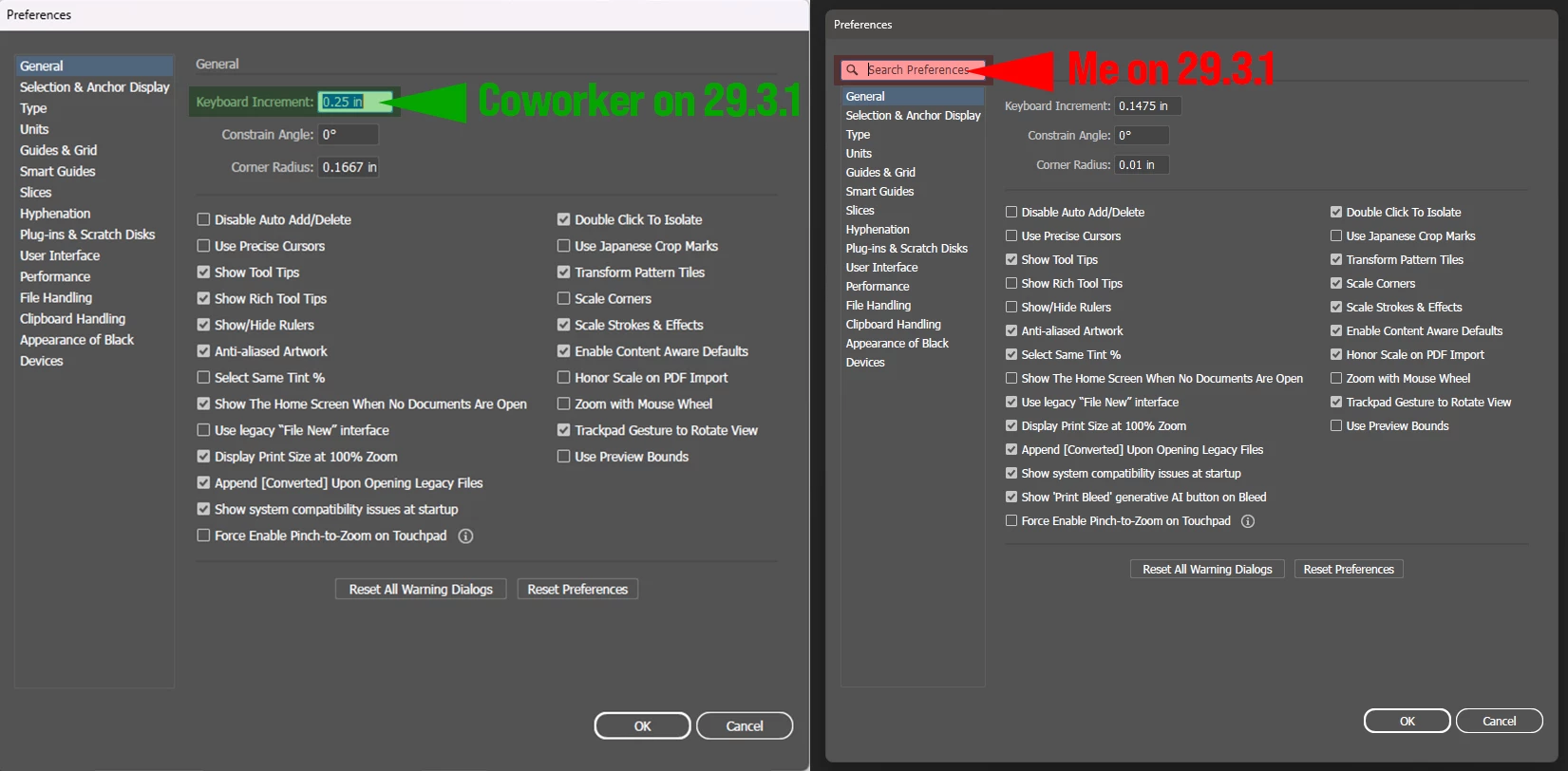
Since updating Illustrator to 29.7.1, I've run upon several issues that are affecting productivity, but the two that are the biggest losers are the randomly-appearing-on-save "The document "" is currently getting saved. Try again after the process is complete" issue and the Preferences > Keyboard Increment change.
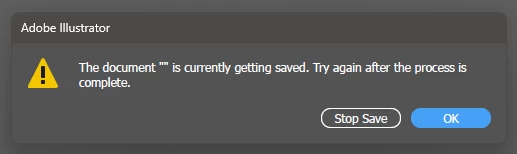


This random save issue is probably the Gold Medal Winner winner of the Frustration Olympics from my angle as when it pops up, the only way I can get around it is to set Paste Remembers Layers, copy all the elements I'm working with to a new document, check that all colors,layters, etc are correct, save it as a new working file, close/reopen the app then delete the original file so I don't get it mixed up with the new one. This is, as they say, no bueno por caca. Oh, and not to mention the poor grammar of "getting saved."


Runnerup is a lil guy who doesn't seem like much of a contender, but he packs a punch... After years of the preferences window defaulting to Preferences > Keyboard Increment being active upon opening (thus my being used to hitting Ctrl+K, entering a value for the keyboard increment and tapping <return> without really looking,) in 29.7.1, it now defaults to the Search Parameters field being active. So now it's Ctrl+K, 4x tab, enter value and hit return 2x. I realize this is not a dealbreaker but more of a "dammit, Adobe, don't fix it if it ain't broke" annoyance.


This update is also chock full of surprises like weird redraw issues, commands not completing or even recognizing being called and other oddball save issues that I've only seen randomly a couple of times, therefore not documentable (yet). Anyone else?

System info:
Intel Core i5-14500 2.60 GHz w/32.0 GB RAM
Windows 11 Pro 24H2 Build 26100.4202

26 replies

Participant
August 20, 2025

I've just discovered the "getting saved" its been about 10 minutes now. Thanks to you i copied the new iteration i was working on into a new file and saved that no problem in the same location but the original file is still "saving". I can't stop the save or just close Illustrator. 

Document has one artboard with Extrude & Bevel applied, but considering the new blank file i copied that artwork to saved fine i don't know if that has a bearing. On reopening after force quitting the recovered document saves fine, albeit with a quick warning that extrude and bevel was not applied on all objects..🤷‍♂

System Info:

M1 Macbook Pro 2021 w/ 16Gb RAM

Sequoia 15.6, saving onto Sandisk Portable SSD via USB-C

RichardPortman7496
Inspiring
August 20, 2025

No idea what's happened to Illustrator, but it's so much glitchier since the latest update. Saved files say they aren't saved, so you close "unsaved". OR, the file says it's 'saving' but it's doing nothing. Have to force quit - happily the recovered files are restoring to save again. Am saving to Lucid cloud storage. Thanks.

Abhishek Rao
Community Manager
Community Manager
August 25, 2025

Hi everyone,


Thank you all for sharing the details of your experience. Since this is happening across different setups, one step that has helped other users is turning off the 'Save in Background' option in Illustrator preferences and then testing again to see if the save completes properly. I'd also suggest saving the file locally instead of to external or synced locations like Google Drive or Lucid cloud, at least for testing, so we can rule out network or sync interference. If the issue continues, please try restarting your machine in Safe Mode and testing the save there to see if a third-party service may be interfering.

It would be really helpful if you can share back your OS and Illustrator versions, confirm if the issue happens on every file or only certain ones, and let me know whether these steps make a difference. That way I can bring more specifics to the team for further review.


Looking forward to your update.

Abhishek

nickgmcclure
Participating Frequently
August 26, 2025

Can confirm that this suggestion (turning off "Save in Background") solved the same crashing / hanging problem I was having. MacOS Tahoe Public Beta 4, Adobe Illustrator 29.7.1 (latest update).

Community Manager
August 19, 2025

Hello @jy_BAS,

I'm sorry to hear about your experience. Could you share more info about the problem with file saving, like if this happens with all files or files from a particular folder location (internal/external/network drive or a cloud-synced folder) or after a specific tool/feature is used, so I can better assist you?

Looking forward to hearing from you.

Anubhav

jy_BAS
jy_BASAuthor
Participating Frequently
August 20, 2025

Hi Anubhav,


It's hard to say exactly what is happening when the "currently getting saved" error occurs as it just randomly appears on save after a previous version has been established. AFAIK, it's only happened when I've been saving across a network to a shared volume—I can't say that I've seen it when saving locally. The files I'm working with are typically ~ 1-5 MB in size, all native Illustrator elements for the most part, with little to no embedded or linked files. I can say for sure that in the last occurence the file was just at 1 MB in size with no linked or embedded elements. It seems completely random in nature, though I've seen it at least once a day since I updated Illustrator in the last week or so. I'll continue on as usual and make note of the conditions when I see it again. Thanks for your quick reply!

Participating Frequently
August 19, 2025

Just paid Adobe for full year, and every app--especially Illustrator--freezes up every single time we use it. Tried restarting, login/out/in, different internet connections + devices, adobe and operating system are up to date, illustrator files are legit,..,.,but nothing works -- we can't edit an illustrator file and save it without illustrator freezing: can't click on anything and no keyboard shortcuts work either. 

Tried contacting "support" multipe times about this -- the bot is super frustarting and time consuming and not helpful at all. It forces us to choose from a selection of issues, none of which pertain to the issue we're describing. We spend forever in chat with random reps who are of zero help and just keep transfering us to someone new....who also can't help and transferes us...to someone who also can't help and transfers us...

How to we get actual help? Spending hours in useless chats is about as frustrating as software that freezes every single time, even after we've done all the basic troubleshooting over and over and over again.

Participating Frequently
August 19, 2025

p.s. all "support" does is ask it take over our computer...their responses have so many grammatical errors and take so long to recieve...they just keep saying they're looking up our account info and then ask to take over our computer...super sketchy 

Community Manager
August 19, 2025

Hello @igisg_0171,

I'm sorry to hear about the trouble you've been experiencing. I reviewed your previous support conversations and noticed there was an open ticket regarding Illustrator freezing when saving files. To help us assist you better, could you please confirm whether you're using Illustrator version 29.7.1 and if your operating system is Windows 11? Additionally, it would be helpful if you could let us know if the issue occurs with new files as well, or only when working with files from specific locations—such as an internal drive, external or network drive, or cloud-synced folders like Google Drive or Dropbox.

Also, could you please try running Illustrator under a different administrator account (Windows) and after rebooting your computer in Safe Mode (Windows), and checking if it helps.

Looking forward to hearing from you.

Anubhav

Participant
August 18, 2025

Hello from Colorado, 

Is anyone else out there having issues with Illustrator 2025 hanging up while saving (and autosaving)? Once it starts autosaving, it never stops - the asterisk never goes away to indicate that the file has been saved. This of course prevents you from exporting the file. I have to force quit every time. This began last night and continues today.


I  have rebooted and am currently running the lastest version of Adobe, along with Windows 11 Version 24H2 for x64-based Systems (KB5062553).


Any ideas?

~michele

Participant
August 19, 2025

I'm having the same issue. Didn't happen until I did the update. Hope they resolve this soon. 


Participant
August 18, 2025

When I have multiple files open in Illustrator and try to save the first file multiple times while designing, it gets stuck on "saving" and will not stop even when I receive and click the pop-up to select "stop saving."

Community Manager
August 18, 2025

Hello @Carmen23582318awoa,

I'm sorry to hear about your experience. Could you share more details, like the exact version of the OS/Illustrator installed on your device, and if you encounter this problem with all files or files from a particular folder location, so we can better assist you?

Looking forward to hearing from you.

Anubhav

matthew_gallagher
Participating Frequently
August 21, 2025

Having the same issue since the last update. Sometimes it saves the file, other times I have to "Save As" since it won't save, and then there are times like right now that Illustrator says:

Adobe Illustrator

The document'' is currently getting saved. Try again after the process is complete.

Stop Save | OK

AI version 29.7.1. iMac M3 running 15.6.1 (24G90)