


- Home
- Illustrator
- Discussions
- Betreff: Illustrator script Rename selected multip...
- Betreff: Illustrator script Rename selected multip...

Copy link to clipboard
Copied
hello
I don't know how to write a script,
I want to find a script that can rename my selected artboard. Just like in the screenshot, just rename my selected artboards.
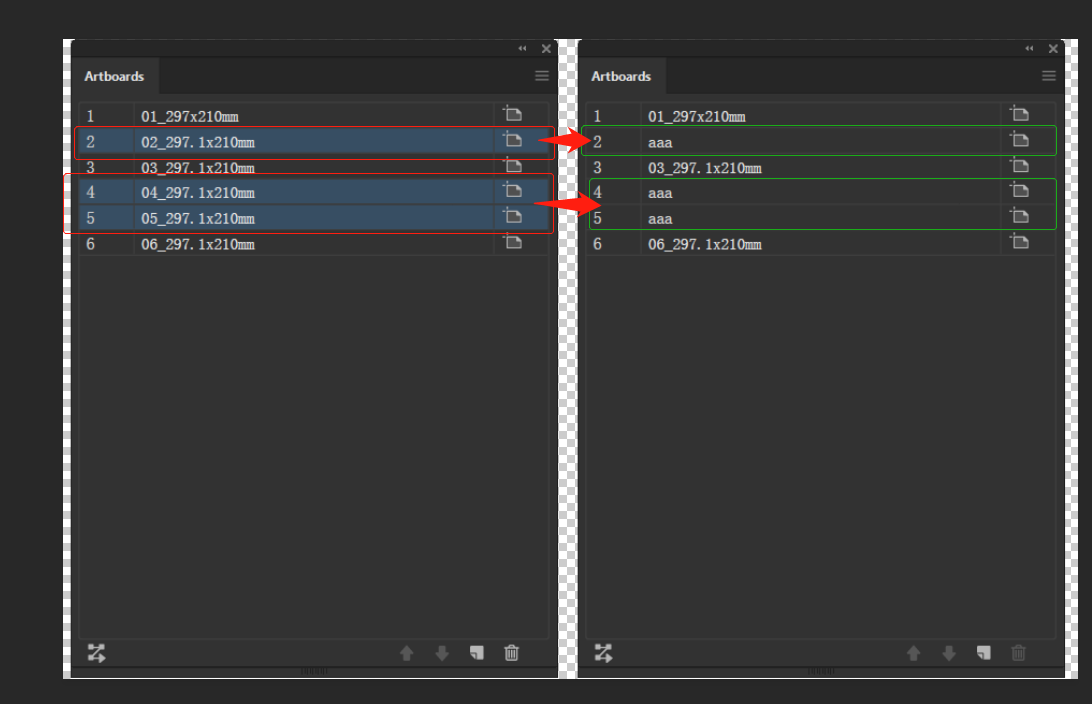


 1 Correct answer


Here you go (without any error management)
// set a new name eg "New Name" for the artboards Nr.?
var aDoc = app.activeDocument;
var which_artBoards_to_rename = prompt( "Rename Active Artboard" + "\n" + "Enter a number:", "2,3,5" ).split(",").join("");
for (i=0; i<which_artBoards_to_rename.length; i++) {
abIdx = which_artBoards_to_rename*1 - 1;
aDoc.artboards[abIdx].name = "New Name " + which_artBoards_to_rename; // set the new name here
}
If that works for, try to understand
and have fun


Explore related tutorials & articles
 9
Replies
9
9
Replies
9

Copy link to clipboard
Copied
If you don't know - try to learn it.

But the names in your left screenshot are not standard. Do you already use a script for that?
For the beginning:
change the name of the active artboard:
// set a new name eg "New Name" for the active artboard
var aDoc = app.activeDocument;
var abIdx = aDoc.artboards.getActiveArtboardIndex ();
aDoc.artboards[abIdx].name = "New Name"; // set the new name here
//aDoc.artboards[abIdx].name = "new Name wharever";
---------------------
or
change the name of another artboard:
// set a new name eg "New Name" for the artboard Nr.?
var aDoc = app.activeDocument;
var which_artBoard_to_rename = 1; // set number of the artboard you want to change - should be 1 or higher; max = max number of artboards in your document
abIdx = which_artBoard_to_rename - 1;
aDoc.artboards[abIdx].name = "New Name"; // set the new name here
//aDoc.artboards[abIdx].name = "new Name wharever";
- Do this for every artboard you want to change its name (or later work with loops or arrays)
- Save your script as eg rename_artboard.jsx in your illustrator scripts folder.
- Run or restart your Illustrator.
- Open a file with multiple artboards and run your script rename_artboard from menu: File --> Scripts --> rename_artboard
Have fun
Copy link to clipboard
Copied
thank you very much
Yes, I used the renaming script in the forum before.
I am also trying to learn how to write scripts.
But it feels a bit difficult

like this?
// set a new name eg "New Name" for the artboard Nr.?
var aDoc = app.activeDocument;
var which_artBoard_to_rename = max; // 1;// set number of the artboard you want to change - should be 1 or higher; max = max number of artboards in your document
max = prompt( "Rename Active Artboard" + "\n" + "Enter a number:", "2,3,5" );
abIdx = which_artBoard_to_rename - 1;
aDoc.artboards[abIdx].name = "New Name"; // set the new name here
Copy link to clipboard
Copied
No.
It does not work in that way.
But I'm not at home yet.
The quickest way:
Take the second code snippet. Copy it two times.
Hardcode the number of the artboard you want change.
Set the number in line #3 to 2
... in the First copy to 3
... and in the second copy to 5
Save
and have fun
Copy link to clipboard
Copied
thanks for the reply
What I want is
A script file can automatically rename a randomly selected artboards
Copy link to clipboard
Copied
... and all of them with the same name?
Really?
Copy link to clipboard
Copied
Here you go (without any error management)
// set a new name eg "New Name" for the artboards Nr.?
var aDoc = app.activeDocument;
var which_artBoards_to_rename = prompt( "Rename Active Artboard" + "\n" + "Enter a number:", "2,3,5" ).split(",").join("");
for (i=0; i<which_artBoards_to_rename.length; i++) {
abIdx = which_artBoards_to_rename*1 - 1;
aDoc.artboards[abIdx].name = "New Name " + which_artBoards_to_rename; // set the new name here
}
If that works for, try to understand
and have fun
Copy link to clipboard
Copied
Yeah
Thank you very much
This is what I want
I will try to learn and add some new features.
Copy link to clipboard
Copied
// set a new name eg "New Name" for the artboards Nr.?
var aDoc = app.activeDocument;
var which_artBoards_to_rename = prompt( "Rename Active Artboard" + "\n" + "Enter a number:", "2,3,5" ).split(",").join("");
var renametext = prompt( "Rename Active Artboard" + "\n" + "Enter a name:", "Printing Category Name" )
for (i=0; i<which_artBoards_to_rename.length; i++) {
abIdx = which_artBoards_to_rename*1 - 1;
aDoc.artboards[abIdx].name ="0"+ which_artBoards_to_rename + "_"+ renametext ; // set the new name here
}

Copy link to clipboard
Copied
Unfortunately, switching to the new forum software destroyed most of the old scripts. Most of the time the counter in square brackets is missing.
Here is the fix for the last script shown on this thread:
// set a new name eg "New Name" for the artboards Nr.?

var aDoc = app.activeDocument;

var which_artBoards_to_rename = prompt( "Rename Active Artboard" + "\n" + "Enter a number:", "2,3,5" ).split(",").join("");
var renametext = prompt( "Rename Active Artboard" + "\n" + "Enter a name:", "Printing Category Name" )

for (i=0; i<which_artBoards_to_rename.length; i++) {
    abIdx = which_artBoards_to_rename[i]*1 - 1;
    aDoc.artboards[abIdx].name ="0"+ which_artBoards_to_rename[i] + "_"+ renametext ; // set the new name here
    }


Get ready! An upgraded Adobe Community experience is coming in January.
Learn more
 AdChoices