


Copy link to clipboard
Copied
Bonjour, j'aimerais savoir comment mettre un texte curviligne dans cercle. par exemple le mot (HELLO) qu'il soit intégré 6 fois tout autour du cercle et que l'écart entre les uns et les autres soit le même, surtout quand le dernier rejoint le premier (cela reste ma difficulté). Merci d'avance.


 1 Correct answer


Jean Louis,
It is very simple if you actually do exactly that "un texte curviligne dans cercle".
Starting with a circle corresponding to the Baseline (no Baseline Shift), you can do it by using a negative Baseline Shift equalling the font size applied to a circle that is twice the font size larger.
In that case you can just create the first instance and then simply use Effect>Distort & Transform>Transform with a Rotation of 60 (or you can use 360/6 which gives full accuracy if you choose a
...

Explore related tutorials & articles
 7
Replies
7
7
Replies
7


Copy link to clipboard
Copied
Fully Justified text will take care of everything BUT the space between the first and last word.
You could do it in InDesign using the special equilization space between and after the words
Copy link to clipboard
Copied
thanks for the info

Copy link to clipboard
Copied
You can type a space character before the first word and then use Justify All for the entire Type on a Path object.
Copy link to clipboard
Copied
thanks for the info
Copy link to clipboard
Copied
Jean Louis,
It is very simple if you actually do exactly that "un texte curviligne dans cercle".
Starting with a circle corresponding to the Baseline (no Baseline Shift), you can do it by using a negative Baseline Shift equalling the font size applied to a circle that is twice the font size larger.
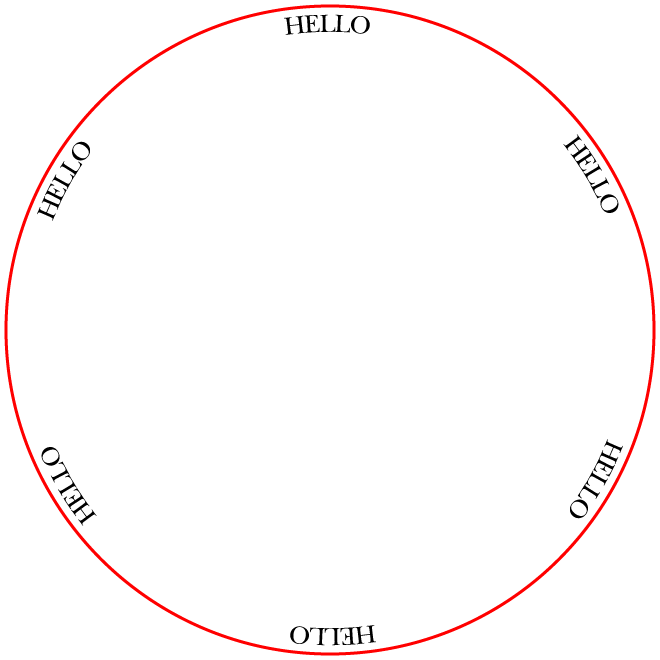
In that case you can just create the first instance and then simply use Effect>Distort & Transform>Transform with a Rotation of 60 (or you can use 360/6 which gives full accuracy if you choose another number such as 7) and 5 Copies.
Below it is shown with 24pt font size in a 648pt circle (copy added in red) corresponding to an original circle of 600, 600 + 2x24 = 648pt, with Align to Center applied in the Paragraph palette.
Starting with a positive Baseline Shift as in your image, you can subtract that from the font size and apply to a circle that is twice that amount larger (such as 600 + 2x18 = 636pt from a Baseline Shift of 6pt).
Click to get closer
Copy link to clipboard
Copied
I will try this technique, thank you very much
Copy link to clipboard
Copied
You are welcome, Jean Louis.
I hope you will share your findings.


Find more inspiration, events, and resources on the new Adobe Community
Explore Now
 AdChoices
