
Inspiring
August 8, 2022
Answered

Illustrator v26.4.1 freezes with progress / processing bar

  • August 8, 2022
  • 24 replies
  • 17044 views

Hello, everyone. This is an issue which has just started today, Monday, August 8th, 2022. I launch Illustrator, but when I do anything that opens a dialog box, I get a progress bar with the word Progress, and below it, Processing...  

Sometimes if I click off of Illustrator and click back on the interface the progress bar goes away, but it comes back a few moments later. I tried restarting Illustrator, restarting the computer (Windows 10), as well as deleting the Illustrator preferences. 

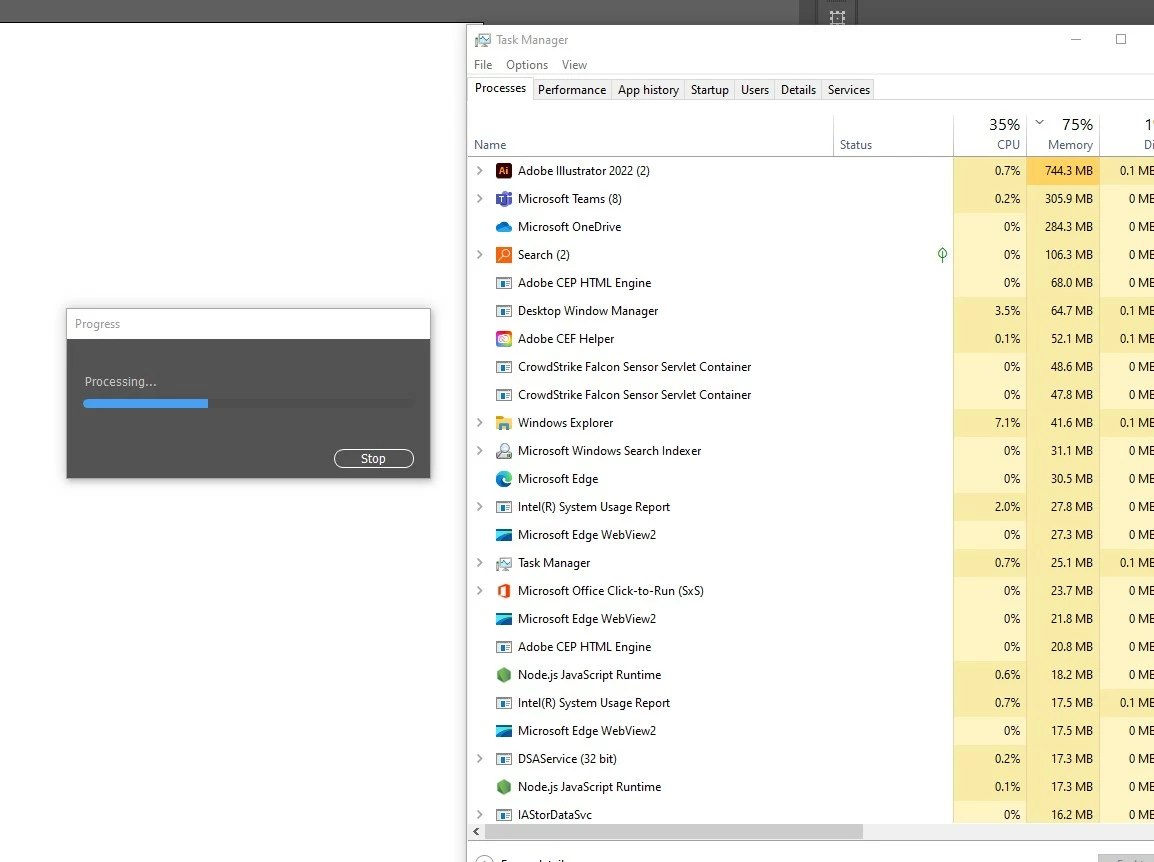
Here is a screenshot of the progress bar and the task manager window. The CPU and Memory usage seems unusually high for an empty document.

I have contacted the IT administrator, but thought I would check with the community too.
This topic has been closed for replies.
Correct answer Anshul_Saini

Hi All,


I am glad to inform you this issue has been fixed. Please update Illustrator to v26.5 and let us know how it goes.

Please feel free to reach out if the issue persists after updating.


Regards,

Anshul Saini

24 replies

Anshul_Saini
Community Manager
Anshul_SainiCommunity ManagerCorrect answer
Community Manager
August 22, 2022

Hi All,


I am glad to inform you this issue has been fixed. Please update Illustrator to v26.5 and let us know how it goes.

Please feel free to reach out if the issue persists after updating.


Regards,

Anshul Saini

Anshul_Saini
Community Manager
Community Manager
August 9, 2022

Hi All,


We are sorry for the trouble. Many users have reported this.


Deleting the .runConfig & .runConfigRobin files from the following location should improve or fix the issue entirely.


Windows:

C:\Users\\AppData\Roaming\Adobe\Adobe Illustrator 26 Settings\en_US\x64

On Windows, "AppData" is a hidden folder. Steps to see hidden files & folders on windows are here (https://bit.ly/3BXFhqb).


Mac:

/Users//Library/Preferences/Adobe Illustrator 26 Settings/en_US

On Mac, user library and .runConfig files are hidden. Press "cmd + shift + ." (period/ dot) keys together to see the hidden files & folders.


If this doesn't help, you may roll back and install the older v26.3.1, and I would request you to upvote this UserVoice (https://illustrator.uservoice.com/forums/601447-illustrator-desktop-bugs/suggestions/45531835-progre...) and add your comment there. 


Let us know how it goes after deleting the files. I will be looking forward to your response.


Thanks & Regards,

Anshul Saini


#Marking it correct to highlight

Participant
August 10, 2022

Doesn't work for me. I can click Uninstall for Illustrator all day and nothing happenss. Creative Cloud Desktop is stuck trying to update Photoshop since the day before yesterday. This is a real pain.

Participant
August 9, 2022

I was working on a file last night with no problem.  When I tried to open it this morning (after a Windows 11 update), it kept crashing.  I opened up Illustrator through the Create Cloud App, and it opened up.  As soon as I try to open any files, it crashed.


I tried resetting the Preferences by opening the file through Bridge and pressing Shift, Control, Delete.  It got stuck on "Processing".  (Nothing happened).


I tried resetting Preferences by opening Illustrator and going to Edit Preferences> Reset Preferences.  It immediately comes up with "Processing" and nothing happens.


I turned my machine on and off and retried all options.


Every time I try to reset Preferences all I get is "Processing" and nothing happens.


Inspiring
August 9, 2022

Hello!

The only way I was able to get working again was to reinstall the previous version of Illustrator. This is some kind of issue with the update. Good luck!

Participant
August 10, 2022

Joesph:


I concure with your actions. I went back to the last released version of Illustrator - and everything is working fine, finally. Definitely some problems with the Illustrator 26.4.1 release that I'm not going to waste my time trying to resolve - I'm sure the Adobe folks will figure the situation out at some point. Until then, I'll just keep clear of that upgrade.......

Participant
August 9, 2022
help, illustartor quits unexpectedly


Participant
August 9, 2022

Updated Illustrator yesterday and it became unusable. Locked up while trying to save, crashed and froze to the point I had to use Task Manager to shut it down. 

This morning, while a client was standing next to me, it did the same thing seven times in twenty minutes. I had to roll back the program to the earlier version


I do not know what the problem is but the update makes this program very unstable. I am on a Windows 10 machine and have had no issues wioth this before the update.

Monika Gause
Community Expert
Community Expert
August 9, 2022

This is a public forum and people posting here are 95% not Adobe staff. While you and a couple other people have issues, lots of people don't.


As a first measure you could try and reset the preferences. This erases all your settings, but in most cases helps.

You could also contact Customer Care, so they can figure it out  for you. https://helpx.adobe.com/contact.html

Participant
August 9, 2022
I am trying to alert Adobe about this issue but I felt it was very
important to alert the Community to the current update problem so they
would not repeat my experience.

It is hard to contact Adobe support to tell them about this- the link you
provided goes to 404 and the support tree does not seem to do much but
address the basic problems, not report new ones. I am still trying but if
anyone can provide me a working link to where I can report this I would be
most grateful
Participant
August 9, 2022

Hy everyone.

Today i got a problem on my workflow.

The (win x64) Illustrator 26.4.1. suddenly just stops.

I always see a small "Progess" window if i open the app.

The "Progress" window doesn't load, it is looks like a frozen situation.

I can't even work.

Nothing.

There is no any crash report.

btw.

- Crashdisk isn't full.

- uninstal and install completed.

- PC restart completed.


The PC performed very well untill today...

Ged_Traynor
Community Expert
Community Expert
August 9, 2022

Moving thread to the Illustrator forum from Using the Community


Participant
August 9, 2022

Hi, I recently had a bug concerning colors. When I try to change the value of a color (RGB), the software crash... And if I insert the value 255 for the red for example, the value that Illustrator show is : 254,9999999999... And then it crashes.


Do you had this problem before? If someone can help me it would be kind.


Thanks for reading this message.

Participant
August 9, 2022

Just to add something new : When I go on : Files/colors. The bug appears again...

I always have the message : "Progressing..." and it never ends... So weird...

Participant
August 9, 2022

Hello Everyone,

I am using trial version of Illustrator to check and buy it in future. But Illustrator is hanging alot. Again and again its showing a popup box saying "processing". Unable to work on it at all. Kindly help.

Community Expert
August 9, 2022

Hi,

could you indicate what are the features of your computer, please?

Lauren5E6C
Participant
August 9, 2022

The "Progress" window with the processing bar keeps popping up every time I try to open any of my Illustrator files.  I've tried uninstalling and resintalling the application several times, restarting my system, and even clearing my system cache but it keeps happening.  I'm running Windows 10 Enterprise and there are no issues with my system in terms of graphics or memory storage.  Why does this keep happening and what is the solution?

Anubhav M
Community Manager
Community Manager
August 9, 2022

Hello @Lauren5E6C@Endre5EA5@jessicaj49630660@Hien22060562vljp,


We are sorry for the trouble. There are multiple reports regarding crashes. Users see a process bar, and Illustrator freezes or crashes then. Do you see similar behavior at your end? If yes, would you mind sharing a few details like:

  • The exact version of Windows (Build Number) and Illustrator (Version)
  • Is this happening with both old & new files?
  • Is this happening after opening a file or performing a particular action/using a specific tool?
  • What exactly happens? Illustrator freezes and starts non-responding, or it simply crashes?
  • Please share the Illustrator app dump file from the Task Manager. The steps are here (https://helpx.adobe.com/acrobat/kb/collect-logs-crash-freeze.html)


Also, try resetting Illustrator's preferences by following the steps shared in this article (https://helpx.adobe.com/illustrator/kb/troubleshoot-preference-issues.html) and sharing your observations.
Disclaimer: Please note that resetting preferences will remove all custom settings, and Illustrator will launch with the defaults. You may take a backup of these settings from the location mentioned in the article.


If that doesn't help, you may roll back and install the older v26.3.1.


Looking forward to your response.


Thanks,

Anubhav

Participant
August 9, 2022
  1. Windows 11 Home 22000.795
  2. Both old and new files, even opening the program standalone (without file)
  3. Progress bar pops up without using any tools 
  4. Illustrator doesn't actually freeze however the progress popup removes any ability to use the program.
Participant
August 8, 2022

Tengo el mismo problema! espero solucionarlo con sus recomendaciones 🙂