Exit
  • Global community
    • Language:
      • Deutsch
      • English
      • Español
      • Français
      • Português
  • 日本語コミュニティ
  • 한국 커뮤니티
0

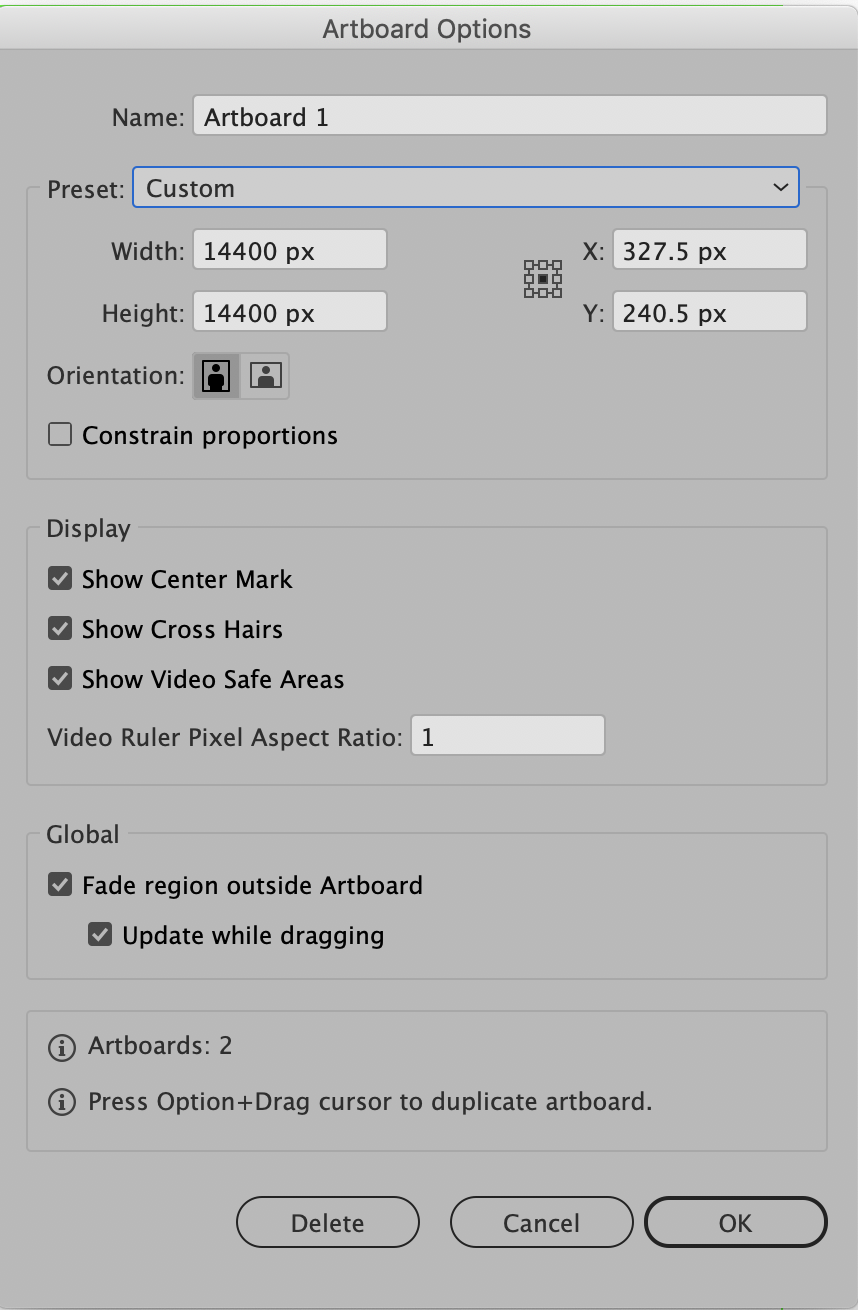
Is there a way to turn off the title safe guides for Film & Video preset documents?

Enthusiast ,
Apr 27, 2019 Apr 27, 2019

There's a ViewMenu> Rulers> Show/Hide Video Rulers command but nothing I can find to turn on and off these title safe, image safe and crosshair guides. I cant even convert to another doc style to get rid of them permanently that I can see in Document Setup (Cmd +Opt + "P").

11.8K
Translate
Report
Community guidelines
Be kind and respectful, give credit to the original source of content, and search for duplicates before posting. Learn more
community guidelines

correct answers 1 Correct answer

Community Expert , Apr 27, 2019 Apr 27, 2019

You can do that in the artboard options.

Translate
Adobe
Community Expert ,
Apr 27, 2019 Apr 27, 2019

You can do that in the artboard options.

Translate
Report
Community guidelines
Be kind and respectful, give credit to the original source of content, and search for duplicates before posting. Learn more
community guidelines
Community Expert ,
Apr 27, 2019 Apr 27, 2019

Here's what the dialog looks like when an artboard is selected after choosing the Artboard tool:

Screen Shot 2019-04-27 at 8.18.01 AM.png

Translate
Report
Community guidelines
Be kind and respectful, give credit to the original source of content, and search for duplicates before posting. Learn more
community guidelines
Community Expert ,
Apr 27, 2019 Apr 27, 2019
LATEST

Here is an "How-to-do" instruction with images:

Re: Starting with Illustrator, problem with background and artwork

Translate
Report
Community guidelines
Be kind and respectful, give credit to the original source of content, and search for duplicates before posting. Learn more
community guidelines