
Participant
August 19, 2025
Answered

Issue: Object dimensions become huge after reopening a file, affecting tools and workflow

  • August 19, 2025
  • 22 replies
  • 5429 views

Hi everyone,

I’m experiencing a serious issue in Illustrator.

When I create a new document, everything works fine: objects display at the correct size on the artboard, and their dimensions in the Properties/Transform panel are accurate.

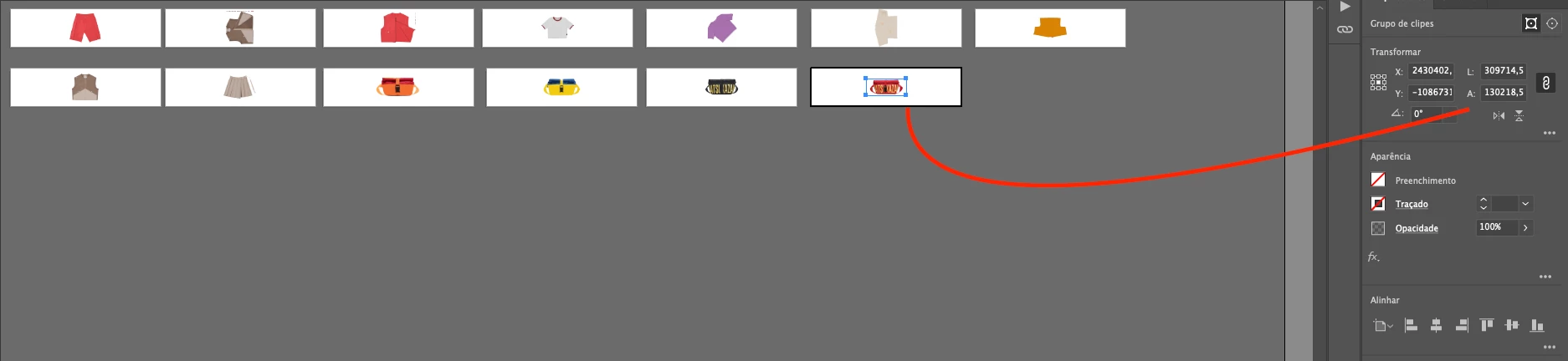
But after I save the file, close Illustrator, and reopen the same document, the objects still look visually correct on the artboard. However, in the Properties/Transform panel their dimensions suddenly become extremely large.

The problem is that once this happens, all Illustrator tools (transform, align, distribute, scaling, etc.) start following these incorrect giant dimensions, which makes it impossible to keep working normally in the same file. It also affects zoom and scroll performance, which become very slow or freeze.

So visually the artwork looks right, but Illustrator is treating it as if it were scaled to enormous values.

Has anyone else faced this? Could it be a units/scale mismatch or a known bug in how Illustrator handles saved files? Any workaround or fix would be greatly appreciated.

Thanks in advance!
Correct answer Abhishek Rao

Hi @efficient_portfolio6777,


I know how disruptive this issue can be, especially in the middle of important projects. The good news is that the team has already rolled out a fix for this in Illustrator 29.8.1, which is available now. Please give the suggestions shared in the pinned replies a try and update Illustrator to the latest version to see if that resolves it for you.


If you're still running into trouble after that, let me know here, so I can check back with the team.

Abhishek

22 replies

Participant
September 12, 2025

@Abhishek Rao is there already a fix for this? I work at a signing agency, and currently am experiencing the same issue ruining my workflow for an important project. Please let me know!

Abhishek Rao
Community Manager
Abhishek RaoCommunity ManagerCorrect answer
Community Manager
September 12, 2025

Hi @efficient_portfolio6777,


I know how disruptive this issue can be, especially in the middle of important projects. The good news is that the team has already rolled out a fix for this in Illustrator 29.8.1, which is available now. Please give the suggestions shared in the pinned replies a try and update Illustrator to the latest version to see if that resolves it for you.


If you're still running into trouble after that, let me know here, so I can check back with the team.

Abhishek

Abhishek Rao
Community Manager
Community Manager
September 9, 2025

Hi everyone,


Thank you all for your patience and for sharing detailed reports and files regarding the scaling issue in Illustrator.

The product team has rolled out a new release, Illustrator 29.8.1, which addresses this issue. The fix prevents any further occurrences of objects scaling incorrectly when reopening files.

Important note: Unfortunately, files that were already affected by this bug cannot be corrected. The update ensures that new and existing files going forward will behave correctly. To avoid any future issues, please update to 29.8.1 and continue your work in this version.

We understand this has caused significant disruption and truly appreciate your understanding and feedback. If you encounter any new issues after updating, please share them with us, so the team can continue monitoring and improving the experience.


Thanks again for your support!

Abhishek

Participant
September 8, 2025

I'm Having the same issue, two files damaged so far. When is gonna be fixed? Now I don't want to open old files because i´m scared of losing them too. 😕😕  

Abhishek Rao
Community Manager
Community Manager
September 5, 2025

Hi everyone,

Thanks a lot for sharing all the details, files, and recordings here. Our team has been able to narrow down the cause of this issue and we are actively working on a fix. We expect to have this resolved early next week with the upcoming release. We'll keep you posted once the fix is available. In the meantime, please continue to share any observations you notice, as it helps us validate our progress.


Appreciate your patience and support.Abhishek

AE-FTW
Inspiring
September 8, 2025

@Abhishek Rao can you give us any indication when the next release is scheduled?
Is there any way to minimise exposure to the current issue?
Thanks,
AE

Participating Frequently
September 9, 2025

The point is moot now since there's an actual update, but last night I discovered that I could avoid the problem by always using Save As instead of save. Was able to make a noon deadline today without issue. I discovered that because I started Save As-ing every 30 minutes or so, so I wouldn't have to go back very far- none of the files were corrupted, until I tried opening one of them later and simply hitting Cmd+S to save... after many hours of work, that file was the first to have a problem.

Old Charles
Known Participant
September 5, 2025

I'm having the same issue here.

I'm developing a signage system for a municipality and I have a deadline on this monday. I've redone the whole thing once already just to discover that the bug occurred again. I'll try to rollback but still I will have to spend the damn weekend at work to redo what I've already done twice.
I can't even reimport the artboards on a new document because they are so huge they messed up everything.


From 25cm to 977cm. I just want to scream.


Inspiring
September 5, 2025

Hi, don't know if this is helpful for you, but using this workaround through Acrobat was helpful for me (my art was all on one artboard; your job sounds like it probable has many. 

›› I opened the corrupt AI file in Acrobat, saved it as an optimized PDF, and reopened in Illustrator. It said there was a problem with the size and it could open it with 'Honor scale on PDF import' to which I said yes. That almost worked (the width of my content was now 1940px instead of 1920px). Which I was able to scale to the correct size (scaling from the corrupt document to 0,20796319% doesn't work, the text doesn't scale correctly). 

Old Charles
Known Participant
September 5, 2025

Thank you, I'll try that.
However, forgot to mention, I'm currently using Illustrator 29.8 and I'm now removing it to install an older version. I read this issue hapens on 29.7.1 too so might go even further backward...


I'm just sad and angry... this issue just created me a lot of troubles...

AE-FTW
Inspiring
September 4, 2025

Just had a mac in our studio start doing this.
Hard to believe the problem is not being sorted or status updates from Adobe being reported here.
Simple files or complicated multi-artboard documents are being destroyed, having massive impacts on timelines.


Often the problem won't be discovered for days or will remain a hidden liability, since the issue is discovered the next time the document is opened.


We're reinstalling an old Illustrator and rebuilding all the documents we think have been affected. Hopefully this workstation will be a viable for Illustrator again - though reports seem varied.

What a mess.

Participant
September 4, 2025

FYI to this board, in the absence of anyone from Adobe advising on what to do, I uninstalled v29.8 and went back to v29.7.1 and also setiched off auto-install.

When I now save documents, close and re-open they stay in the original size. Fingers crossed this works until they figure out the fix forv 29.8!

Participating Frequently
September 4, 2025

I never upgraded from v29.7.1 (MacOS, Apple Silicon), and I'm currently having the problem.

Participant
September 4, 2025

Is there anyone from Adobe that can get back to us about this problem. It's affecting the daily operation of our studio. Thanks.

Participant
September 4, 2025

Agreed. This is a problem for my company too. We discovered it this week. It is negatively impacting our operations and deadlines. Is this bug being addressed? When will there be an update?

Participant
September 3, 2025

We are having the same issue as well in our marketing department. It started yesterday. Would love a fix for this!

Participant
September 3, 2025

Hi, I am having the same issue. It's disappointing to read this entire thread and have nobody from Adobe offer a solution.


Please can somebody from Adobe post a clear solution to this problem. I can't keep spending time resizing entire projects due to this software glitch.


Many thanks.

Old Charles
Known Participant
September 5, 2025

It's disappointing to see all the Adobe product being more and more infested with ads, templates for sale, offers, tutorials, promotional video, and finally AI pushed everywhere... but then doing almost nothing to practically improve their producs or solve problems. And then they wonder why so many are switching to other software.

As most of the people here, I work with Adobe products. It means, I pay my bills, including the Adobe subscription.
Now I have a HUGE deadline on monday that's literally going to be f*cked up because of a bug. I can't postpone it. It's for a municipality and has to be done for monday. Guess who will spend the damn weekend at the office redoing everything from scraps? I'm feeling frustrated.