


Participant
August 18, 2017
해결됨

Jagged edges in Illustrator

  • August 18, 2017
  • 3 답변들
  • 23132 조회

Hi everyone,

I have been experiencing a problem that seemed to have happened out of no where. Whenever I go to make a logo or write any text, the edges are really jagged. It's sort of hard to explain how it looks, so I included a screenshot HERE.

I looked at other questions on the forum and didn't find anything pertaining to this exact issue. Some other people have been having issues with a different type of jagged edges - to which many suggested turning on the anti-alias option in preferences. I did that and it didn't seem to have done anything. I also tried uninstalling the software (removing preferences) and reinstalling it. It's still doing it.

It does this to all the texts and any shapes I make. When you look at the screen shot, the top half is text and the bottom half are lines and shapes (the image is zoomed in of course).

Any suggestions as to how to resolve this will be greatly appreciated!

Thank you so much for your help!

Lauren
이 주제는 답변이 닫혔습니다.
최고의 답변: AshutoshChaturvedi

AshutoshChaturvedi​ Here is a screenshot


Hi,

As suspected you are running the same GPU issue that we are tracking with Apple. Please add your vote here: High Sierra (macOS 10.13) GPU rendering issues - Intel Graphics – Adobe Illustrator Feedback

We will email you once we have a fix available in the OS update.

3 답변

Participant
November 11, 2017

Hi

i had the same exact issue, i just turned off the GPU preview and now the jagged (sketchy) borders disappeared

norteno
Participant
October 24, 2017

I am having the same issue. With GPU performance turned ON, my elements are distorted. It's completely unusable. I turned GPU performance OFF and Illustrator is so slow its also unusable. This error has been happening since I purchased my new Macbook Pro, 13 inch.  Image below is an icon with GPU performance turn ON. If I zoom out, it might get better, but then the icon next to it gets distorted.

AshutoshChaturvedi
Legend
October 24, 2017

norteno  wrote

This error has been happening since I purchased my new Macbook Pro, 13 inch. 

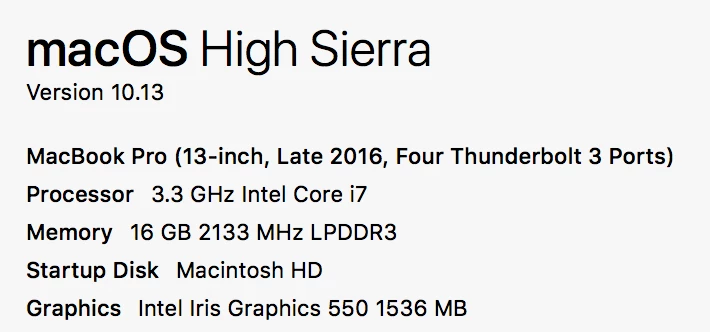
If you can share details of the machine I can comment better.

Symptoms seen in the image look like the GPU issue we are tracking with Apple. Refer to this link: Known issues - Running Illustrator CC on macOS 10.13 High Sierra

norteno
Participant
October 24, 2017

AshutoshChaturvedi​ Here is a screenshot

Kurt Gold
Community Expert
Community Expert
August 18, 2017

It's the GPU Preview disease.

Turn it off in the View menu by enabling the CPU preview or turn it off in the preferences.

John Mensinger
Community Expert
Community Expert
August 18, 2017

This needs a sticky announcement or something.

Kurt Gold
Community Expert
Community Expert
August 18, 2017

Probably it would even be better to resolve this vexed issue. Illustrator should detect if it is able to handle GPU preview faultlessly on a specific machine. If it cannot do it, it should turn on CPU preview by default.