
Participant
October 4, 2021
Answered

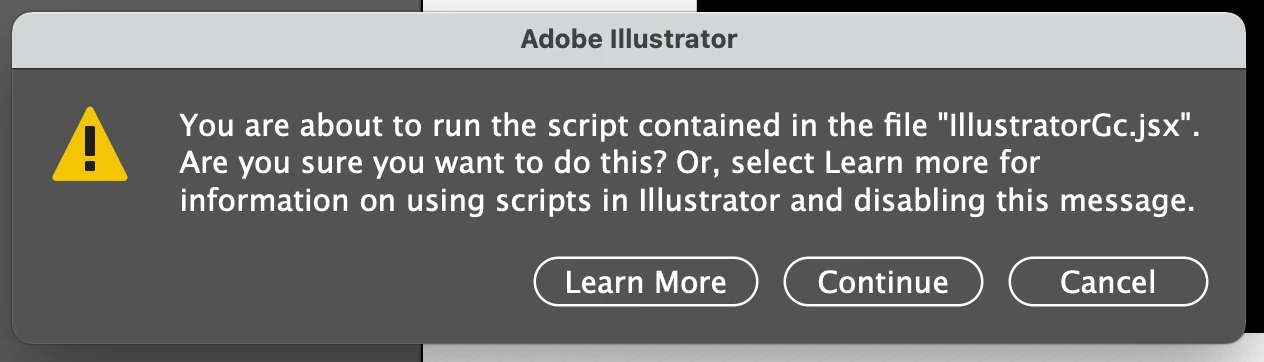
JSX error

  • October 4, 2021
  • 1 reply
  • 643 views

I'm getting a super annoying error message coming up in Illustrator rendering it unusable. This comes up every 20 seconds and sometimes more and I can't seem to stop this. Does anyone know how I can stop this error appearing?


Thanks

This topic has been closed for replies.
Correct answer alanclarkdesign

I actually think this worked - thanks so much. In case anyone stumbles across this and doesn't want to read through the thread, I took this script and saved it as a .jsx file:


app.preferences.setBooleanPreference("ShowExternalJSXWarning", false);


In case you're not sure how to create a jsx file, it's simply a text file saved with a .jsx extention. Then go to Illustrator and open it via File / Scrips /  Other scripts.

1 reply

Charu Rajput
Community Expert
Community Expert
October 4, 2021
alanclarkdesignAuthorCorrect answer
Participant
October 4, 2021

I actually think this worked - thanks so much. In case anyone stumbles across this and doesn't want to read through the thread, I took this script and saved it as a .jsx file:


app.preferences.setBooleanPreference("ShowExternalJSXWarning", false);


In case you're not sure how to create a jsx file, it's simply a text file saved with a .jsx extention. Then go to Illustrator and open it via File / Scrips /  Other scripts.