Participant
October 10, 2018
Answered

Just a question...

  • October 10, 2018
  • 7 replies
  • 872 views

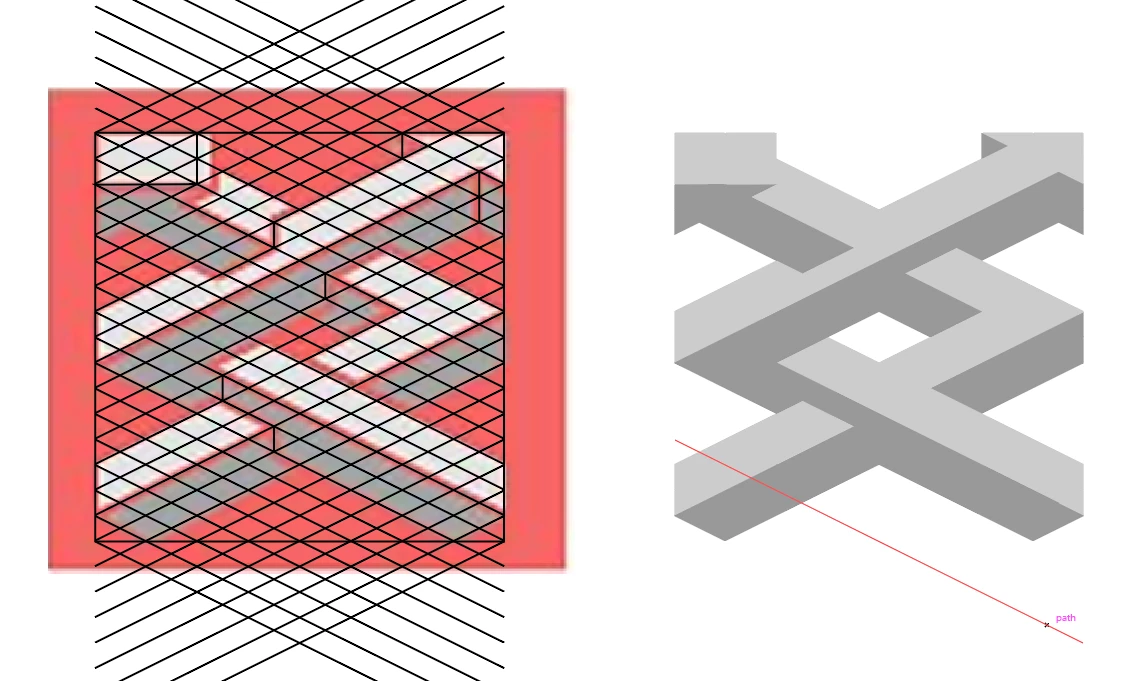
Hey I am kinda new to illustrator and I was wondering how you would even start to approach this design... Thanks

    This topic has been closed for replies.
    Correct answer Doug A Roberts

    you can construct the first with an isometric grid. then use live paint or shape builder to connect the shape.
    7 replies

    jane-e
    Community Expert
    Community Expert
    October 11, 2018

    For practice and to learn how, start by putting these images onto a locked layer.

    Then create a new layer and try tracing them with the Pen tool. Then you’ll start to get an idea. If (when?) you get stuck, post back with a screen shot! There are multiple ways, but you might start there.

    JETalmage
    Inspiring
    October 11, 2018

    There's nothing expressly "isometric" about either of the images you posted. They employ a (probably arbitrary) parallel perspective construction (meaning parallel edges of the subject are drawn as parallel, rather than as if converge toward vanishing points as they recede in the distance), but that alone does not make them isometric.

    JET

    happie_97
    Community Expert
    Community Expert
    October 10, 2018

    I agree with chanaart learning these tools will help you with this project and with many more elements you may want to build in the future.

    Here are some links: Pen Tool, Grid, Live Paint, and Pathfinder

    Doug A Roberts
    Community Expert
    Doug A RobertsCommunity ExpertCorrect answer
    Community Expert
    October 10, 2018

    you can construct the first with an isometric grid. then use live paint or shape builder to connect the shape.

    chanaart
    Community Expert
    Community Expert
    October 10, 2018

    so many ways to do it. all of the above can be a great solution. You need to look into the following:

    Pathfinder, grid, live paint, pen tool

    Inspiring
    October 10, 2018

    I use a template and draw on a separate artwork layer.  The template consists of either a sketch or a photo.  In the sample on the left I would draw the lighter color first and dupe it for the darker Gray color.  There are great tools at your disposal like the Pathfinder, Rectangle, and Rotate, Reflect, etc.  You will, through practice and time, become familiar with the tools and your speed and accuracy should improve.

    manal shanableh
    Legend
    October 10, 2018

    You can use pen tool, also you can draw shapes and use shape builder tool to remove unwanted areas.

    lambiloon
    Community Expert
    Community Expert
    October 10, 2018

    Hi this can done in grid method in Adobe Illustrator there are many methods at youtube...check example...Thanks.

    Ali Sajjad / Graphic Design Trainer / Freelancer / Adobe Certified Professional