


- Home
- Illustrator
- Discussions
- Re: Loop through a certain named layer and all it'...
- Re: Loop through a certain named layer and all it'...

Copy link to clipboard
Copied
Hi,
I'm trying to write a loop to search through a specific layer name 'Artwork' (including all it's groups and sub groups) to identify any text below 6pt and if so, increase the size of the affected font up to 6pt.
I have set up a file where I have x3 pieces of text as follows (see screenshot):
1. 'Layer 2' text is in 'Layer 2'.
2. 'Top Level of 'Artork' layer' text is in the top level of the 'Artwork' layer.
3. 'Group ‘Artwork_Ref_2’ of ‘Main_Group’ of ‘Artwork layer' text is within a sub group of a group on the 'Artwork' layer.
I have managed to write a loop that will either change any text below 6pt on the entire document or just on the very top level of the 'Artwork' layer (see code example for the top level of the 'Artwork' layer), but can not get it to loop through all the groups and sub groups on the desired 'Artwork' layer. What am I doing wrong?
var idoc = app.activeDocument.layers["Artwork"];//Top level of 'Artwork' layer
for (i=0; i<idoc.textFrames.length; i++) {
  if (idoc.textFrames[i].textRange.characterAttributes.size < 6) {
    idoc.textFrames[i].textRange.characterAttributes.size = 6;
      }
}
Thanks in advance.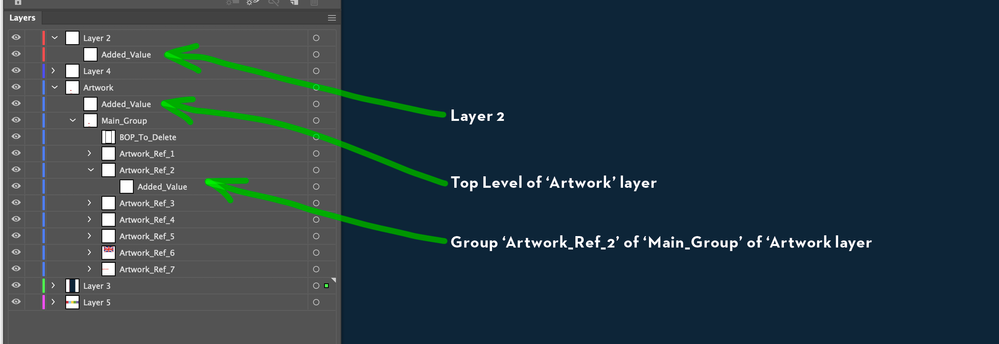


 2 Correct answers

var doc = app.activeDocument;
var targetLayer = doc.layers["Artwork"];
for (var i = 0; i < targetLayer.textFrames.length; i++) {
  if (targetLayer.textFrames[i].textRange.characterAttributes.size < 6) {
    targetLayer.textFrames[i].textRange.characterAttributes.size = 6;
  }
}
function accessSubitems(subitems) {
  for (var j = 0; j < subitems.length; j++) {
    if (subitems[j].typename == "TextFrame" && subitems[j].textRange.characterAttributes.size < 6) {
      subitems[j].textRange.characterA


Here you go,
var _artWorkLayer = app.activeDocument.layers["Artwork"];//Top level of 'Artwork' layer

function main(_pageItem) {
    for (var i = 0; i < _pageItem.length; i++) {
        if (_pageItem[i].typename == 'TextFrame') {
            changeSize(_pageItem[i]);
        } else if (_pageItem[i].typename == 'GroupItem') {
            main(_pageItem[i].pageItems);
        }
    }
}

function changeSize(item) {
    if (item.textRange.characterAttributes.size < 6) {
        item.textRange.charac
Explore related tutorials & articles
 10
Replies
10
10
Replies
10

Copy link to clipboard
Copied
Hi,
Try following snippet, it will change size of all textframes inside the layer 'Artwork'.
var idoc = app.activeDocument.layers["Artwork"];//Top level of 'Artwork' layer


function main(_pageItems) {
    for (i = 0; i < _pageItems.length; i++) {
        if (_pageItems[i].typename == 'TextFrame') {
            changeSize(_pageItems[i]);
        } else if (_pageItems[i].typename == 'GroupItem') {
            main(_pageItems[i].pageItems);
        }
    }
}

function changeSize(item) {
    if (item.textRange.characterAttributes.size < 6) {
        item.textRange.characterAttributes.size = 6;
    }
}

main(idoc.pageItems);Copy link to clipboard
Copied
Thanks for the quick reply. I have just tried this and it doesn't change the size on the bottom text that is in a sub group. If I move the text out of the sub group to the top level of the first group, it does resize it. How would I amend the snippet you have provide to allow it to work on all objects in all groups and all sub groups of the 'Artwork' layer?
Copy link to clipboard
Copied
…to add to the above, I also moved it to the first subgroup ('Artwork_Ref_1') which sits above the 'Artwork_Ref_2' that holds the text and it seems to work from there. Does the loop not go deeper than the first sub group in the snippet you provided?
Copy link to clipboard
Copied
Could you please attach your ai file? It will be easy to debug all scenarios in one go.
Copy link to clipboard
Copied
Try following one
var idoc = app.activeDocument.layers["Artwork"];//Top level of 'Artwork' layer

function main(_pageItem) {
    if (_pageItem.typename == 'TextFrame') {
        changeSize(_pageItem);
    } else if (_pageItem.typename == 'GroupItem') {
        for (i = 0; i < _pageItem.pageItems.length; i++) {
            main(_pageItem.pageItems[i]);
        }
    }
}

function changeSize(item) {
    if (item.textRange.characterAttributes.size < 6) {
        item.textRange.characterAttributes.size = 6;
    }
}

for (var j = 0; j < idoc.pageItems.length; j++) {
    main(idoc.pageItems[j]);
}
Copy link to clipboard
Copied
Hi, thanks for all your help on this so far.
The above code does not seem to work either. I have attached the ai file to help you debug. What I need it to do is search all text in the 'Artwork' layer and see if it is below 6pt and size up if needed, but do not want it to touch any other items on the other layer in the document. Hope this makes sense.
Copy link to clipboard
Copied
var doc = app.activeDocument;
var targetLayer = doc.layers["Artwork"];
for (var i = 0; i < targetLayer.textFrames.length; i++) {
  if (targetLayer.textFrames[i].textRange.characterAttributes.size < 6) {
    targetLayer.textFrames[i].textRange.characterAttributes.size = 6;
  }
}
function accessSubitems(subitems) {
  for (var j = 0; j < subitems.length; j++) {
    if (subitems[j].typename == "TextFrame" && subitems[j].textRange.characterAttributes.size < 6) {
      subitems[j].textRange.characterAttributes.size = 6;
    }
    if (subitems[j].pageItems) {
      accessSubitems(subitems[j].pageItems);
    }
  }
}
for (var k = 0; k < doc.pageItems.length; k++) {
  if (doc.pageItems[k].parent == targetLayer && doc.pageItems[k].pageItems) {
    accessSubitems(doc.pageItems[k].pageItems);
  }
}Copy link to clipboard
Copied
Here you go,
var _artWorkLayer = app.activeDocument.layers["Artwork"];//Top level of 'Artwork' layer

function main(_pageItem) {
    for (var i = 0; i < _pageItem.length; i++) {
        if (_pageItem[i].typename == 'TextFrame') {
            changeSize(_pageItem[i]);
        } else if (_pageItem[i].typename == 'GroupItem') {
            main(_pageItem[i].pageItems);
        }
    }
}

function changeSize(item) {
    if (item.textRange.characterAttributes.size < 6) {
        item.textRange.characterAttributes.size = 6;
    }
}

for (var j = 0; j < _artWorkLayer.pageItems.length; j++) {
    if (_artWorkLayer.pageItems[j].typename == 'TextFrame')
        changeSize(_artWorkLayer.pageItems[j])
    else if (_artWorkLayer.pageItems[j].typename == 'GroupItem')
        main(_artWorkLayer.pageItems[j].pageItems);
}Copy link to clipboard
Copied
Both these solutions work. Thank you both for your help and input on this.
Much appreciated.
Copy link to clipboard
Copied
Great!


Get ready! An upgraded Adobe Community experience is coming in January.
Learn more
 AdChoices