/t5/illustrator-discussions/need-help-fixing-cursor-direction-problem-when-using-the-type-tool/td-p/9265503Aug 15, 2017
Aug 15, 2017
Copy link to clipboard
Copied
Hello,
Can someone help me correct a typing direction problem? When using the type tool and typing a sentence, the direction of the word is vertical from bottom to top. I want to type normally in the horizontal position. My "type orientation is currently set at horizontal". Also, my keyboard arrows do not move in the proper direction when using illustrator and there is a small line at the bottom of the cursor when using the type tool.
Bill Silbert • Community Expert, Aug 16, 2017Aug 16, 2017
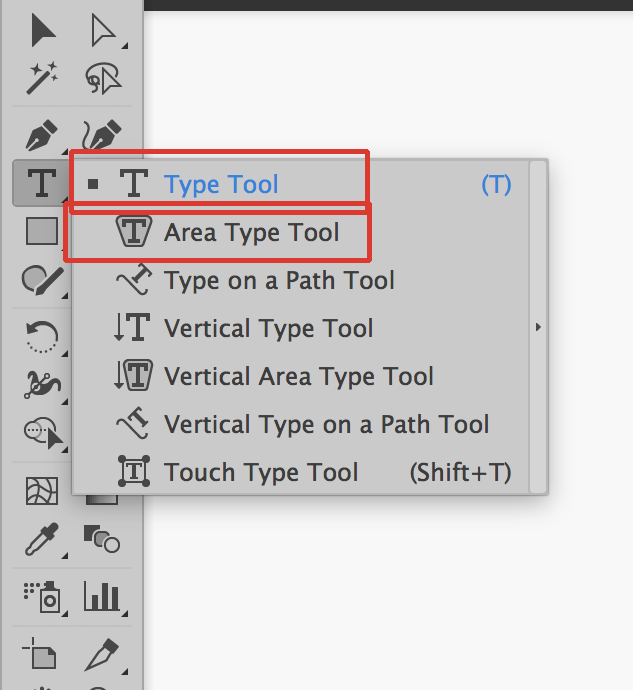
If you pull down on the black triangle at the lower right of the type tool you will see that there are several type tools to choose from. Make sure that you are using one of the type tools highlighted in the screen shot below:
Note that there are also two type tools that are for vertical typing which most likely are the ones that you've been using.
/t5/illustrator-discussions/need-help-fixing-cursor-direction-problem-when-using-the-type-tool/m-p/9265504#M59905Aug 16, 2017
Aug 16, 2017
Copy link to clipboard
Copied
If you pull down on the black triangle at the lower right of the type tool you will see that there are several type tools to choose from. Make sure that you are using one of the type tools highlighted in the screen shot below:
Note that there are also two type tools that are for vertical typing which most likely are the ones that you've been using.








 2
Replies
2
Replies


 AdChoices