


- Home
- Illustrator
- Discussions
- Re: No pen pressure option after update AI CC 2018
- Re: No pen pressure option after update AI CC 2018

Copy link to clipboard
Copied
Hi,
after I did the last update just a few days ago (AI CC 22.1) my pen pressure option under brush settings disappeared. It is still shown for the blob brush nut not for the paint brush anymore. (I used a pressure sensitive, calligraphic brush)
Any suggestions how to fix that? Its driving me crazy 😞
Thank you for some help!


 1 Correct answer


Try and reset the Wacom preferences. If that does not help:
Contact Wacom.


Explore related tutorials & articles
 17
Replies
17
17
Replies
17

Copy link to clipboard
Copied
Which system and which tablet is that?
Copy link to clipboard
Copied
its a Wacom Intuos Pro , Driver Version 6.3. 27-2 System is Sierra 10.12.6
Thanks!
Copy link to clipboard
Copied

Options completely changed....

Copy link to clipboard
Copied
Hi,
Can you clarify please, are you talking about this option? 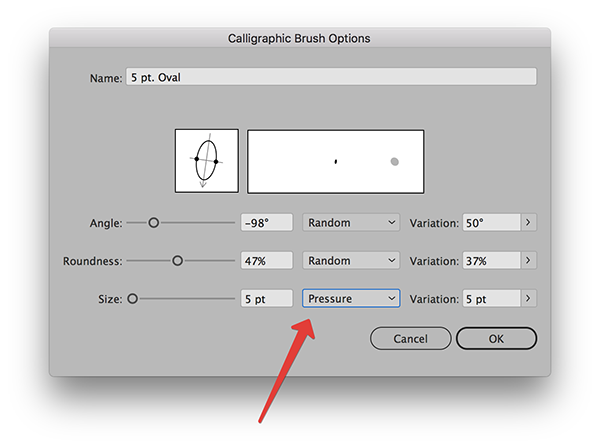
Because 'Blob brush' tool has this option under tool options dialog. But for 'Paintbrush' tool this option can be found only in the settings of each individual brush in the 'Brushes' panel.
Copy link to clipboard
Copied
Thank you! That solved my first problem... But it still doesn't apply the pressure function anymore. Stroke always looks the same. It worked perfectly before I updated AI. I am completely new to AI.. So I am confused
Thanks!
Copy link to clipboard
Copied
Check the 'Variation' option. It should be the same as the size of the brush. 
Copy link to clipboard
Copied
..Its also greyed out. By some reason, it always jumps back to uniform in the top bar menu, even if I choose a different option. When I open the option tool, it jumps right back to uniform and deactivates pressure an variation.
Copy link to clipboard
Copied

Copy link to clipboard
Copied
Frida2017 wrote
..Its weird, almost all brushes have the pressure options greyed out now, or don't even open the option panel anymore. Somehow, the whole brush option is messed up now. Didn't have that problem with the older version ..
I see... It looks like the problem with Wacom drivers. You should try to reinstall the drivers.
Copy link to clipboard
Copied
OK, I´ll try that. Thanks!
Copy link to clipboard
Copied
... I reinstalled the drivers, restarted my computer, but still the same problem 😞
Copy link to clipboard
Copied
Try and reset the Wacom preferences. If that does not help:
Contact Wacom.
Copy link to clipboard
Copied
Will try that. Thank you!
Copy link to clipboard
Copied
THAT fixed it!! Thank you so much!!!!
Other Question, I saw you founded the German Illustrator User Group. Where can I find that group or can I join it? .. Sorry, off topic, I know, but I so want to learn a more skilled use of AI ..
Thank you!
Copy link to clipboard
Copied
We are mostly a virtual User Group, since it's difficult to organize meetings across the country.
www.ai-ug.de
and a little more active on our Facebook page.
Copy link to clipboard
Copied
Thank you! Will definitely check it out
Copy link to clipboard
Copied
..Its weird, almost all brushes have the pressure options greyed out now, or don't even open the option panel anymore. Somehow, the whole brush option is messed up now. Didn't have that problem with the older version ..


Find more inspiration, events, and resources on the new Adobe Community
Explore Now
 AdChoices