Exit
  • Global community
    • Language:
      • Deutsch
      • English
      • Español
      • Français
      • Português
  • 日本語コミュニティ
  • 한국 커뮤니티
0

Objects is getting stick with the pointer

Community Beginner ,
May 24, 2021 May 24, 2021

It happens very fequently that objects in illustrator is sticking with the mouse poiter. I have to press escape to let go of it, but in order to work again on the same file i have to save it and reopen it.
How do i solve that?

TOPICS
Bug , Performance , Tools
1.9K
Translate
Report
Community guidelines
Be kind and respectful, give credit to the original source of content, and search for duplicates before posting. Learn more
community guidelines

correct answers 1 Correct answer

Community Beginner , Mar 26, 2024 Mar 26, 2024

just posting the solution that worked for me.

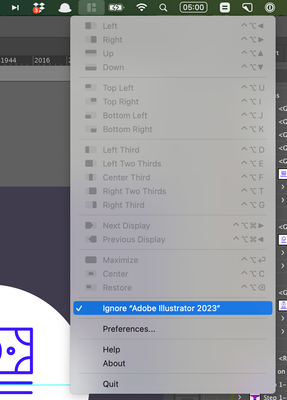
i'm on a mac and have the app 'magnet' running. if you tell magnet to ignore illustrator the issue is fixed. click on icon in toolbar and check 'Ignore "Adobe Illustrator". (illustrator must be running in foreground to see this option)

CleanShot 2024-03-26 at 12.51.10@2x.png


found on reddit: https://www.reddit.com/r/AdobeIllustrator/comments/1anlwe0/illustrator_objects_sticking_to_the_mouse_cursor/

Translate
Adobe
Community Expert ,
May 24, 2021 May 24, 2021

What OS are you on? Might you have some mouse cursor enhancement or setting on in your OS?

Translate
Report
Community guidelines
Be kind and respectful, give credit to the original source of content, and search for duplicates before posting. Learn more
community guidelines
Community Expert ,
May 24, 2021 May 24, 2021

There are also the OS preference/control panel options for people with disabilities. Without knowing your OS version is difficult to assist further.

Most of the posts I find are on the mac and resolved by updating the OS or creating a new user, which implies a setting was changed from the default and causing this.

Translate
Report
Community guidelines
Be kind and respectful, give credit to the original source of content, and search for duplicates before posting. Learn more
community guidelines
Community Beginner ,
May 27, 2021 May 27, 2021

I'm using Catalina 10.15.7 at the moment. I might as well add it was doing just perfect before Catalina.

Translate
Report
Community guidelines
Be kind and respectful, give credit to the original source of content, and search for duplicates before posting. Learn more
community guidelines
Community Expert ,
May 24, 2021 May 24, 2021

defaultoq,


Maybe you have invoked the cat mode.


Sorry, it was stronger than I, seeing that Mike had already given a better answer.


Translate
Report
Community guidelines
Be kind and respectful, give credit to the original source of content, and search for duplicates before posting. Learn more
community guidelines
Community Beginner ,
May 27, 2021 May 27, 2021

Hi Jacob, 
Tried what you said and sadly that ain't working.
But thank you for your time.

Translate
Report
Community guidelines
Be kind and respectful, give credit to the original source of content, and search for duplicates before posting. Learn more
community guidelines
Community Beginner ,
Mar 26, 2024 Mar 26, 2024
LATEST

just posting the solution that worked for me.

i'm on a mac and have the app 'magnet' running. if you tell magnet to ignore illustrator the issue is fixed. click on icon in toolbar and check 'Ignore "Adobe Illustrator". (illustrator must be running in foreground to see this option)

CleanShot 2024-03-26 at 12.51.10@2x.png


found on reddit: https://www.reddit.com/r/AdobeIllustrator/comments/1anlwe0/illustrator_objects_sticking_to_the_mouse...

Translate
Report
Community guidelines
Be kind and respectful, give credit to the original source of content, and search for duplicates before posting. Learn more
community guidelines