


- Home
- Illustrator
- Discussions
- Re: one path back from originalDocPath scripting
- Re: one path back from originalDocPath scripting

Copy link to clipboard
Copied
I'm using scripts to save PDFs in various formats in various folders.
var PRINT = Folder(originalDocPath + "/Print");
if (!PRINT.exists) {
    PRINT.create();
}
var _pdfFileName = PRINT.fsName + "/" + originalDocName + "_PRINT.pdf";
var dest = Folder(PRINT);
My Folder structure looks like this.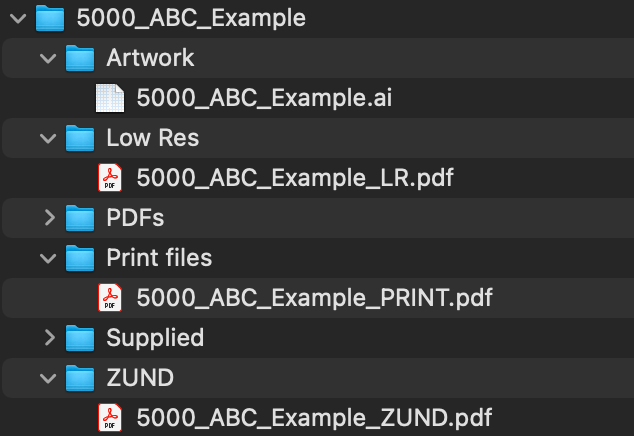
Currently I have to have the document saved in the enclosing folder (5000_ABC_Example) but I want to have it in the Artwork folder.
Basically how do I direct to:


 1 Correct answer

I see now...
Give this a try...
var LOWRES = Folder(originalDocPath.parent + "/Low Res");
if (!LOWRES.exists) {
    LOWRES.create();
}
var _pdfFileName = LOWRES.fsName + "/" + originalDocName + "_LR.pdf";
var dest = Folder(LOWRES);
Regards,
Mike


Explore related tutorials & articles
 7
Replies
7
7
Replies
7


Copy link to clipboard
Copied
Simple URI notation:
\..\Artwork
Mylenium
Copy link to clipboard
Copied
Hi, thanks for the fix.
var LOWRES = Folder(originalDocPath + "\..\Low Res");
if (!LOWRES.exists) {
    LOWRES.create();
}
var _pdfFileName = LOWRES.fsName + "/" + originalDocName + "_LR.pdf";
var dest = Folder(LOWRES);
creates a new folder -
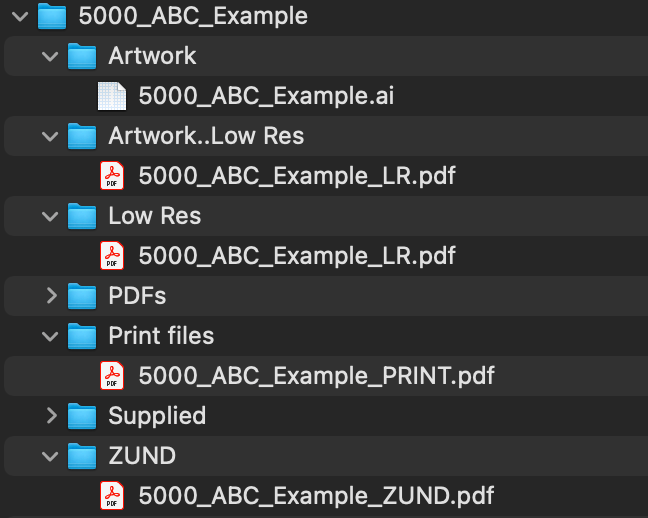
What am I doing wrong?
Copy link to clipboard
Copied
It's not clear from your screen shot where the new "LOWRES" folder is being created.
Regards,
Mike
Copy link to clipboard
Copied
Hi @Mike Bro
The script is creating a folder named "Artwork..Low Res" inside of "5000_ABC_Example".
I want it to create a folder inside "5000_ABC_Example" called "Low Res" (If it doesn't already exist) and save the new file in it.
Copy link to clipboard
Copied
I see now...
Give this a try...
var LOWRES = Folder(originalDocPath.parent + "/Low Res");
if (!LOWRES.exists) {
    LOWRES.create();
}
var _pdfFileName = LOWRES.fsName + "/" + originalDocName + "_LR.pdf";
var dest = Folder(LOWRES);
Regards,
Mike
Copy link to clipboard
Copied
That creates a folder outside of the folder
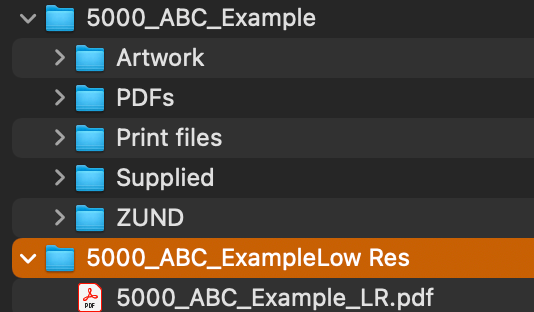
But changing "\Low Res" to "/Low Res" fixed it.
I now have what I wanted 🙂
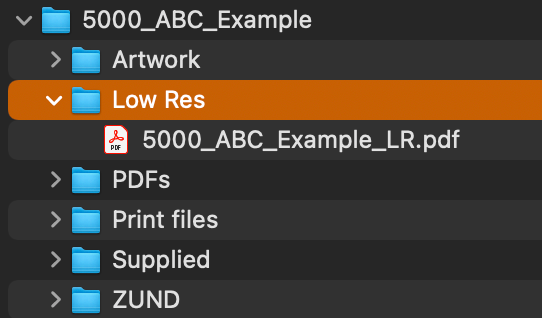
Thanks for your help
var LOWRES = Folder(originalDocPath.parent + "/Low Res");
if (!LOWRES.exists) {
    LOWRES.create();
}
var _pdfFileName = LOWRES.fsName + "/" + originalDocName + "_LR.pdf";
var dest = Folder(LOWRES);
Copy link to clipboard
Copied
Yes, I saw that and made edits to my post but you must have copied the code before hand.
Regards,
Mike


Get ready! An upgraded Adobe Community experience is coming in January.
Learn more
 AdChoices