
Participating Frequently
October 14, 2022
Answered

one path back from originalDocPath scripting

  • October 14, 2022
  • 1 reply
  • 651 views

I'm using scripts to save PDFs in various formats in various folders. 


var PRINT = Folder(originalDocPath + "/Print");
if (!PRINT.exists) {
    PRINT.create();
}
var _pdfFileName = PRINT.fsName + "/" + originalDocName + "_PRINT.pdf";
var dest = Folder(PRINT);

My Folder structure looks like this.\
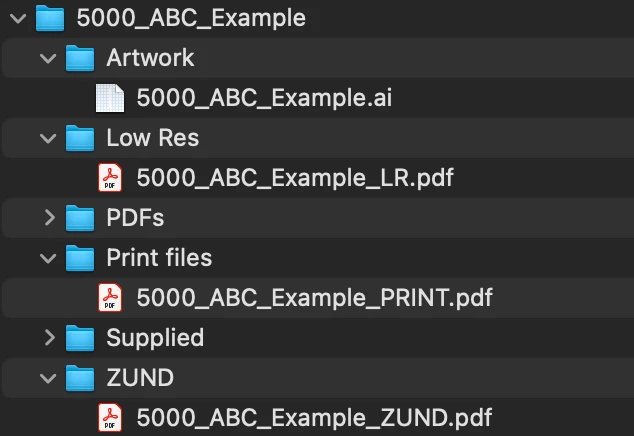
Currently I have to have the document saved in the enclosing folder (5000_ABC_Example) but I want to have it in the Artwork folder. 

Basically how do I direct to:

originalDocPath but back one folder?
This topic has been closed for replies.
Correct answer Mike Bro

Hi @Mike Bro 

The script is creating a folder named "Artwork..Low Res" inside of "5000_ABC_Example".

I want it to create a folder inside "5000_ABC_Example" called "Low Res" (If it doesn't already exist) and save the new file in it.


@Kyle26205577rhrw,


I see now...

Give this a try...


var LOWRES = Folder(originalDocPath.parent + "/Low Res");
if (!LOWRES.exists) {
    LOWRES.create();
}
var _pdfFileName = LOWRES.fsName + "/" + originalDocName + "_LR.pdf";
var dest = Folder(LOWRES);


Regards,

Mike

1 reply

Mylenium
Legend
October 14, 2022

Simple URI notation:


\..\Artwork


Mylenium

Participating Frequently
October 14, 2022

Hi, thanks for the fix.

var LOWRES = Folder(originalDocPath + "\..\Low Res");
if (!LOWRES.exists) {
    LOWRES.create();
}
var _pdfFileName = LOWRES.fsName + "/" + originalDocName + "_LR.pdf";
var dest = Folder(LOWRES);

creates a new folder - 

What am I doing wrong?


Legend
October 14, 2022

@Kyle26205577rhrw 


It's not clear from your screen shot where the new "LOWRES" folder is being created.


Regards,

Mike