


Copy link to clipboard
Copied
I want to see if anyone can replicate this.
It's a strange issue concerning overprint, and it only happens on these two swatches which are the 2 previous ones from the end of the very 1st row of swatches.
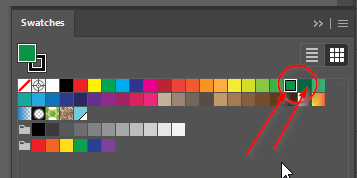
- Create a new CMYK document.
- make a dark/black box in the background so you can tell if the overprint is working.
- make a circle, fill it with any swatch besides these two problem swatches and check Overprint Fill, have one part of it overlap the box to be able to see the difference.
- Turn on Overprint Preview and see the difference - it should be working.
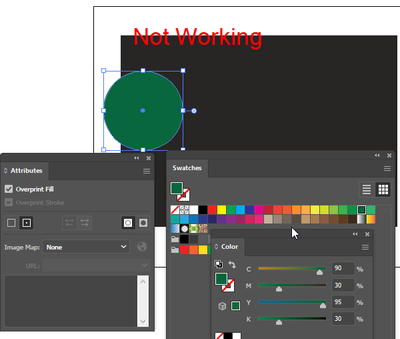
- Now pick one of these two swatches and see it's not working?
- Switching to any other swatch (I have not tested them all) has it working again.





 1 Correct answer


Your swatch contains a percentage of black and therefore will not overprint on a black background.


Explore related tutorials & articles
 12
Replies
12
12
Replies
12

Copy link to clipboard
Copied
Your swatch contains a percentage of black and therefore will not overprint on a black background.
Copy link to clipboard
Copied
Ha, I learned something new (I may have forgotten it) in years! I have only ever used overprinting with spot colors, years ago too, but yes this is the way, thanks all!
Copy link to clipboard
Copied
And it encouraged me to refine the document about overprint I started years ago 🙂

Copy link to clipboard
Copied
As Ton already mentioned, the behaviour you describe is the correct way how overprinting actually works.
In case you need to "simulate" overprinting with the green swatches that contain black percentages, you may use the Multiply blending mode in the Transparency palette instead.

Copy link to clipboard
Copied
Hi.
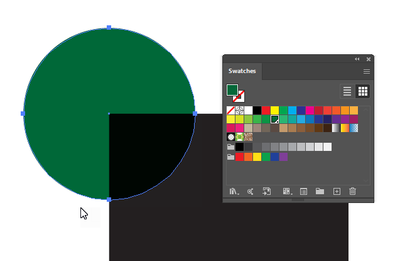
You can also convert the swatch into spot color to temporarily see the overprint.
Regards
Copy link to clipboard
Copied
But that will give you trouble when you don't want to print with an additional spot color ink.
Copy link to clipboard
Copied
As Kurt mentioned, multiply is a possible workaround. When used with spot colors, the colors separate as spot inks. Simulating the effect of Overprint with process inks and Multiply looks good, as long as you don't start stacking objects, be cause they will... multiply, something Overprint does not do.
To simulate the behaviour of overprint spots, but with process colors, Darken would be a better choice.
Have a look at this document that shows overprint and blending modes (the online preview does not show overprint):
https://shared-assets.adobe.com/link/70dcf0f1-2b34-4a88-590c-5b8e1d96ff09
Copy link to clipboard
Copied
Well, Ton, then there are always the Isolate Blending mode abilities that one may use. But your hint about the Darken blending mode is correct, of course.
It's a very interesting topic. Can you remember the intensive discussions we had about fifteen years ago with (pre)press expert John Kallios who created and explained the most complex situations including (transparent) raster objects in conjunction with all kind of other objects and their colour definitions? Incredible insights.
Copy link to clipboard
Copied
I don't remember John Kallios, but I remember many discussions about transparency and spot colors.
I think most of the time Darken blending mode would be a better choice than Overprtint.
It makes good separations with spot colors, it does not destroy the effect when spots are converted to process and it previews correctly in (non adobe) pdf viewers and web pages.
Copy link to clipboard
Copied
What? You do not remember John Kallios?
He was a genuine and extremely knowledgeable man when it came to explaining the most complex transparency interactions from the point of view of a printer.
But of course I won't grass you up, Ton. Have a good night. 🙃
Copy link to clipboard
Copied
I searched the forums for his name, 2012 came up as his last post and I was not that involved with the forums at that time.
Copy link to clipboard
Copied
Right, Ton. At least you now do know who are the real forum veterans. 🙃


Get ready! An upgraded Adobe Community experience is coming in January.
Learn more
 AdChoices