
Participant
February 6, 2020
Answered

Pantone 293c

  • February 6, 2020
  • 4 replies
  • 3163 views

Hi, I opened a new file, using only on colour, Pantone293c which was coming in at C100 M80 Y12 K3, when my colleague opened my saved file the colour was still Pantone 293c, yet the attributes were now C100 M74 Y11 K2, has anyone else had this problem?
This topic has been closed for replies.
Correct answer Ton Frederiks

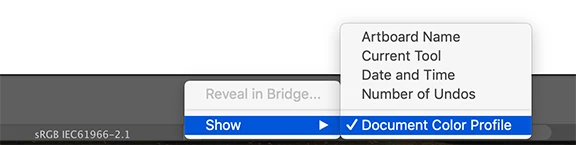
You probably both have a different document color profile.

To check it look at the bottom of your screen:

4 replies

Ton Frederiks
Community Expert
Ton FrederiksCommunity ExpertCorrect answer
Community Expert
February 6, 2020

You probably both have a different document color profile.

To check it look at the bottom of your screen:

Community Expert
February 6, 2020
Ton Frederiks
Community Expert
Community Expert
February 6, 2020

I don't think this is a problem with having old and new Pantone libraries.

The fixed CMYK values in the old Pantone library were different.

I wonder why you see CMYK values for the spot color instead of Lab values and Book Color?

meganchi
Legend
February 6, 2020

Is there version of Pantone color library the same as yours? If not, then that is the culprit. The Pantone company tweaked their color swatches and the latest Pantone color libraries are their digital standard.

Participant
February 6, 2020

hi, thanks for your reply, could they have a different version of the pantone colour libraries if both our versions of illustrator are 2020 and have the same settings?

Community Expert
February 6, 2020
Community Expert
February 6, 2020

Hi, your collegue are using a different version of Illustrator?

Please take a look here:

https://helpx.adobe.com/illustrator/kb/pantone-colors-dont-match-illustrator.html

Participant
February 6, 2020

Hi Francesco, thanks for your reply, both my colleague and i have the same version of illustrator with the same settings,

i will ahve a look at the link you gave me,