Copy link to clipboard
Copied
Is there a way in Illustrator to import (File >Place) multiple objects and place them in a grid like in InDesign? In InDesign you use the cmd + shift (mac) and draw a rectangle, adding columns and rows with the right/left and up/down arrows. I have tried these steps in Ai without success.
Thank you for your help
Hi Pascal,
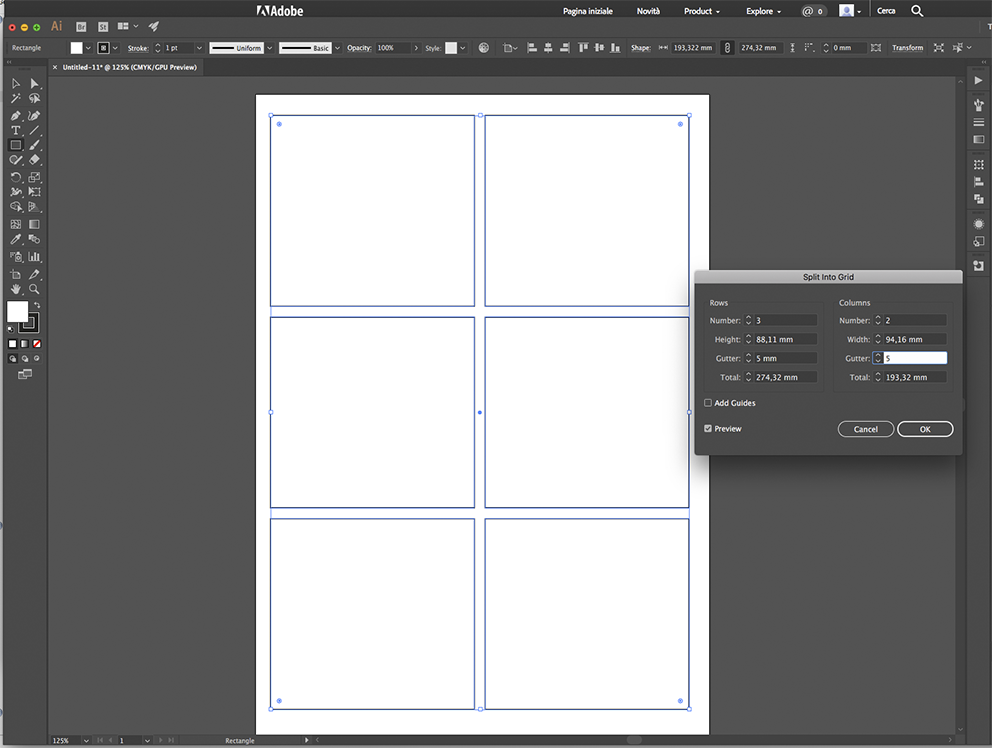
you can get a similar result in Illustrator with some more step than in InDesign.
Draw an object with the dimensions you want for placing the photos, then select menu OBJECT > PATH > SPLIT TO GRID

So you can use the frames for the clipping masks

Copy link to clipboard
Copied
not natively. there may be plugins that work like this but i'm not aware of one.
Copy link to clipboard
Copied
Thank you for your response.
On Mon, Jan 23, 2017 at 11:29 AM, dougofakkad <forums_noreply@adobe.com>
Copy link to clipboard
Copied
Hi Kurt,
Thanks for responding. I am currently using the latest version of Adobe Illustrator CC.
Thanks for your help.
Pascal
Copy link to clipboard
Copied
Then you have at least a workaround that may suit your needs or not.
When you place multiple files in the most recent versions of Illustrator, the cursor that appears while placing is Smart Guides sensitive. So, if you turn on Smart Guides you can place and distribute/align the files freehand or you first draw a grid (for example with the Rectangular Grid tool) and use that grid to place and distribute/align at the same time.

Copy link to clipboard
Copied
Which version of Illustrator are you using?
Copy link to clipboard
Copied
Hi Pascal,
you can get a similar result in Illustrator with some more step than in InDesign.
Draw an object with the dimensions you want for placing the photos, then select menu OBJECT > PATH > SPLIT TO GRID

So you can use the frames for the clipping masks

Get ready! An upgraded Adobe Community experience is coming in January.
Learn more