
Participant
August 11, 2022
Answered

Preview Panel very small on ai and eps files

  • August 11, 2022
  • 2 replies
  • 1339 views

Does anyone know how to fix Preview Panel? When in Illustrator I go to open another file, I clearly see the file names but the "Preview Panel" is very tiny for AI and EPS files. But PNG or JPEG show big and easy to see. I did see a post Adobe Support 2019 version to change in Preferences "advanced panel" but my version is 2022 and I don't see "advance panel" anywhere. Thank you
This topic has been closed for replies.
Correct answer Anubhav M

Hello @Donna in Phoenix,


Thanks for confirming that. The Preview Pane is a component of Windows Explorer, and Illustrator has no control over it.

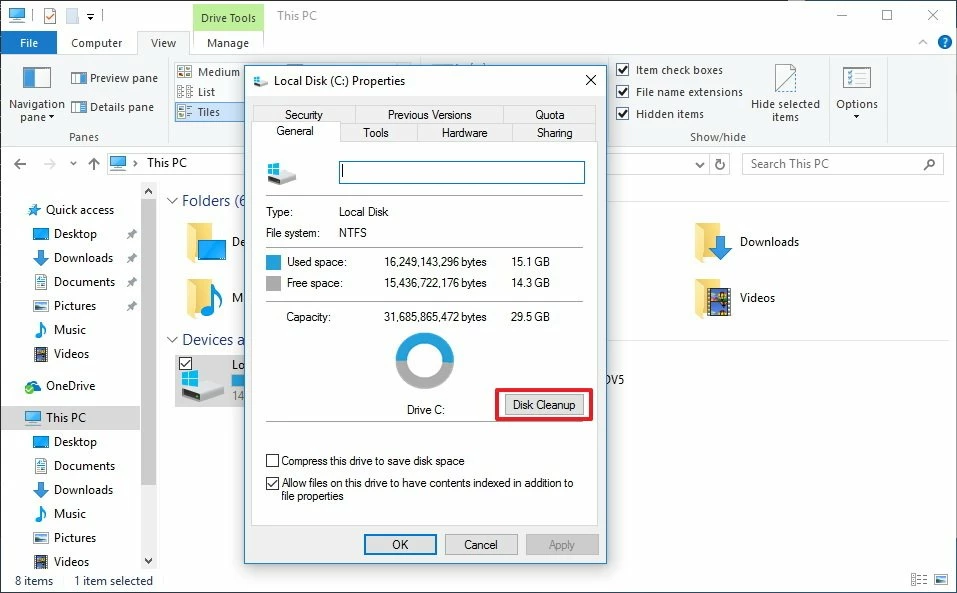
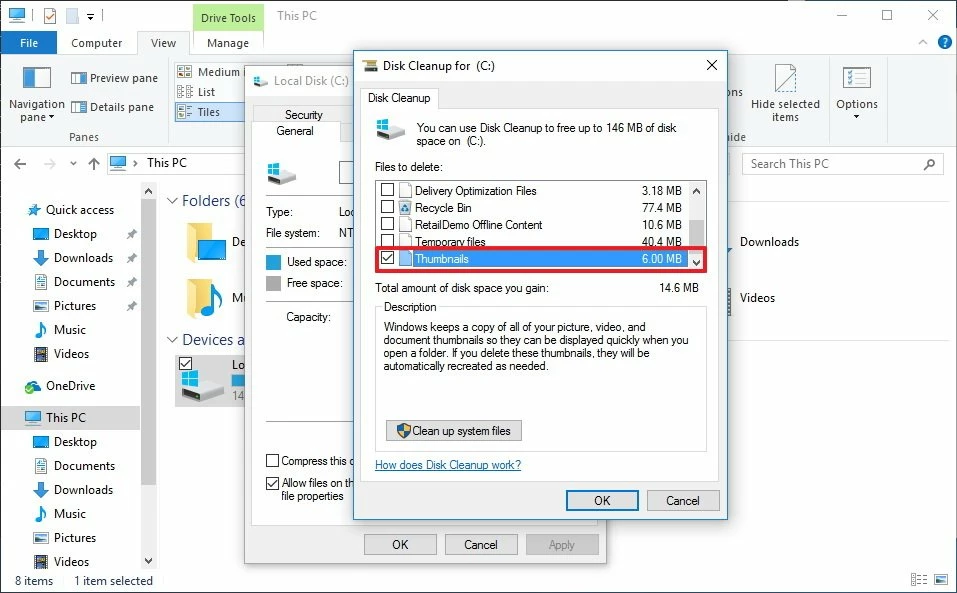
I would request you try clearing the thumbnail cache for Windows by following these steps and share your observations:

  1. Open File Explorer.
  2. On the left pane, click This PC.
  3. Right-click the C: drive where Windows 10 is installed, and select Properties.
  4. Click the Disk Cleanup button.


  1. Check the Thumbnails option, and uncheck all the other options.


  1. Click OK.
  2. Click Delete Files to confirm and to complete the task.

    If the issue persists, kindly try the suggestions shared in this community post and check if it helps: https://community.adobe.com/t5/illustrator-discussions/ai-and-psd-preview-on-windows-10/td-p/8716285.

    Looking forward to your response.


Regards.


Note: Marking correct for visibility.

2 replies

Met1
Legend
August 12, 2022

If you must preview Illy files save as pdf... they'll enlarge if you enlarge the viewing panel, ai files stay the same size as they are using a small thumbnail...

Participant
August 12, 2022

This is not an option for the mass files I use for business purposes, but I do appreciate the suggest.

Anubhav M
Community Manager
Community Manager
August 11, 2022

Hello @Donna in Phoenix,


Thanks for reaching out. I would request you share some screenshots or a screen recording of the issue you are facing so we can investigate this further.


Looking forward to your response.


Thanks,

Anubhav

Participant
August 11, 2022

See the preview panel on the right side. I can't figure out to make it be larger. It is larger with previewing a png or jpeg not it is this small when previewing ai files. Thank you!

Bill Silbert
Community Expert
Community Expert
August 12, 2022

Could you please provide the exact version of Windows you're using and if this has been an ongoing issue? Does it only happen in Illustrator? If it is a recent occurence did it start after an upgrade to either Illustrator or your operating system?