


Exit
  • Global community
    • Language:
      • Deutsch
      • English
      • Español
      • Français
      • Português
  • 日本語コミュニティ
  • 한국 커뮤니티
0

PROBLEM TRACING A PATH

Explorer ,
Jan 19, 2021 Jan 19, 2021

Hey!

So I have this image that has this trapeze-like stroke design and I want to make a precise path in Illustrator with exact measurements in each of its sides, replicate it to have a full large line, and then combine it into a single path, I'm not new to Illustrator but I'm not the best at it.

To summarize, I want the same path as the image but in an Illustrator precise path. It's just like using the "Zig-zag" effect but with "strong" lines, if I use this effect it makes the line soft and I want the path as shown below

I've been trying for the past two but non of my experiments are the way I want.

Thanks in advance.
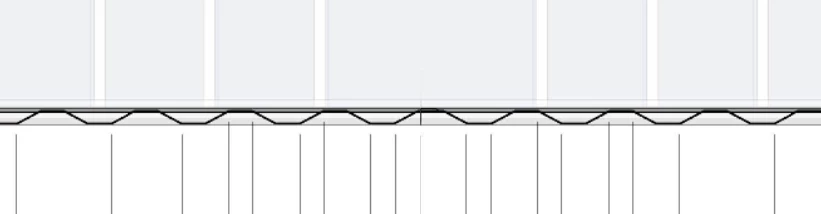
Captura de Pantalla 2021-01-20 a les 0.29.05.png

TOPICS
Draw and design , Tools
347
Translate
Report
Community guidelines
Be kind and respectful, give credit to the original source of content, and search for duplicates before posting. Learn more
community guidelines
Adobe
Community Expert ,
Jan 20, 2021 Jan 20, 2021

Looks like a custom pattern brush may do what you want.


Translate
Report
Community guidelines
Be kind and respectful, give credit to the original source of content, and search for duplicates before posting. Learn more
community guidelines
Community Expert ,
Jan 20, 2021 Jan 20, 2021

guino,


You can:


1) At the far left (or elsewhere), create a horizontal path with a length of a full broken zig zag, then Object>Path>Add Anchor Points twice,

2) Deselect and Direct select the two rightmost new Anchor Points and Object>Transform>Move (downwards) by the height between the top and bottom horizontal part,

3) Deselect and Select with the (normal) Selection Tool, then Effect>Distort&Transform>Transform>Move horizontally by the length from 1) and set the number of Copies as desired,

4) Object>Expand Appearance if desired.


Move/adjust position if needed.


Edit: Hi Kurt. Last white stuff disappeared here. How there?


Translate
Report
Community guidelines
Be kind and respectful, give credit to the original source of content, and search for duplicates before posting. Learn more
community guidelines
Community Expert ,
Jan 20, 2021 Jan 20, 2021

Draw the first 4 line segments, then alt + drag to make a copy, then duplicate using (ctrl + D ) 

Translate
Report
Community guidelines
Be kind and respectful, give credit to the original source of content, and search for duplicates before posting. Learn more
community guidelines
Community Expert ,
Jan 20, 2021 Jan 20, 2021

More than enough white stuff, Jacob. At the moment I could build a lot of snowmen and igloos.


Translate
Report
Community guidelines
Be kind and respectful, give credit to the original source of content, and search for duplicates before posting. Learn more
community guidelines
Community Expert ,
Jan 20, 2021 Jan 20, 2021

Enough to share you know where, Kurt?


Translate
Report
Community guidelines
Be kind and respectful, give credit to the original source of content, and search for duplicates before posting. Learn more
community guidelines
Explorer ,
Jan 23, 2021 Jan 23, 2021

Thanks for all the replies!

P.S: How do you edit a post here I don't see an option, thanks.

Translate
Report
Community guidelines
Be kind and respectful, give credit to the original source of content, and search for duplicates before posting. Learn more
community guidelines
Community Expert ,
Jan 23, 2021 Jan 23, 2021
LATEST

For my part you are welcome, guino.


I for one hope you will share your findings.


Unfortunately, there is no way to edit your post. That feature has been removed owing to recurring trouble with less nice posters that have had their posts moderated only to edit the bad things back in.


It is possible to ask for editing by a moderator.


Translate
Report
Community guidelines
Be kind and respectful, give credit to the original source of content, and search for duplicates before posting. Learn more
community guidelines