Exit
  • Global community
    • Language:
      • Deutsch
      • English
      • Español
      • Français
      • Português
  • 日本語コミュニティ
  • 한국 커뮤니티
0

Problem with saving logo

Explorer ,
Jul 24, 2020 Jul 24, 2020

I created my logo in Illustrator and when I created a new document for a project, the dimensions on my logo were 500x500 pixels, however, when I saved it the document became a rectangle. Can anyone explain this?

Thank you.


Carolyn

TOPICS
Draw and design , Import and export , Type
614
Translate
Report
Community guidelines
Be kind and respectful, give credit to the original source of content, and search for duplicates before posting. Learn more
community guidelines
Adobe
Community Expert ,
Jul 24, 2020 Jul 24, 2020

When you say that it became a rectangle, do you mean that height or width became distorted and that height and width we no longer equal?

Was you logo vector?

What were the steps you did to save the document?

Translate
Report
Community guidelines
Be kind and respectful, give credit to the original source of content, and search for duplicates before posting. Learn more
community guidelines
Explorer ,
Jul 25, 2020 Jul 25, 2020

Hi Barbara,

When I saved it before, I just did a straight export as png and the width changes. In Illustrator it is still 500x500 however when you upload it or open it the width dimensions change so that instead of a square it looks like a rectangle and I can't get the entire logo to be seen when I crop it.

I tried an experiment last night after leaving this message and apparently if I save as legacy, the dimensions stay the say (500x500). I'm not sure why.

I would appreciate any assistance you can provide.


Thank you.


Carolyn

Translate
Report
Community guidelines
Be kind and respectful, give credit to the original source of content, and search for duplicates before posting. Learn more
community guidelines
Community Expert ,
Jul 25, 2020 Jul 25, 2020

I'm not able to replicate the issue. 

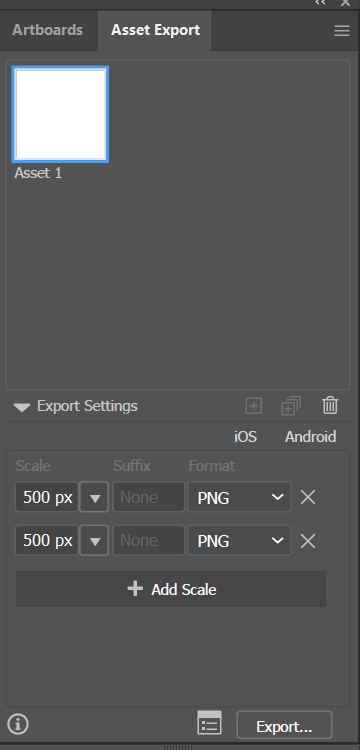
When you export you should be able to enter the exact pixels that you need.

image.png

Translate
Report
Community guidelines
Be kind and respectful, give credit to the original source of content, and search for duplicates before posting. Learn more
community guidelines
Explorer ,
Aug 01, 2020 Aug 01, 2020
LATEST

I had to save it for legacy so that the graphic stayed the correct size

Translate
Report
Community guidelines
Be kind and respectful, give credit to the original source of content, and search for duplicates before posting. Learn more
community guidelines
Community Expert ,
Jul 25, 2020 Jul 25, 2020

Can you please show screenshots?

Translate
Report
Community guidelines
Be kind and respectful, give credit to the original source of content, and search for duplicates before posting. Learn more
community guidelines