Exit
  • Global community
    • Language:
      • Deutsch
      • English
      • Español
      • Français
      • Português
  • 日本語コミュニティ
  • 한국 커뮤니티
0

Problem with using Minus Front in Illustrator

New Here ,
Sep 22, 2018 Sep 22, 2018

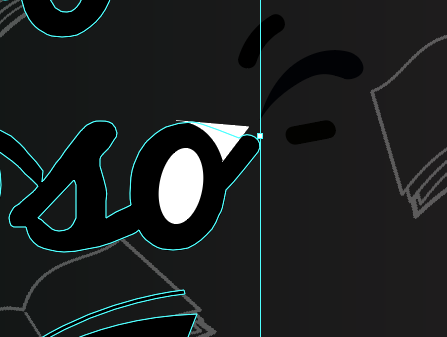
I am editing a logo and I want to get rid of some extra strokes. I made a couple of white shapes on top of the areas that I want out, selected everything and then clicked on ''Minus front'' but instead of deleting the white objects it deletes the entire logo. I tried looking for solutions in some videos but I just don't get what it is that I'm doing wrong or if this is how you do it at all. Thanks in advance.

749
Translate
Report
Community guidelines
Be kind and respectful, give credit to the original source of content, and search for duplicates before posting. Learn more
community guidelines

correct answers 1 Correct answer

Advocate , Sep 22, 2018 Sep 22, 2018

Maybe try to use Shape Builder?

Select all and choose Shape Builder (Shift+M) then prass Alt key to remove unwanted part of your artwork

pawel

Translate
Adobe
Advocate ,
Sep 22, 2018 Sep 22, 2018

Maybe try to use Shape Builder?

Select all and choose Shape Builder (Shift+M) then prass Alt key to remove unwanted part of your artwork

pawel

Translate
Report
Community guidelines
Be kind and respectful, give credit to the original source of content, and search for duplicates before posting. Learn more
community guidelines
New Here ,
Sep 22, 2018 Sep 22, 2018
LATEST

Ohhhhh. Thank you SO much. It worked

Translate
Report
Community guidelines
Be kind and respectful, give credit to the original source of content, and search for duplicates before posting. Learn more
community guidelines
Community Expert ,
Sep 22, 2018 Sep 22, 2018

Is everything grouped together? If so, everything that is in front, other than the last thing will be subtracted from the front, so to speak. Instead of the Pathfinder, still using the white shapes, you might want to use the Shapebuilder tool, hold down alt and subtract the part that you don't want.

Translate
Report
Community guidelines
Be kind and respectful, give credit to the original source of content, and search for duplicates before posting. Learn more
community guidelines
Community Expert ,
Sep 22, 2018 Sep 22, 2018

Following up macpawel's post, here two videos about using the Shape Builder that could help.

http://www.jeffwitchel.net/2011/12/geared-up-for-shape-builder/

Here's another: http://www.jeffwitchel.net/2012/10/create-instant-puzzle-pieces/

Translate
Report
Community guidelines
Be kind and respectful, give credit to the original source of content, and search for duplicates before posting. Learn more
community guidelines