

sam.t
Participating Frequently
August 8, 2022
Answered

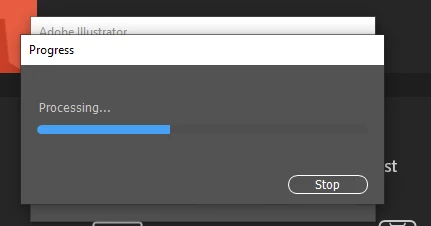
Progress Bar "Processing" Keeps Popping Up in Illustrator v26.4.1

  • August 8, 2022
  • 18 replies
  • 12166 views

I keep getting this "Progress" bar upon opening Illustrator and it prevents me from doing anything. I've tried uninstalling and re-installing the application, restarting etc.. nothing seems to get rid of it! It's happening on my work computer that's running Windows 10 Enterprise. 


I hope something can be done as I primarly use Illustrator for my projects!


Thanks so much,


Sam 


Correct answer Anshul_Saini

Hi @sam.t @dianae63580053 @MrBill812 @David Greusel 


We are sorry for the trouble. This has been reported on multiple posts by many users. We have logged a bug with the product team and will like to investigate the issue further. Would you mind sharing a few details like:


In the meantime, you may roll back and install the older v26.3.1.


Looking forward to your responses.


Thanks & Regards,
Anshul Saini

#Marking it correct to highlight

18 replies

Known Participant
September 5, 2022

I see the latest update is 26.5. Anyone know if the issue is fixed or shall I still avoid updating for now?

MrBill812
Participating Frequently
September 5, 2022

26.5 seems to be O.K.

I kept 26.3.1 loaded just in case but have not had any issues with 26.5 so far.

Known Participant
September 7, 2022

Thanks. Updating it now. If anything just to get rid of the annoying pop-up every morning!

New Participant
August 9, 2022

Thanks, I had the same issues. Illustrator would crash upon opening it or I would get a "Processing..." message.

I have unistalled the newest version and went back to the previous version of Illustrator, so far it seems to be working.

Thank you for the information. 

Does anyone know when it will be "Safe" to update to the latest version??

Thanks

Monika Gause
Community Expert
Community Expert
August 9, 2022
quote

Does anyone know when it will be "Safe" to update to the latest version??


By @SMP23


So far I would assume they are investigating if there even is an issue or if it's just the preferences that need to be reset. Also this doesn't seem to affect everyone (and that's where it gets complicated).


So if you want to be notified of a possible solution, watch the forum regularly - I would expect a solution to be posted here. Or check out if there is already a bug report on uservoice. Then you can vote for it, which subscribes you to all the updates.

 http://illustrator.uservoice.com

New Participant
August 9, 2022

Thanks for the information. I will keep the older version 26.3.1 for now until the issue is resolved. The new version 26.4.1 was working OK until today, I did not change anything at my end, I hope there is a solution that will allow a successful update. Thanks again.

Greyygg
New Participant
August 9, 2022

It's happening to me it seems because of recovery files. If I had a file open and force quit the program with task manager, (which is generally my way of closing the program at the end of the day) upon re-opening if I don't hit the cancel recovery button pretty quick, I get the processing status bar that goes nowhere. I have uninstalled/reinstalled with no luck. Did not clear preferences yet...but my illustrtaor has crashed twice today just randomly

Monika Gause
Community Expert
Community Expert
August 9, 2022

Force quit is not a good way to end any application. Usually Illustrator will save the preferences file when you close it as a part of the properly executed ending. So when you interrupt the proper close cycle or even prevent it altogether, it might end in chaos.

Greyygg
New Participant
August 9, 2022

Thanks for your reply. I've been doing it that way for years. No different than power randomly shutting off, which happens often enough in the rural area in which I live. It does force the program to load recovered files (which are essentially different files than what I saved, so I can just close them after review) but that is my whole reason for doing so...to see where I was and what all I was working on the day before. I have never had an issue until today, when many others are experiencing same issue. I just updated yesterday for first time in a few months also. I rolled back a version and things are working as intended now 🙂

August 9, 2022

I am also having the same issue, crossing my fingers they fix in soon.


Known Participant
August 9, 2022

Read the previous comments. Only fix at this stage is to uninstall and reinstall a previous version

New Participant
August 9, 2022

I have the same problem! i think it was a problem of my computer and uninstall/reinstall a couple of times but didn`t work. The progress bar won't let me do anything else until I force stop the program. Please do something! 

Known Participant
August 9, 2022

Just uninstall and reinstall a previous version, as per above comments.

BroadstreetStudios
New Participant
August 9, 2022

Same issue here, cannot save client files to export (PDF) format for delivery without this occurring.  Screenshot attached.

Latest version of Illustrator (26.4.1) and Windows 11 21H2 (build 22000.795)

MrBill812
Participating Frequently
August 9, 2022

Roll back to the previous version of 26.3.1 & you should be O.K.

Known Participant
August 9, 2022

Interesting, the older version I've reverted back to is 26.4. I assume the lastest was 26.4.1? What ever it was it wouldn't work, all good now.

New Participant
August 9, 2022

Same problem here... and no luck. Glad that I am not alone. Lost a whole days worth of work.... 

Known Participant
August 9, 2022

Yep, as per others here same issue. Had a windows update this morning so thought that had something to do with it or a bug in the files I was trying to open. Uninstalled and re-installed the previous version and all good now.

davidicus
Inspiring
August 8, 2022

This is frustrating! Can't open it without  Progress: Processing... popping up and the progress bar stalls right away. Stop button doesn't do anything. Can I assume if i drop back a version that the new document will be incompatible? The worst!!

MrBill812
Participating Frequently
August 9, 2022

If you drop back a version it will still be compatible as it was not a 'Major' release.

Anshul_Saini
Community Manager
Anshul_SainiCommunity ManagerCorrect answer
Community Manager
August 8, 2022

Hi @sam.t @dianae63580053 @MrBill812 @David Greusel 


We are sorry for the trouble. This has been reported on multiple posts by many users. We have logged a bug with the product team and will like to investigate the issue further. Would you mind sharing a few details like:


In the meantime, you may roll back and install the older v26.3.1.


Looking forward to your responses.


Thanks & Regards,
Anshul Saini

#Marking it correct to highlight

sam.t
sam.tAuthor
Participating Frequently
August 8, 2022

Hi Anshul! Thanks for your reply 🙂 Yikes yes it looks like a lot of people are experiencing this! 

Here are the details you requested from my end: 


- Windows OS Build Number: 19043.1826 ,  Most recent version of illustrator

- Happening with all files. Have noticed glitchy / crashing behaviour for the past couple weeks, but this process bar is new today - I didn't really put the two together until I've read other's posts about it.

- I unfortunatley don't have access to the dump files as I don't have admin powers, but hoping someone else on the thread can!  


Hope this helps - glad to know falling back on the older version is an option for now. 


Thanks!


Sam