


- Home
- Illustrator
- Discussions
- Re: Remove Duplicate Items from Array
- Re: Remove Duplicate Items from Array

Copy link to clipboard
Copied
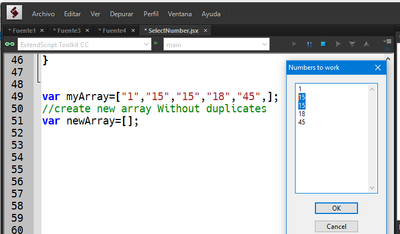
I frecuently receive information from customers (image below)
I need to remove duplicate numbers
How can I create a new array without duplicated items
any help will be appreciate


 2 Correct answers

function removeDuplicate(a) {
    for (var i = 0; i < a.length; i++) {
        for (var j = 0; j < a.length; j++) {
            if (i != j && a[i] == a[j]) {
                a.splice(j, 1);
            }
        }
    }
    return a;
}

var array1 = [1, 1, 1, 2, 2, 2, 3, 3, 3];
var array2 = removeDuplicate(array1);
alert( array2 );  // 1,2,3



I usually make a "map", meaning adding each array value to an object. Since you can't have duplicate object keys, each duplicate value would replace it's previous value if it already exists
var map = {};

var arr = [1,2,3,1,2,3];

for (var a=0; a<arr.length; a++) {
    map[arr[a]] = arr[a]; // {"1":1, "2":2, "3":3}
}

var unique = [];

for (var b in map) {
    unique.push(map[b]);
}

alert(unique);
Explore related tutorials & articles
 8
Replies
8
8
Replies
8

Copy link to clipboard
Copied
function removeDuplicate(a) {
    for (var i = 0; i < a.length; i++) {
        for (var j = 0; j < a.length; j++) {
            if (i != j && a[i] == a[j]) {
                a.splice(j, 1);
            }
        }
    }
    return a;
}

var array1 = [1, 1, 1, 2, 2, 2, 3, 3, 3];
var array2 = removeDuplicate(array1);
alert( array2 );  // 1,2,3
Copy link to clipboard
Copied
Awesome! Thanks in advance !!!
Gdelgado
Copy link to clipboard
Copied
sorry I don't mean harm but this array breaks the algo
var array1 = [2, 3, 1, 2, 2, 1, 3, 3, 2]; // returns 3,1,2,3
Copy link to clipboard
Copied
Oops. Thanks for the catch.
What about
function removeDuplicate(a) {
    for (var i = a.length-1; i > -1; i--) {
        for (var j = 0; j < a.length; j++) {
            if (i != j && a[i] == a[j]) {
                a.splice(j, 1);
            }
        }
    }
    return a;
}
var array1 = [2, 3, 1, 2, 2, 1, 3, 3, 2];
var array2 = removeDuplicate(array1);
alert( array2 );  // 1,3,2
Alternatively
function removeDuplicate(a){
    var b = [];
    for (var i = 0; i < a.length; i++) {
        var duplicate = (function () {
            for (var j = 0; j < b.length; j++) {
                if (b[j] == a[i]) {
                    return true;
                }
            }
            return false;
        } () );
        if (!duplicate) {
            b.push(a[i])
        }
    }
    return b;
}
var array1 = [2, 3, 1, 2, 2, 1, 3, 3, 2];
var array2 = removeDuplicate(array1);
alert( array2 );  // 2,3,1
Copy link to clipboard
Copied
both versions work!
Copy link to clipboard
Copied
I usually make a "map", meaning adding each array value to an object. Since you can't have duplicate object keys, each duplicate value would replace it's previous value if it already exists
var map = {};

var arr = [1,2,3,1,2,3];

for (var a=0; a<arr.length; a++) {
    map[arr[a]] = arr[a]; // {"1":1, "2":2, "3":3}
}

var unique = [];

for (var b in map) {
    unique.push(map[b]);
}

alert(unique);
Copy link to clipboard
Copied
this is my approach as well. feels nice and tidy.
Copy link to clipboard
Copied
Thank you all for your support!! 🙂


Get ready! An upgraded Adobe Community experience is coming in January.
Learn more
 AdChoices