TuTzeeT
Participant
September 11, 2015
Answered

Right Click inside artboard is not working

  • September 11, 2015
  • 60 replies
  • 31708 views

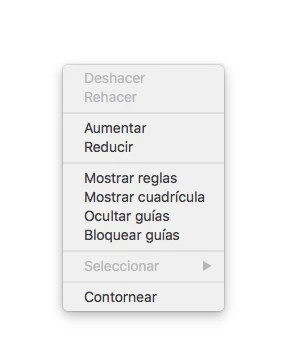
Not the tools right click, i mean, in the artboard. Since i've upgraded my illustrator to CC 2015 in Os X El Capitan (Public Beta 6) the rigth click menu disappear. I need to uninstall and the install again an then works, but when i close the program and opened again, the menu again disappear. This is the menu that i don't found. (I took a screenshot when it works)

Sorry for my english, i don't remember because i was depported again to Mexico.

    This topic has been closed for replies.
    Correct answer AshutoshChaturvedi

    Hello,

    We have fixed this issue in our latest CC 2015.2 update. Please apply the patch using Adobe Creative Cloud application.

    If you do not see the patch right away

    1. Go to Adobe Creative Cloud application
    2. Click on the Gear icon on the top right
    3. From the menu select “Check for App Updates”

    Regards,

    Ashutosh Chaturvedi

    60 replies

    Participant
    July 20, 2017

    Hi

    In illustrator cc some times right click is not working at the same time top menus also not working, i all-ready tried with creative cloud top right gear icon >> check for updates but i didn't found any changes

    please help me how to resolve this issues

    Monika Gause
    Community Expert
    Community Expert
    July 20, 2017

    mohitg91891919  schrieb

    Hi

    In illustrator cc some times right click is not working at the same time top menus also not working, i all-ready tried with creative cloud top right gear icon >> check for updates but i didn't found any changes

    please help me how to resolve this issues

    Plese read the complete thread to check if any of the menitioned tips solves your issue. Thank you.

    DrTc
    Inspiring
    February 24, 2017

    In CC 2017 when extracting a second file window to view on a second monitor larger or print sized, Ai stops responding to clicks. Opening/closing layers or groups in panels etc just do not work. One clicks and clicks and noting happens.
    When all windows & panels are brought to main display working on one Ai window/single monitor styled eventually Ai starts responding. (Nvidia 1060 6GB latest drivers)

    Participant
    December 22, 2015

    It seems like the issue is due to a problem with illustrator cc 2015 setting the zero point for the screen when a second monitor is connected. It looks like Adobe has solve the issue if your second monitor is located to the right of your primary display, but they have not solved the issue for an instance where the second monitor is set to the left of the primary display. This is why removing the second monitor fixes the issue, and why if you move the second monitor to the right of the primary display under display settings it also fixes the problem. We have applied all the latest updates from Adobe and have yet to see this issue fully resolved.

    antoniopedota
    Participant
    February 2, 2016

    You rock mate. Thanks!

    Inspiring
    December 4, 2015

    Its fixed which is great but I am also seeing random placement of dialogue boxes, sometimes they appear on the secondry screen, sometimes on the main, on the main they sometimes appear on the far left or in the middle.

    When launching illustrator or indesign, all bets are off as to which screen the menu bar will appear on, if it appears on the secondary you have to open or create new, where by the dialogue box will appear correctly on the main screen and the menubar is now active on the main screen.

    Its like chasing bloody chickens around.

    Inspiring
    December 6, 2015

    Is it just me with this issue of random dialgue box placement, save dialogue always appears on secondry monitor, its only in adobe illustrator and frankly its mega annoying.

    Also how the heck do you find posts you've made, I click on my profile and activity and all I get is random stuff by other people, most of it in french strangely.

    Miiagod
    Participating Frequently
    December 7, 2015

    I have that too, the dialogue boxes predominantly open on the secondary monitor. Also some tool options jump over to the second monitor, but this doesn't bother me so much. I'm just happy to have my right click and custom stroke widths back!

    As for the profile, the 'activity' section refers to overall activity on the forum. You find your posts under the 'Inbox' on the left hand side, or alternatively (top RH side) View Profile/ Content.

    Participant
    December 4, 2015

    Hey, Stupid interim solution to keep 3 screens, in preferences place your macbook screen down, its ok for me:

    Participant
    December 4, 2015

    Everything is fixed with the latest update !

    Miiagod
    Participating Frequently
    December 1, 2015

    Yay! Welcome back right click! The latest Illustrator CC update (2015.2.0 release) fixed the bug.

    AshutoshChaturvedi
    AshutoshChaturvediCorrect answer
    Legend
    December 1, 2015

    Hello,

    We have fixed this issue in our latest CC 2015.2 update. Please apply the patch using Adobe Creative Cloud application.

    If you do not see the patch right away

    1. Go to Adobe Creative Cloud application
    2. Click on the Gear icon on the top right
    3. From the menu select “Check for App Updates”

    Regards,

    Ashutosh Chaturvedi

    Participating Frequently
    December 1, 2015

    Thank you, that worked!

    LeafAudio
    Participant
    December 1, 2015

    Yep, me too. Same problem. I run a Wacom Cintiq and this fault has made it nearly useless. Normally I work on my iMac then transfer over to the wacom but I have to unplug my Wacom to have right click.

    Adobe, doesn't Apple give you new OS's in order for you to test it out? How could something this big slip by you guys. You've made my job very difficult and frustrating over the last few months. You keep this kind of oversight up and you'll have people leaving you in droves. I've been a faithful Adobe customer for the last 7 years and this lack of customer service has me looking elsewhere.

    Participant
    December 1, 2015

    Leaf I understand your frustration.

    Have you setup the workaround so that you can get right click back?  If you haven't I can walk you through it so you can return to a little bit of normality in Illustrator.

    Participant
    November 30, 2015

    Still using the Automator wSMgrCfg deletion work around.  Has anyone had any luck uninstalling and reinstalling Illustrator?  Should I try that?

    derekm66190816
    Participant
    November 30, 2015

    I'm having the same issue and when I contacted Adobe support they said they are aware of the issue and their engineers are working on it. It should be fixed with the next update to Illustrator coming in December. No specific date was given. At first the support person said update your graphics card to which I laughed as this is a complete joke. It doesn't seem to be a big enough issue for them to fix with a non-scheduled update. Oh well, will wait and see what comes in the next few weeks.